X just published a full guide telling creators to let Grok Bot handle their busywork. It passed 480K views in four days.
Most founders are about to use it wrong. They will ask it to write a few posts and stop there, when it can run as a full social media manager for their app. That is 90% of what it can do for the business, left on the table.
Here is why. Making content for marketing is basically free now. AI UGC, slideshows, animated reels: all of it costs pennies and takes minutes. The hard part is everything that happens after you hit post:
A post goes viral and there is no link anywhere near it
A winner gets posted once, on one platform, and never again
Your content keeps flopping because nobody looked at the numbers
Every post that pops without a way to find your app is giving those downloads away.
If you have been wondering how to use Grok Bot for marketing, this is the full setup. It turns one Bot into an AI social media manager for your app, and it does two things:
Grok Bot finds what is going viral on X, TikTok and Instagram today and turns it into posts about your app.
Postiz gets those posts onto every platform, then runs the automations that keep a viral post earning long after you have moved on.
The system comes from the operator who built the marketing engine behind Cal AI (full credit at the end). All 7 Grok Bot prompts are below as plain text, so you can paste them straight into your Bot. All you need is a Grok Bot, a Postiz account and a free Apify account.
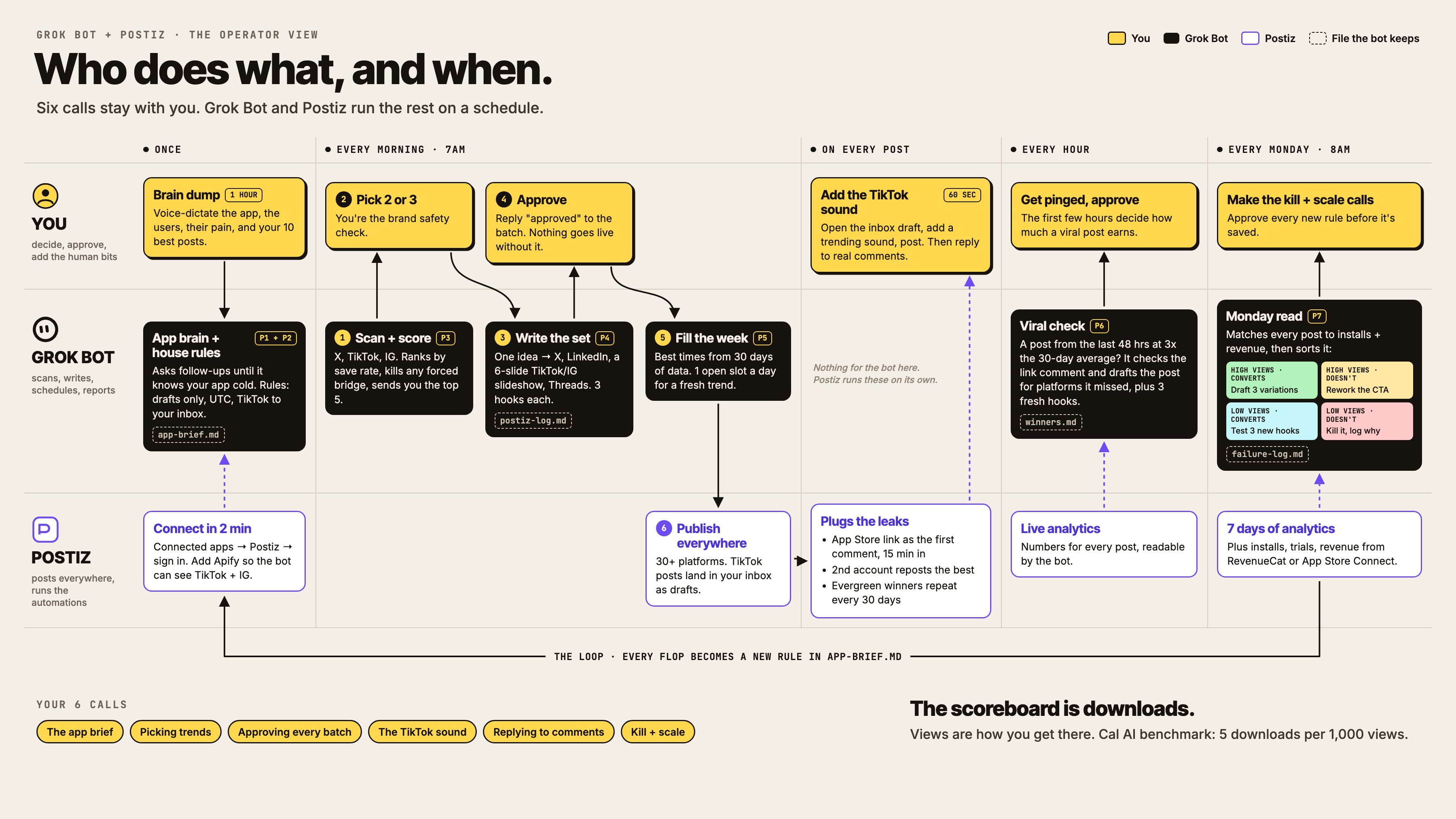
Who does what, and when. Six calls stay with you. Grok Bot and Postiz run the rest on a schedule. Click to open the full-size diagram.
Grok Bot as your AI social media manager in 8 steps (TL;DR)
Build the app brain. Brain-dump your app and let the Bot save it as app-brief.md (Prompt 1).
Connect Postiz from inside Grok Bot, then lock in seven house rules so every post starts as a draft (Prompt 2).
Add the Apify plugin so the Bot can see TikTok and Instagram.
Scan trends every morning at 7am, ranked by save rate, with forced tie-ins killed (Prompt 3).
Write the set: one idea, adapted for X, LinkedIn, TikTok, Instagram and Threads (Prompt 4).
Fill the week in one message using your best-performing times from Postiz analytics (Prompt 5).
Plug the five leaks: a first comment with your link, cross-posting, 30-day repeats, second-account reposts and an hourly viral alert (Prompt 6).
Read the numbers every Monday and sort each post into one of four buckets by views and downloads (Prompt 7).
Manage all your social media in one place with Postiz
A Grok Bot social media manager is a Grok Bot (xAI’s persistent AI agent) that knows your app, has a scheduling tool connected, and runs on routines. It researches trends, drafts posts for each platform, schedules them and reports on results. You approve the work instead of doing it.
Grok Bot launched in beta in August 2026. It is a separate product from the Grok chatbot: each Bot keeps its own memory, skills and scheduled routines, and works through the apps you connect to it.
In this setup the jobs are split across three tools:
Tool
Job in the system
How it connects
Grok Bot
Scans trends, writes the drafts, fills the calendar, sends the alerts and the Monday report
It is the agent you talk to. Its routines run in the cloud on a schedule
Postiz
The calendar, drafts you approve, publishing to 30+ channels, analytics the Bot can read, and automations that fire after a post goes live
Connected app inside Grok Bot (sign in once)
Apify
Lets the Bot see what is trending on TikTok and Instagram
Apify plugin, called by typing @apify in a chat
1. Why Grok Bot, and why right now
Social media is one of the strongest Grok Bot use cases for an app, for three reasons.
First, it lives where trends start. Grok Bot can search X on its own. Every other agent has to go looking for what is trending, while Grok Bot is sitting inside the place where trends begin. That makes the trend scan the easiest part of this whole system.
Second, it has its own cloud computer and runs routines on a schedule. You set a job once (scan trends every morning, check analytics every hour, write the Monday report) and it keeps running while you sleep. xAI’s documentation puts it plainly: routines “run in the cloud while your laptop is closed”, and one Bot can own up to 50 of them.
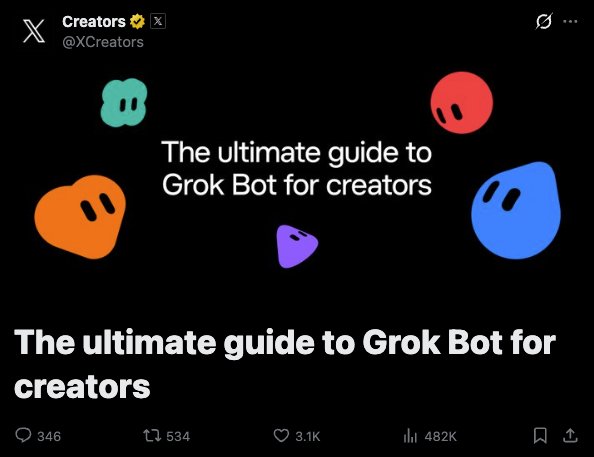
Third, X is pushing it hard. The creator guide did more than 480K views in four days. When a platform is promoting a new feature, the people who build on it early get the attention.
The X Creators guide to Grok Bot: 482K views in four days.
Grok Bot can already post for you. What Postiz adds is the system around the posting:
A real calendar. You see the whole week before anything goes out.
Drafts you approve. The Bot writes, you say yes.
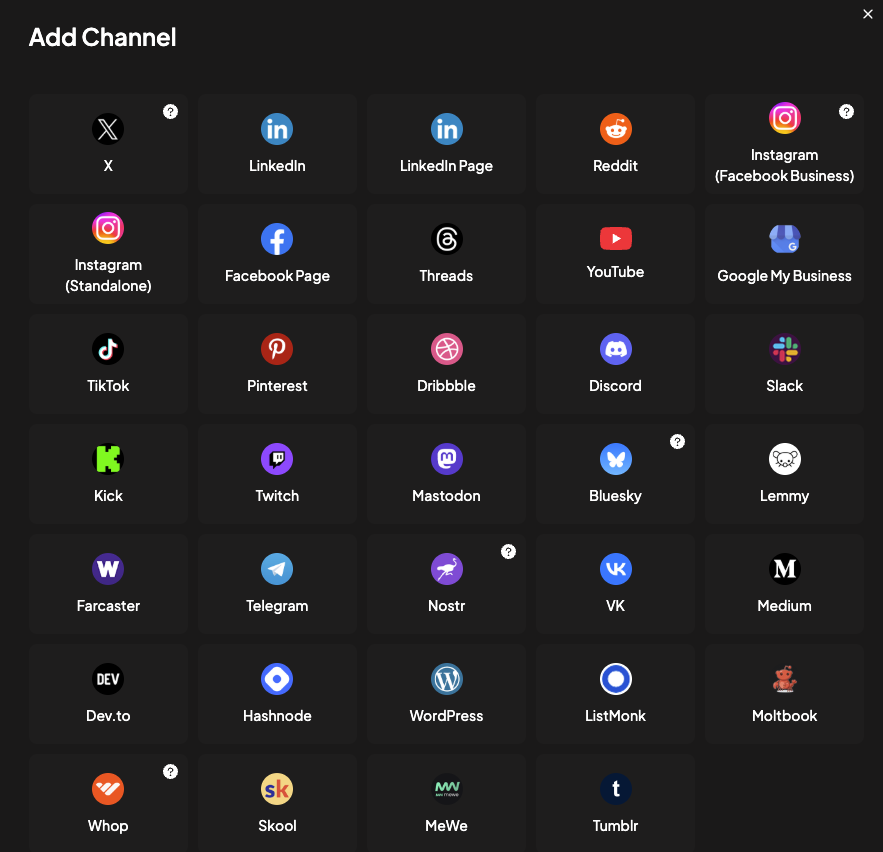
30+ platforms from one place. One connection instead of one integration per network.
Analytics your Bot can read. The viral alert and the Monday report both run on these numbers.
Automations that fire after the post goes live. First comments, reposts and repeats happen without you or the Bot.
Postiz is built to be driven by AI agents. The same account works from Grok Bot, Claude Code, ChatGPT or any agent that can use the Postiz MCP server or CLI, so the system you build here is not locked to one model.
Every channel a Grok Bot can publish to once Postiz is connected.
2. Build a Bot that actually knows your app
Your Bot is only as good as the context you give it. X’s own guide says the same thing, and it is right.
So turn on voice dictation and brain-dump everything about your app. What it does. Who it is for. The one moment where a user goes “oh, that’s cool”. What your users complain about. Your 10 best-performing posts ever. Budget about an hour for it.
Prompt 1: Build the app brain
You're going to be the social media manager for my app, [APP NAME].

I'm going to brain-dump everything about it. Ask me follow-up questions until you could explain it to a stranger better than I can.

Then save a file called app-brief.md with:
- What the app does in one sentence a 12-year-old would get
- Who it's for (age, situation, what they've already tried)
- The magic moment: the 3 seconds where someone "gets it"
- Pain bank: 20 problems our users have, in their own words
- Proof: real numbers, reviews, and results I've given you
- Voice: how we sound, words we use, words we never use
- Off-limits: topics, claims, and trends we never touch

Here are my 10 best posts ever and why I think they worked: [LINKS]
Break down the hook, format, and length of each one and add a "what works for us" section to the brief.
Every later prompt reads app-brief.md. The trend scan scores trends against the pain bank and the magic moment, the writer uses the voice section, and the off-limits list is your brand safety filter. Skip it and every post the Bot writes could be about any app.
3. Connect Postiz to Grok Bot (about 2 minutes)
In Grok Bot, open the connected apps section and search for Postiz.
Click add, then sign in to your Postiz account when it asks.
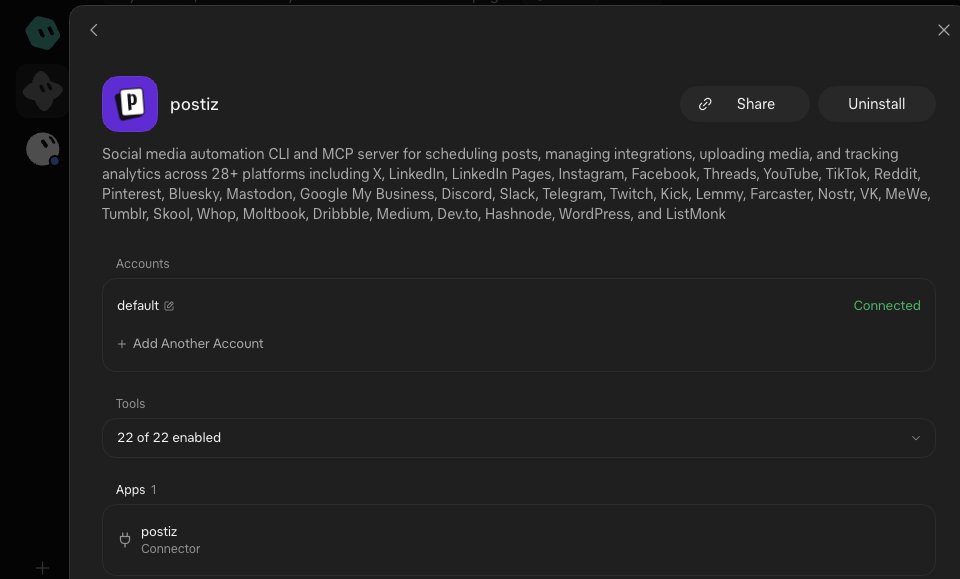
Ask the Bot to list your connected accounts. If it comes back with your channels, you are live.
Postiz connected inside Grok Bot: one account, 22 tools, no API key pasted.
Before you let the Bot touch anything, give it house rules. This is the most important prompt in the article.
Prompt 2: House rules
Save these as permanent rules for every Postiz action you take:

1. Every post you create is a DRAFT. Never publish or schedule live unless I reply "approved" to that specific batch.
2. Convert every time I give you to UTC before you schedule.
3. Before posting to any platform, read that platform's settings in Postiz and follow its rules (length, media, format).
4. Label anything made with AI using the platform's AI label. Label anything sponsored as a paid partnership.
5. TikTok posts go through UPLOAD mode so they land in my TikTok inbox, where I add the trending sound by hand.
6. Never post the same caption on two platforms. Adapt it.
7. Log every draft you create in postiz-log.md with the date, platform, hook, format, and the trend it came from.
Three of these rules carry the system:
Rule 1 keeps you in control. The Bot can draft all day. Nothing reaches your audience until you reply “approved”.
Rule 5 is deliberate. In upload mode, Postiz sends the video to your TikTok inbox instead of publishing it. You open the draft, add a trending sound and post. It takes about 60 seconds.
Rule 7 makes the Monday report possible. Without postiz-log.md, the Bot has no way to match a download back to the hook and trend that earned it.
4. The daily trend loop
Every morning, the Bot looks at what is moving on X, TikTok and Instagram and asks one question: is there an honest way to connect this to my app?
Most trends won’t pass, and that is fine. A forced trend tie-in is worse than no post at all.
X is the easy part, because Grok Bot can search it on its own. TikTok and Instagram are where most consumer apps grow, and the Bot can’t see either one without help. That is what the Apify plugin is for.
Add the Apify plugin so the Bot can see TikTok and Instagram
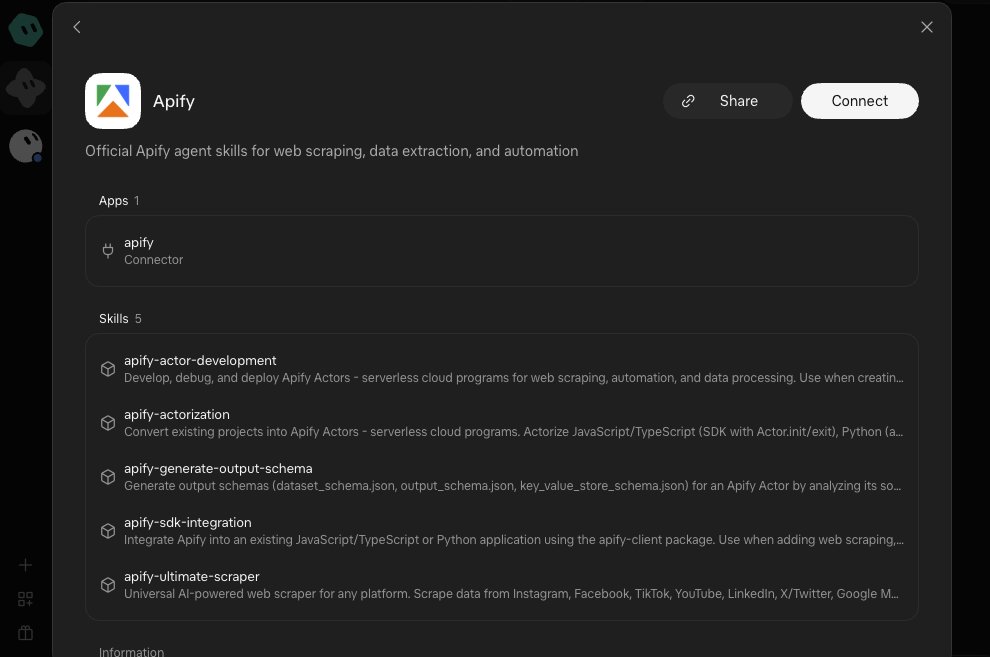
In Grok Bot, open Settings, then Plugins, and search for Apify.
Click add and sign in to your Apify account. The free plan is enough to test this.
Type @apify in any chat, and the Bot can run TikTok and Instagram scrapers for you.
The Apify plugin in Grok Bot. Its scraper skill covers TikTok, Instagram, YouTube, LinkedIn and X.
Have the Bot rank what it finds by save rate: saves divided by views. People save the posts they want to come back to, so a save tells you more than a like.
Apify charges per result, so start with 5 hashtags or search terms and add more once you see the bill.
Prompt 3: Morning trend scan (daily routine, 7am)
Every morning at 7am, find what's getting traction on X, TikTok, and Instagram. Focus on [YOUR NICHE] plus anything mainstream. Ignore politics, tragedies, and anything in the off-limits list in app-brief.md.

X: scan the last 24 hours with high-engagement searches (min_faves:500, or 2000+ for noisy topics).

TikTok and Instagram: use @apify to run the TikTok Scraper and the Instagram Scraper on [HASHTAGS AND SEARCH TERMS]. Pull the top 20 posts from the last 3 days on each and rank them by save rate (saves divided by views). If saves aren't available, use comments divided by views. For each one, note the format and the sound, since that's what we'd borrow.

For each trend, score it 1 to 10 on:
- How fast it's growing
- How honestly it connects to our pain bank or magic moment
- How easy it is to make a post about today

Send me the top 5 with the platform, the source link, why it's moving, and the bridge: one sentence on how it connects to our app. Kill anything where the bridge feels forced.
The 7am scan: dozens of trends go past, and only the ones with an honest bridge to your app get picked.
The Bot sends you five candidates. You pick two or three. Once you have picked the trends worth riding, the Bot writes the set: one idea, adapted to every platform you are on.
Prompt 4: Write the set
Take the trends I approved and write one post per platform for each:

- X: short post, hook in line one, no link in the post
- LinkedIn: story version, one sentence per line, 100 to 200 words
- TikTok and Instagram: a 6-slide slideshow script (hook slide, story, app shows up on slide 3 or 4, payoff)
- Threads: the X version, rewritten so it isn't a copy

For each one write 3 hook options and pick the best one.
Use the voice section of app-brief.md.
Create everything as drafts in Postiz and send me the batch.
5. Schedule the week in one message
Once you have approved the drafts, you don’t need to drag anything around a calendar. Tell the Bot when your audience is most active and let it fill the slots.
Prompt 5: Fill the week
Schedule my approved drafts across the next 7 days.

- Use the times that performed best in the last 30 days of Postiz analytics. If there isn't enough data, use [TIMES].
- No more than [X] posts per platform per day.
- Don't put two posts on the same topic back to back.
- Leave one open slot per day for a trend that breaks that morning.

Show me the full week as a table before you lock anything in.
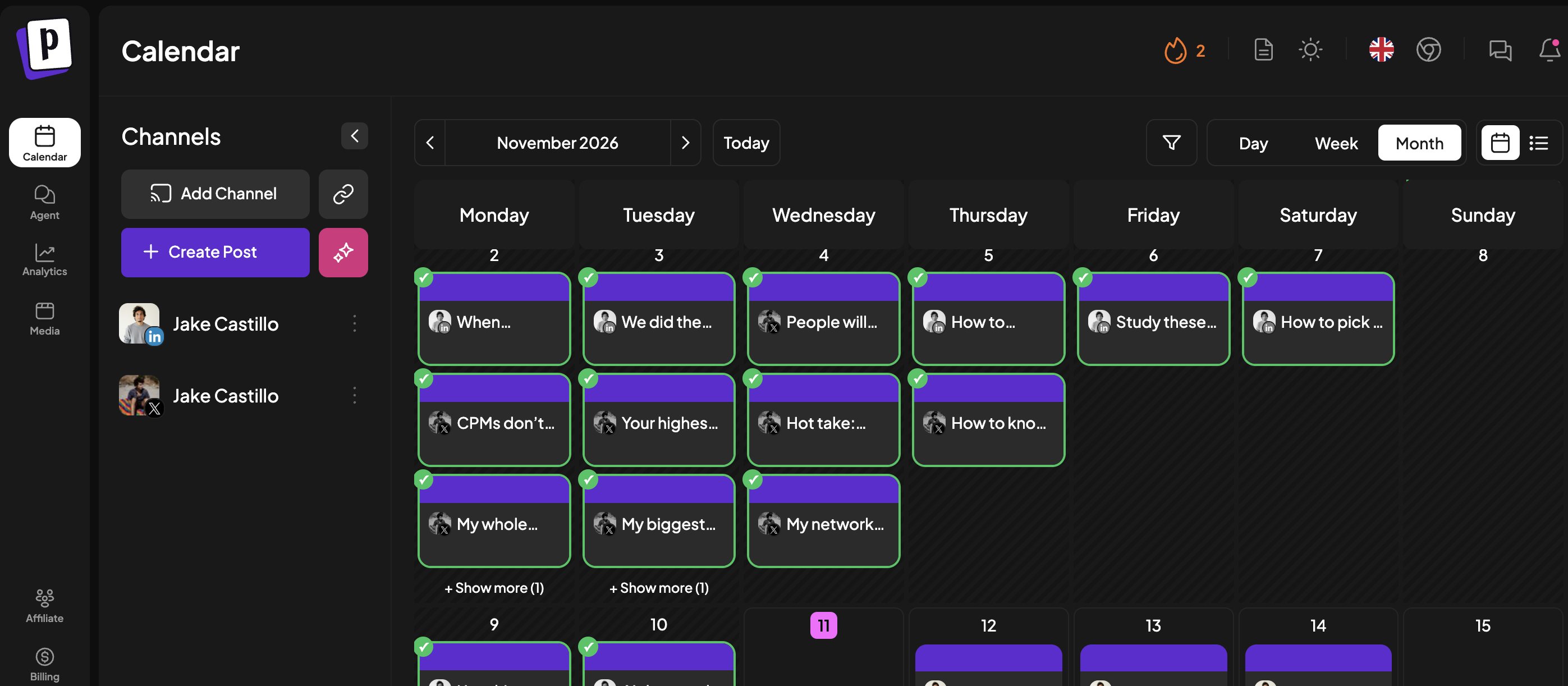
A month in the Postiz calendar after the Bot fills it: LinkedIn and X posts on every weekday.
The open slot matters. It is what lets a trend from the 7am scan go out the same day without bumping a post you already approved.
6. The 5 automations that plug the leaks
These are the five most common leaks in an app’s social media marketing, and the social media automation that closes each one.
Five leaks, five corks. Each one is a way a good post fails to turn into downloads.
Leak
The fix
Who runs it
Nobody can find your app
An automatic first comment with your App Store link, 15 minutes after the post goes live
Postiz (delayed comment)
Your winner only lives on one platform
Adapted versions on every other platform within 24 hours
Grok Bot drafts, Postiz publishes
You only post your winners once
Evergreen posts repeat every 30 days
Postiz (repeat post)
Your other accounts are sitting idle
Your founder account and brand account repost each other’s best work
Postiz (re-posters)
Nobody is watching when something takes off
An hourly viral alert with drafts ready to approve
Grok Bot routine reading Postiz analytics
Leak 1: Nobody can find your app
Every post gets an automatic first comment with your link. For your app, the comment is one line and the App Store link.
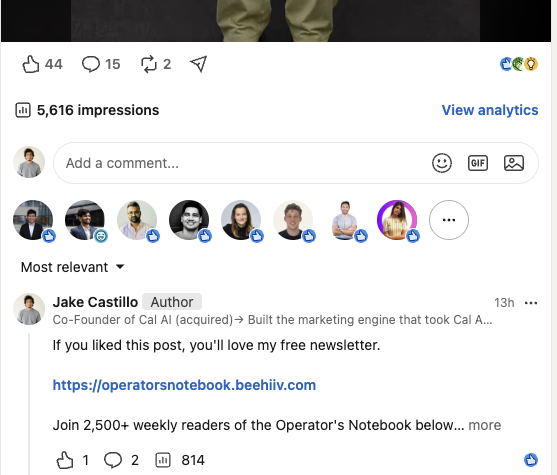
The operator behind this setup does it on every LinkedIn post he publishes. Postiz drops a comment pointing to his newsletter 15 minutes after the post goes live, and he never types it by hand. On the post below, which reached 5,616 impressions, that comment alone was seen 814 times.
An automatic first comment on LinkedIn, added by Postiz 15 minutes after the post went live.
Leak 2: Your winner only lives on one platform
A post that pops on X has already passed the hardest test there is. Within 24 hours it should be on every other platform you are on, adapted for each one. With an agent drafting the versions and Postiz publishing them, that takes minutes instead of an afternoon.
Leak 3: You only post your winners once
Your followers saw it. The other 99% of the platform didn’t. Set your best evergreen posts to repeat every 30 days and let them keep working.
Leak 4: Your other accounts are sitting idle
If you have a founder account and a brand account (you should), one should repost the other’s best work automatically.
Leak 5: Nobody is watching when something takes off
This is the one to set up first.
Prompt 6: Viral alert (hourly routine)
Every hour, check the analytics for every post published in the last 48 hours in Postiz.

If any post is beating our 30-day average by 3x or more:
1. Message me right away with the post and the numbers.
2. Make sure it has the app link comment. If it doesn't, draft one.
3. Draft adapted versions for every platform it isn't on yet.
4. Draft 3 variations: same structure, fresh hook.
5. Add it to winners.md with why you think it worked.

Everything stays a draft until I approve it.
When a post takes off, the first few hours decide how much you get out of it. This routine makes sure you are there for them.
7. The Monday read
The true scoreboard is downloads. Views are nice, but only if they drive conversions.
A post that does 400K views and sends you 40 downloads is worse than one that does 60K views and sends you 60. For a reference point, the Cal AI benchmark in the operator’s diagram is 5 downloads per 1,000 views.
Every Monday, the Bot sorts last week’s posts into four buckets:
Converting
Not converting
High views
Draft 3 variations for this week
Keep the hook, rework the CTA
Low views
Keep the angle, test 3 new hooks
Kill it, and log why in failure-log.md
Prompt 7: Monday report (weekly routine)
Every Monday at 8am, pull the last 7 days of analytics from Postiz and installs, trials, and revenue from [REVENUECAT / APP STORE CONNECT]. Match them to the posts in postiz-log.md.

Sort every post into one bucket:
- High views, converting: draft 3 variations for this week
- High views, not converting: keep the hook, rework the CTA
- Low views, converting: keep the angle, test 3 new hooks
- Low views, not converting: kill it, and log why in failure-log.md

Then tell me:
- The 3 best posts and what they have in common
- Which platform is pulling its weight and which isn't
- One thing to stop doing
- Any new rules to add to app-brief.md

Show me every change before you save it.
The Monday read: every post from last week lands in one of four trays.
The failure log is the most valuable file in the whole system. Every flop becomes data to iterate on, and the Bot reads it before your next batch of content.
One warning. If you are getting downloads but nobody is paying, stop posting. That is an onboarding or paywall problem, and no amount of content will fix it.
8. Where you still need a human
You can hand most of this to the Bot. Six calls stay yours:
The app brief. Nobody knows your magic moment better than you.
Picking trends. The Bot will happily tie your app to something it shouldn’t. You are the brand safety check.
Approving every batch. Nothing goes live without a yes from you.
The TikTok sound. Sixty seconds in the TikTok app per post.
Replying to comments. Real replies to real people.
The kill and scale calls. The Bot sorts the buckets, you make the decision.
Grok Bot makes the content machine easy to start. It is still up to you to do the simple, unsexy things longer and faster than everyone else.
The full Grok Bot routine schedule at a glance
Only three of the seven prompts become routines. The rest run once, or run when you approve something.
When
What runs
Prompt
File the Bot keeps
Once
App brain and house rules
1 and 2
app-brief.md
Every morning, 7am
Trend scan, then the set and the weekly fill after you approve
3 (routine), then 4 and 5
postiz-log.md
On every post
First comment, reposts and repeats
None. Postiz runs these on its own
Every hour
Viral check on the last 48 hours of posts
6 (routine)
winners.md
Every Monday, 8am
Four-bucket report and new rules for the brief
7 (routine)
failure-log.md
Three routines sit well inside Grok Bot’s limits. According to xAI’s documentation, a Bot can own up to 50 routines and their schedules must be at least five minutes apart. Each run draws from your plan’s usage, and the hourly viral check alone is 24 runs a day. If usage gets tight, run it every two or three hours instead.
Want a bigger team than one Bot? This seven-agent Grok Bot content team splits the same work across specialist Bots, and this X system shows one Bot running three X accounts to 69.8M impressions.
FAQ
Can Grok Bot work as an AI social media manager?
Yes. With an app brief, Postiz connected and three routines, a Grok Bot can scan trends daily, draft posts for each platform, schedule them and report on results every week. Brand judgment stays with you: picking trends, approving batches, replying to comments and deciding what to kill or scale.
Can Grok Bot post to TikTok, Instagram and LinkedIn?
Through Postiz, yes. Once Postiz is connected, the Bot can draft and schedule posts on any channel in your Postiz account. That includes TikTok, Instagram, LinkedIn, X, Threads, YouTube and Facebook. To read TikTok and Instagram trends, it uses the Apify plugin.
Do I need an API key to connect Grok Bot to Postiz?
No. Search for Postiz in Grok Bot’s connected apps, click add and sign in to your Postiz account. Your social accounts stay connected inside Postiz, so the Bot never sees your social media passwords. An API key route also exists if you prefer to set the Bot up from the terminal.
Will the Bot publish without my approval?
Not with the house rules in Prompt 2. Rule 1 makes every post a draft until you reply “approved” to that specific batch. Prompts 6 and 7 repeat the same condition for viral follow-ups and for changes to the brief.
How many Grok Bot routines does this setup use?
Three: the 7am trend scan, the hourly viral alert and the Monday report. xAI allows up to 50 routines per Bot, with schedules at least five minutes apart, so there is plenty of room to add more.
What does it cost to run?
Three things. A plan that includes Grok Bot: check x.ai for current pricing. A Postiz account: there is a 7-day free trial, then paid plans from $29 per month (as of November 2026). And Apify: the free plan is enough for testing, and after that you pay per scraped result.
Does this work if my product is not a mobile app?
Yes. Swap downloads for the conversion you care about (signups, trials or sales) and point the Monday report at wherever that number lives. The loop stays the same: scan, write, schedule, plug the leaks, read the numbers.
Give your Grok Bot a calendar to fill
The Bot can find the trend and write the post. What decides whether that post turns into downloads is everything after it goes live: the link in the first comment, the versions on the other platforms, the repeat, the alert when it takes off.
Try Postiz free for 7 days, connect your channels, add Postiz to your Grok Bot and paste in the first three prompts. Tomorrow at 7am, your AI social media manager sends you its first five trends.
Credit: this setup was originally shared on X by Jake Castillo, co-founder of Cal AI (acquired), who built the marketing engine behind the app. Jake writes about building and scaling consumer apps in his free newsletter, Operator’s Notebook.
Build a practical social media marketing plan that drives real business results. Learn platform selection, metrics, budgeting, workflows, and growth frameworks.
Discover small business marketing automation with our guide. Learn to automate tasks, nurture leads, and drive growth with strategies that actually work.