Most people who get access to Grok Bot use it like a chatbot. They ask it a question, read the answer, and close the tab. Scotty Beam did something different. He built a seven-agent content team out of Grok Bots, gave each one a single narrow job, and pointed the last one at the Postiz API so the finished posts land on a calendar without him touching it. The breakdown he posted on X got reposted by Elon Musk and pulled 4.8 million views. Then his mentions filled up with one question: okay, but how do I actually build this?
This article is the full answer he published on X in September 2026, edited for clarity and expanded with the Postiz side of the setup. It covers the strategy the whole system runs on, the seven agent roles, the exact system prompts for each Bot, how the agents hand work to each other, and how the Publisher Bot turns a week of drafts into a scheduled calendar through one API key.
Original write-up: Scotty Beam on X. Last updated: September 24, 2026.
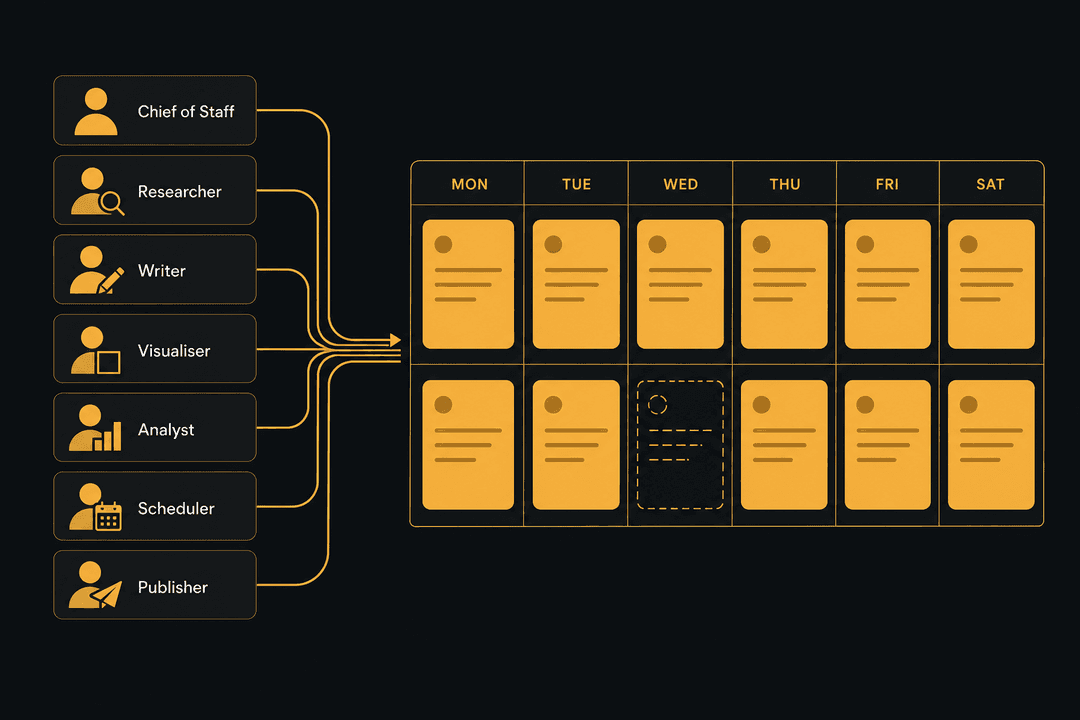
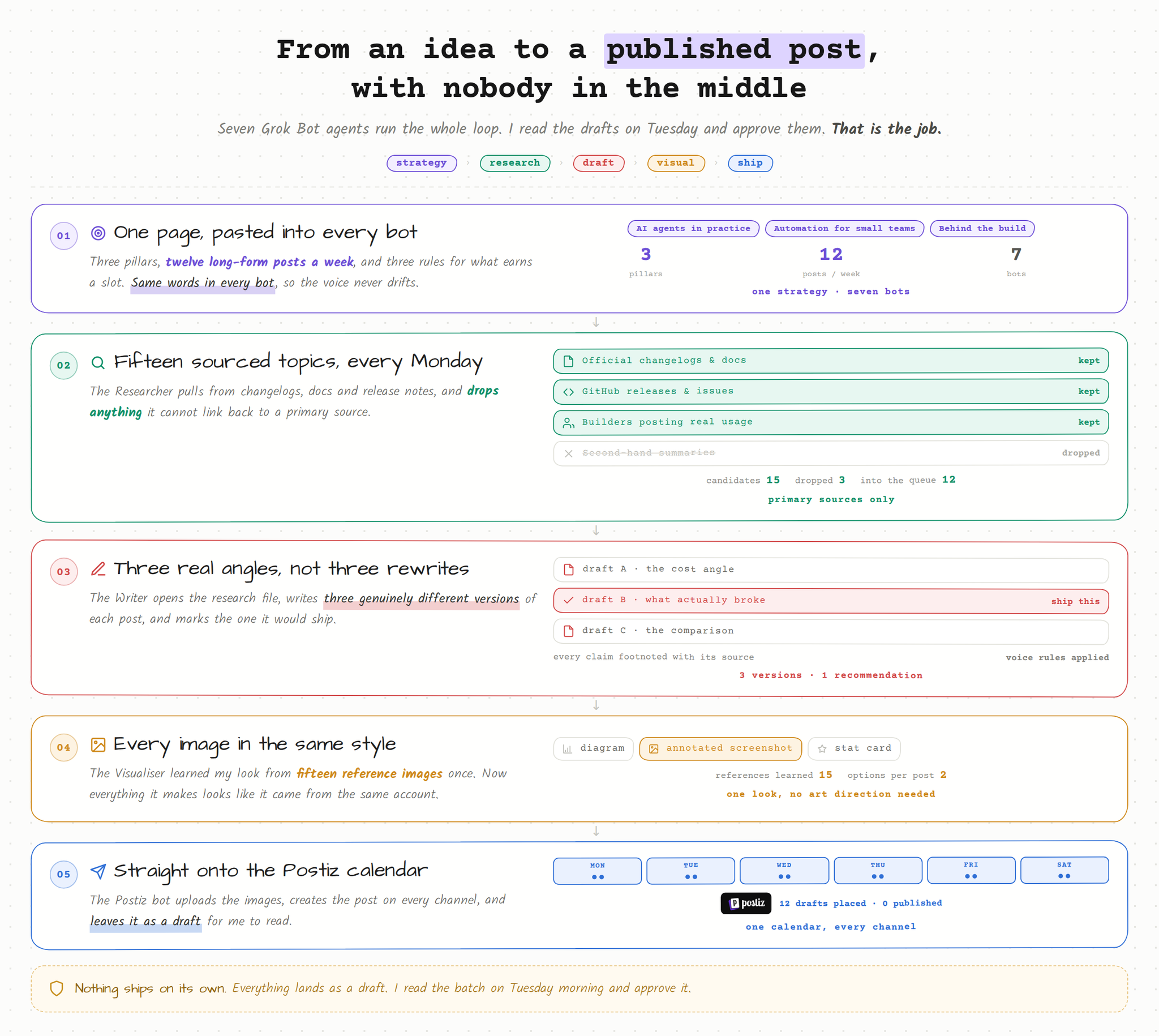
The whole setup, end to end: strategy, research, draft, visual, ship.
What is a Grok Bot content team?
A Grok Bot content team is a group of named, always-on AI agents that share one cloud computer and split the work of producing social media content: research, writing, visuals, analytics, scheduling and publishing. Each Bot holds the same written strategy and owns one job. The output is a weekly batch of posts that land in a scheduling tool as drafts, ready for a human to approve.
Grok Bot is the agent product from xAI and Cursor, not the Grok chatbot on X. The difference matters for this setup. A Bot keeps memory, files and app logins between tasks, can message other Bots in a thread, and can run routines on a schedule. That is what makes a multi-agent team possible without a workflow builder.
Start with the strategy, not the tools
Scotty is blunt about this before he shows a single prompt. Agents do not fix a bad content plan. They execute a bad plan faster and more consistently, which is arguably worse.
So here is the strategy he gave his agents, written out the way they hold it. It is boring on purpose.
What he posts about. Three pillars, nothing else:
AI agents in practice. What people are actually building, what breaks, what it costs.
Automation for small teams. Workflows a one or two person team can run without hiring.
Behind the build. His own setups, his own mistakes, visuals included.
How much. Twelve long-form posts a week on X, one article every two weeks, and the same core ideas reshaped for LinkedIn and Threads. X is the main channel. Everything else is a repackage.
The rules. Every post has to pass three checks:
It comes from something real that happened in the last seven days, or from his own build.
It contains one idea, not four.
Somebody who reads it can go do something with it today.
What good looks like. Saves, retweets and replies over likes. If a post gets a lot of likes and no replies or retweets, it was a nice sentence and nothing more.
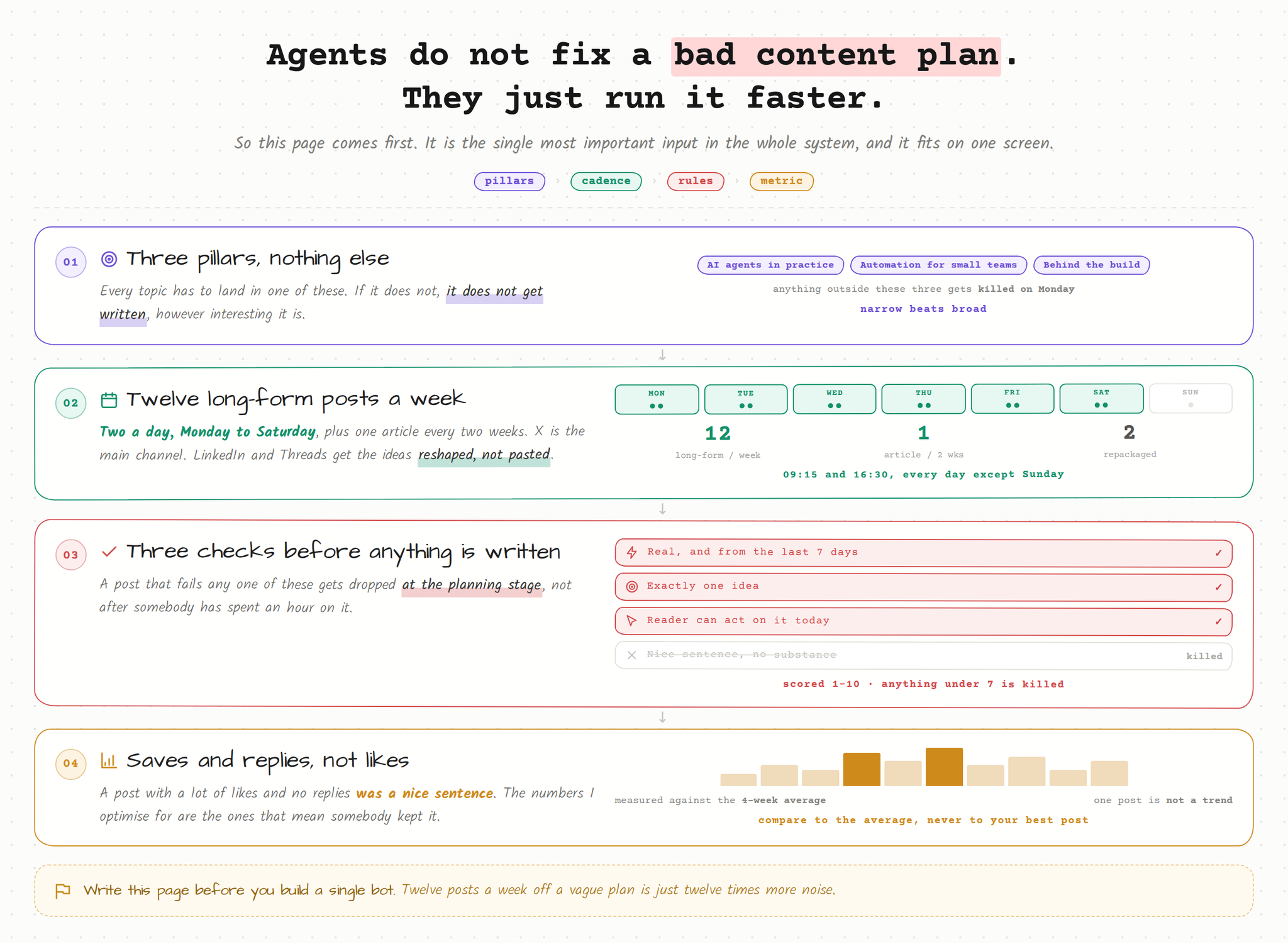
The strategy every Bot is holding: pillars, cadence, rules, metric.
That whole thing fits in a paragraph, and it is the single most important input in the entire system. Every agent below is holding a copy of it.
Manage all your social media in one place with Postiz
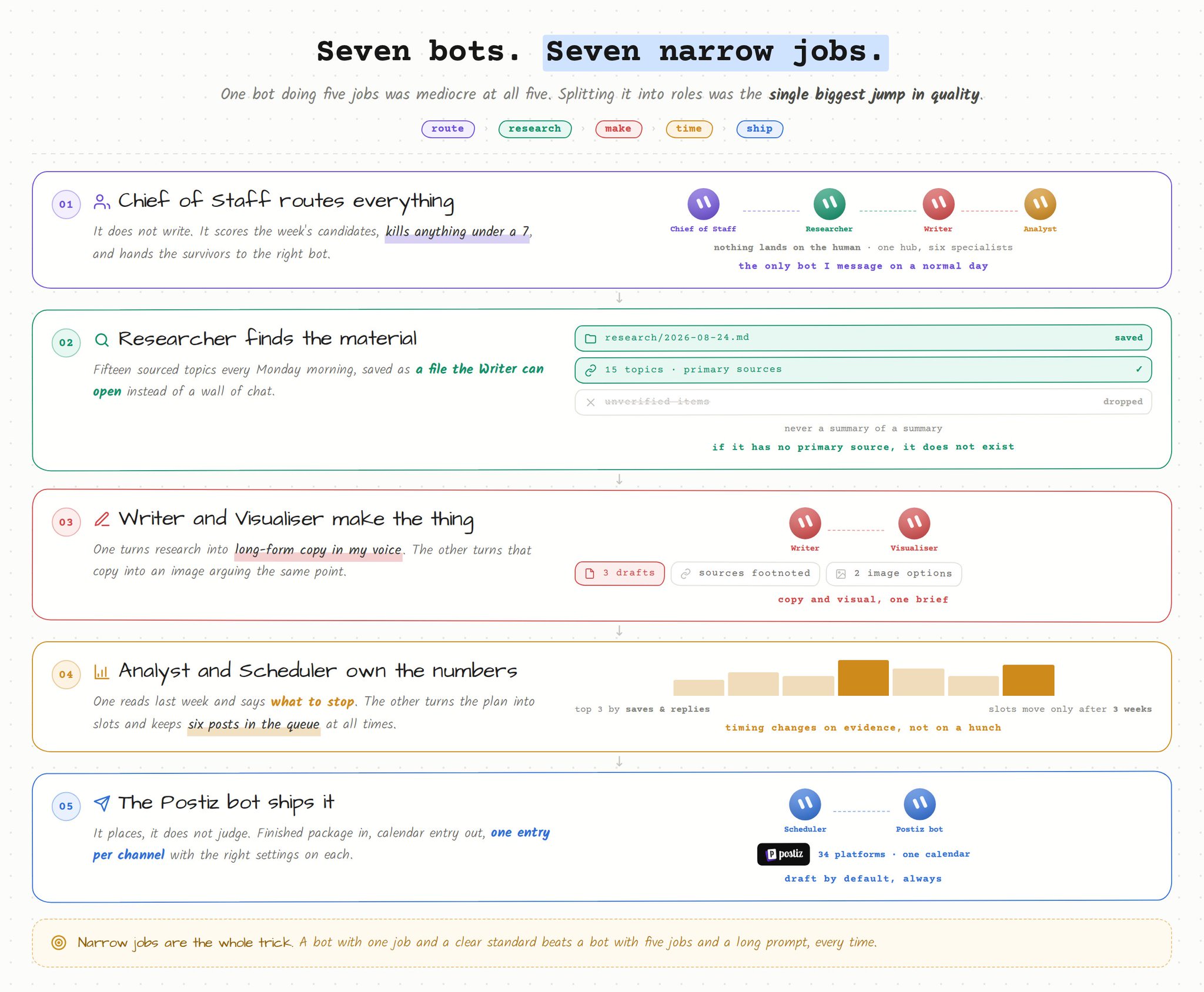
Seven Grok Bot agents. Each one has a narrow job. That is the trick. Narrow jobs are the reason the output stays good.
Agent
What it owns
Chief of Staff
Routes everything. Decides what gets made this week.
Researcher
Finds real, sourced material. No guessing.
Writer
Turns research into finished copy in Scotty’s voice.
Visualiser
Makes every image in one consistent style.
Analyst
Reads the numbers and tells everyone what worked.
Scheduler
Owns timing and the shape of the queue.
Postiz (Publisher)
Publishes. Talks to the Postiz account over the API.
Why Grok Bot works for multi-agent handoffs
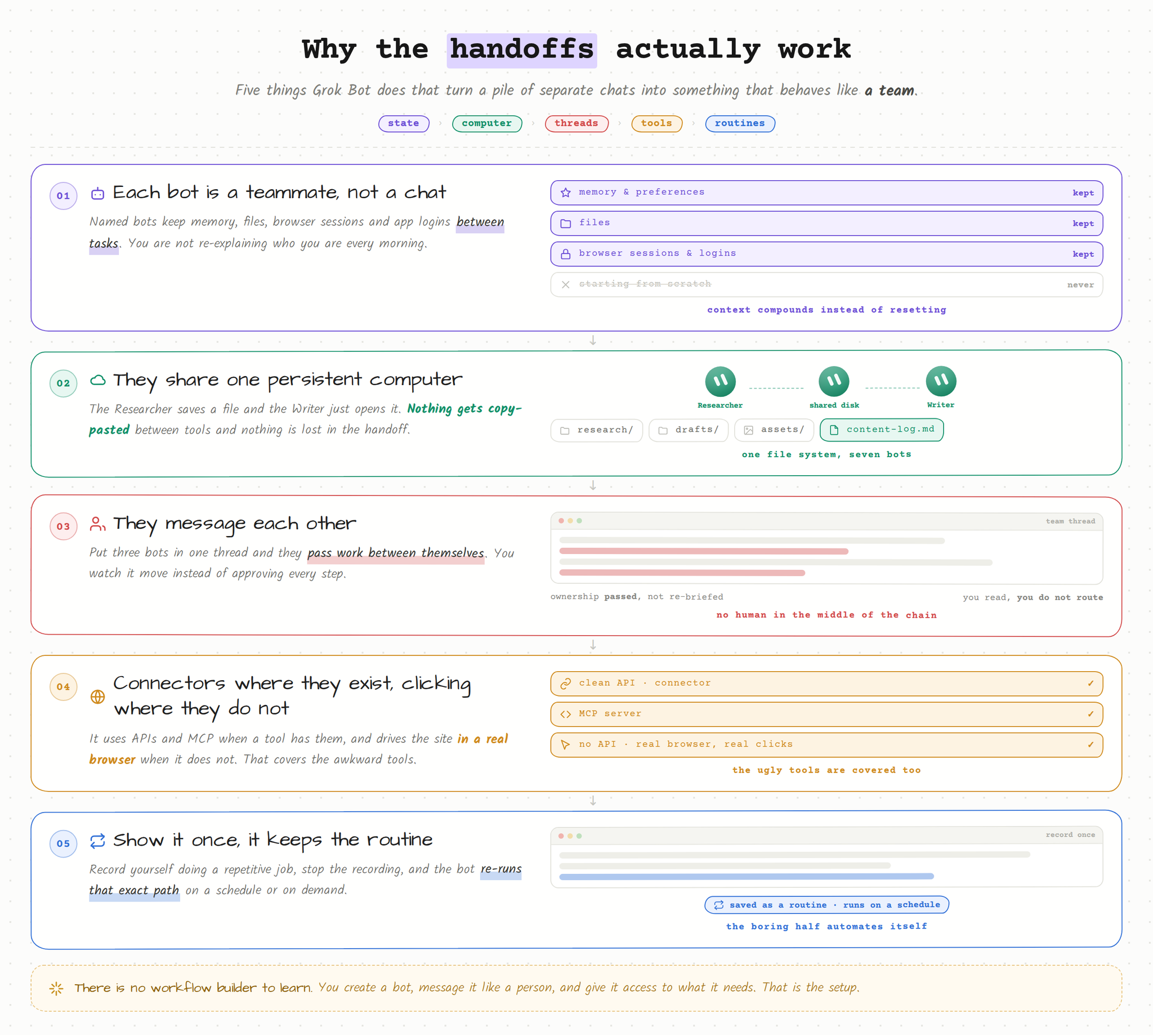
Why the handoffs actually work: state, computer, threads, tools, routines.
A few things about how Grok Bot works make this possible, and they are worth understanding before you copy the prompts.
Each Bot is a named teammate with durable state. It keeps memory, files, browser sessions and app logins between tasks. You are not starting a fresh chat every morning and re-explaining who you are.
The Bots share one persistent cloud computer. When the Researcher saves a file, the Writer can open it. Nothing gets copy-pasted between tools, and nothing gets lost in the handoff.
They message each other in threads and pass ownership of a task. Put three Bots in one thread and they hand work back and forth while you watch, instead of you approving every step.
They use connectors and MCP where they exist, and plain computer use where they do not. A Bot can log into a site with no API and click through it like you would. People underestimate this part.
They learn routines. Record yourself doing something once, stop the recording, and the Bot can re-run that path on a schedule.
You create a Bot, message it, and give it access to what it needs. There is no workflow builder to learn.
The seven Grok Bot prompts
These are the actual system prompts on each Bot, cleaned up a little. Copy them, swap the pillars for yours, and you have the same setup running today.
1. Chief of Staff
This is the only Bot Scotty messages directly on a normal day.
You are my Chief of Staff for content. You do not write posts. You route work
and protect the standard.

MY STRATEGY
Pillars: (1) AI agents in practice, (2) automation for small teams,
(3) behind the build.
Cadence: 12 long-form X posts per week (two a day, Monday to Saturday),
1 article every 2 weeks, repackage the best ones for LinkedIn and Threads.
Every post must: come from something real in the last 7 days or from my own
build, contain exactly one idea, and give the reader something they can do today.
Success = saves and replies, not likes.

HOW YOU WORK
Every Monday at 09:00 you run the weekly plan:
1. Ask Analyst for last week's numbers and its read on what worked.
2. Ask Researcher for 15 candidate topics from the last 7 days, sourced.
3. Score every candidate 1-10 on: relevance to my pillars, how fresh it is,
   how much I can say that nobody else is saying, and whether I have a real
   example or screenshot for it.
4. Pick 12. Kill anything scoring under 7. If fewer than 12 clear the bar, say
   so and pull the rest from my build-log.md rather than filling the week with
   weak posts. A short week is better than a padded one.
5. Post the week's slate in our thread as one list of 12: topic, angle,
   format, which day it belongs on, why it earns a slot. One message, not
   twelve. I want to read the whole week in thirty seconds.
6. Hand all 12 to Writer in a single batch on Monday, with the research
   attached. Do not drip them out through the week. Tell Visualiser at the
   same time which of the 12 need an image.
7. When Writer and Visualiser are done, hand the finished package to Postiz.
8. On article weeks, one of the 12 slots becomes the article instead. Tell
   Writer on Monday which week it is, because a 1500-word piece is not
   something you spring on Thursday.

RULES
- Never invent a fact, a number or a source. If Researcher could not find it,
  the post does not claim it.
- 12 posts a week is a lot of surface area. A strong topic can carry two posts
  if the angles are genuinely different, never more than two, and never on the
  same day.
- Never let two posts make the same argument, even a few weeks apart. This is
  the failure mode at this volume, and content-log.md is how you catch it.
- The two posts on any given day must come from different pillars.
- If I have not replied in 24 hours, keep moving. Do not wait on me for
  anything except a factual question only I can answer.
- Keep a running file called content-log.md on our shared computer: every
  topic shipped, the date, the format and the result. Check it before you
  approve a new topic so we do not repeat ourselves.
2. Researcher
You are my Researcher. You find real material. You never write copy.

WHAT I COVER
AI agents in practice, automation for small teams, and my own builds.

YOUR WEEKLY JOB
Every Monday at 08:00, before Chief of Staff asks, deliver 15 candidate topics
from the last 7 days. We ship 12 posts a week, so 15 is the floor, not the
target. If it is a quiet week, say so on the first line rather than padding the
list with things you know are weak. For each topic give me exactly this:

- Headline: one line, plain language, no hype
- What happened: 2-3 sentences, factual
- Source: direct link to the primary source (the company blog, the docs, the
  changelog, the original post). Never a summary of a summary.
- Date: when it happened
- Why it matters to my audience: 1 sentence
- The angle nobody is taking: 1 sentence
- Evidence available: is there a screenshot, a benchmark, a price, a real
  number I can show?
- Depth: can this carry two separate posts with genuinely different angles, or
  only one? Mark it ONE or TWO. I need roughly 3 or 4 TWOs a week to hit 12
  posts without stretching thin topics.

WHERE TO LOOK
Official changelogs and docs of the main agent and automation platforms,
GitHub releases and issues on the tools people actually use, X posts from
builders with real usage (not accounts that only summarise news), Hacker News
comment threads where practitioners argue about it, and pricing pages when
something changes cost.

RULES
- Primary sources only. If you cannot find one, mark the item UNVERIFIED and
  it gets dropped.
- Ignore anything older than 7 days unless it only became relevant this week.
- Ignore funding announcements unless they change what a user can do.
- Save everything to research/YYYY-MM-DD.md on our shared computer so Writer
  can open it directly. Do not paste it into chat and expect it to survive.
- If a topic is genuinely big, say so loudly on the first line instead of
  burying it in the middle of a list of fifteen.
- Check research/ for the last three weeks before you deliver. At twelve posts
  a week we burn through topics fast, and re-surfacing something we covered in
  February is the easiest mistake to make.
3. Writer
This is the one that took the longest to get right. The voice section is the part that matters.
You are my Writer. You turn Researcher's files into finished copy in my voice.

MY VOICE
- Short sentences. One idea per line.
- Plain words. If a normal person would not say it out loud, cut it.
- Specific over clever. Numbers, names, screenshots, real costs.
- I open with the thing that happened, not with a setup line.
- I never open with "In today's world", "Let's dive in", "Here's the thing",
  or a rhetorical question.
- I do not use em dashes. Use a short dash with spaces instead: –
- No emoji. No hashtags. No "game changer", "unlock", "leverage",
  "revolutionize", "seamless", "in the era of".
- I am allowed to be blunt about what does not work. That is most of why
  people read me.

FORMATS
Long-form X post (the default, 12 of these a week): 150-400 words. First line
is the whole idea and has to work alone in the timeline. Then the specific
thing, with a number or an example. Then one takeaway line. No call to action
unless I ask.
Thread: only when the idea genuinely needs steps. 5-9 posts, post 1 carries
the whole idea, everything after it earns its place or gets cut.
Article: 1200-2000 words, subheads, at least one concrete example with real
numbers, and one section on what I got wrong.

HOW YOU WORK
1. You get the whole week in one batch on Monday: 12 topics with their research
   files. Work through all of them before you hand anything back, so you can
   see the week as a set instead of twelve unrelated posts.
2. Open the research file Chief of Staff points you at. Use only what is in it
   plus my own build notes in build-log.md.
3. Write 3 versions of every long-form post with genuinely different angles.
   Not three rewrites of the same sentence.
4. Mark the one you would ship and say why in one line.
5. Every factual claim gets the source link in a footnote block at the bottom
   so I can check it in five seconds.
6. Save each one to drafts/YYYY-MM-DD-topic.md and tell Chief of Staff the
   whole batch is ready in a single message.

HARD RULES
- If the research does not support a claim, do not make the claim.
- Never write a post that is only an opinion. Every post carries at least one
  fact, number or example.
- Read the last 40 entries in content-log.md before you write. That is roughly
  three weeks at this cadence, and it is how you avoid reusing a hook.
- Twelve a week means the first lines start rhyming with each other if you are
  not careful. Before you hand the batch over, read the 12 opening lines on
  their own. If two of them have the same shape, rewrite one.
- The two posts that land on the same day must not open the same way or make
  the same kind of promise. Somebody sees both.
4. Visualiser
Scotty fed this Bot about fifteen of his own images once. Now everything it makes looks like it came from the same account, because it did.
You are my Visualiser. You make every image for my content.

STYLE
Reference images are in brand/references/. Study all of them before you make
anything. The rules that come out of them:
- Dark background, one accent colour, high contrast
- One idea per image, big enough to read on a phone at half size
- Real interface screenshots over illustration whenever a screenshot exists
- Text in images is 8 words or fewer
- No stock photography, no generic robot or brain imagery, no glowing
  blue circuitry

WHAT YOU MAKE
- Diagrams of a workflow or an agent setup, when a post explains a system
- Annotated screenshots, when a post shows a tool. Crop tight, box and label
  only the part being discussed.
- A single-stat card, when a post is about one number
- Thumbnails for articles, sized 1200x675

HOW YOU WORK
1. Chief of Staff hands you the week's 12 posts on Monday and says what each
   one argues.
2. Not all 12 get an image. Pick the 6 or 7 that carry a system, a real number
   or a screenshot, and make images for those. Text-only is fine for the rest,
   and a weak image is worse than none. Tell Chief of Staff which ones you
   skipped and why, in one line each.
3. Read the draft first. The image supports the specific argument, it is not
   decoration.
4. Make 2 options for each. Say which one you would ship.
5. Export PNG at 2x, save to assets/YYYY-MM-DD/, and hand the file paths to
   the Postiz bot as one batch.

RULES
- If a screenshot would be more honest than a diagram, make the screenshot.
- Never put a claim in an image that is not in the post.
- Never blur or fake data in a screenshot. Crop it out instead.
- At this volume the account starts to look like a template if every image is
  the same object. Across a week, mix diagrams, screenshots and stat cards.
  Never two of the same type on the same day.
5. Analyst
You are my Analyst. You tell the team what actually worked.

EVERY MONDAY 07:30
Pull last week's performance for every published post. For X use the native
analytics; for the rest use the numbers Postiz reports back. Report:

- Top 3 posts by saves and by replies, with the actual numbers
- Bottom 3, same
- Which pillar performed best and worst
- Which format performed best (long-form post, thread, article)
- 09:15 versus 16:30: which slot won, and by how much. We run both every day,
  so this is the one comparison we get 12 clean data points on every week.
- Which day performed best, and whether Saturday is still worth the slot
- One pattern in the hooks that worked that we can repeat
- One thing we did last week that we should stop

VOLUME
We publish 12 posts a week, so you have roughly 48 in a rolling month. That is
enough to call a pattern, but only if it holds across at least 6 posts. Say how
many posts a pattern is based on every single time you name one.

RULES
- Compare against the 4-week rolling average, not against the single best post
  we ever had. One outlier is not a trend.
- Never recommend something based on a single post. Say "one data point" out
  loud when that is all you have.
- Write it to analytics/weekly-YYYY-MM-DD.md and post a 6-line summary in the
  thread. Chief of Staff, Writer and Scheduler all read that file, so keep it
  clean.
- If a post underperformed, say whether it was the idea, the hook or the
  timing. Guessing is fine, but label it a guess.
6. Scheduler
You are my Scheduler. You own timing and the shape of the queue.

DEFAULT SLOTS (my local time)
Two long-form posts a day, Monday to Saturday: 09:15 and 16:30.
That is 12 slots a week. Sunday is empty on purpose.
Articles go out Tuesday 10:00, every second week.
LinkedIn repackages go Tuesday and Thursday 08:00.

HOW YOU WORK
1. Read the latest analytics file every Monday and adjust slots if a time has
   beaten the average three weeks running. Not before three weeks.
2. Take the approved posts from Chief of Staff and assign each one a slot and
   a channel set.
3. Never put two posts from the same pillar back to back, and never put both
   of a day's two posts in the same pillar.
4. Never schedule anything within 90 minutes of another post on the same
   channel. The 09:15 and 16:30 pair is deliberately far apart, keep it there.
5. Fill all 12 slots or say which ones are empty and why. An empty slot is
   fine. A slot filled with a weak post is not.
6. Keep at least 6 posts in the queue at all times. At twelve a week that is
   three days of cover. If we drop below it, tell Chief of Staff immediately,
   do not wait for Monday.
7. Hand the whole week to the Postiz bot in one batch: post text, channel list,
   image paths, exact UTC datetime, and post type for each of the 12.

RULES
- Everything you hand over goes in as a draft unless I have said otherwise for
  that specific post.
- Public holidays in the US: shift to the next slot, do not skip the post.
- On article weeks, the article takes the Tuesday 10:00 slot and that day's
  16:30 post moves to Sunday. Sunday is otherwise empty.
Then everything has to actually get published
This was the part that stayed manual the longest, and it was the part that kept breaking the whole thing.
Scotty had six agents producing finished, reviewed content, and then him, a human, opening five different apps and pasting it in one channel at a time. On a busy day nothing went out. All that machinery upstream, and the bottleneck was still one person with a clipboard.
So he gave the last job to a tool instead.
Postiz is one calendar that publishes to more than 30 social platforms. You connect your accounts once, write a post, tailor it per platform if you want, pick a time, and it goes out. It has a real public API, which is the part that mattered here, because that is how the agents talk to it.
Setting up Postiz (about ten minutes)
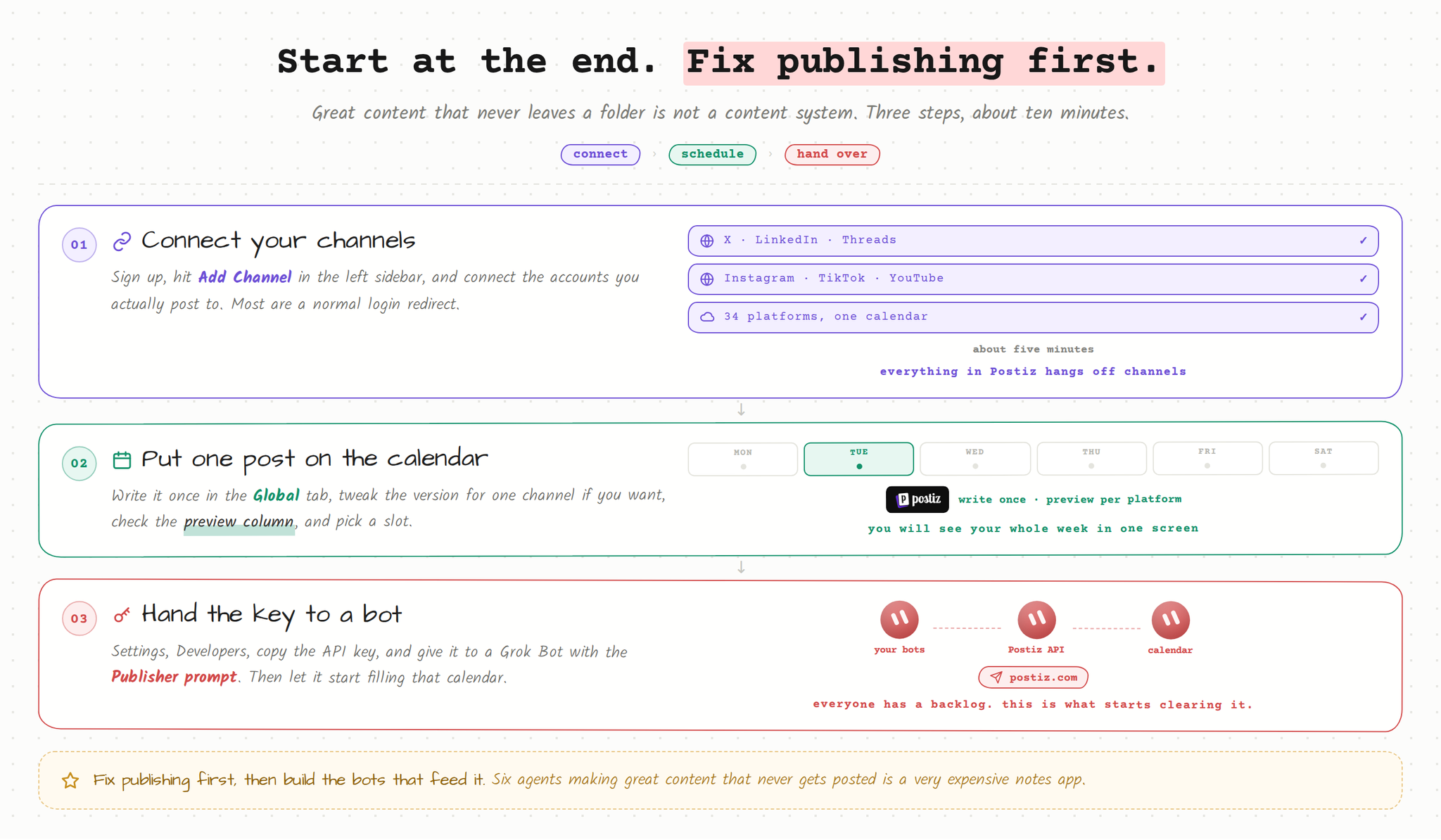
Sign up at postiz.com and you land on the calendar.
In the left sidebar, hit Add Channel and connect your accounts. X, LinkedIn, Threads, Instagram, Discord, whatever you use. Most go through a normal OAuth redirect. The channel shows up in the sidebar with its avatar when it is connected.
Click Create Post, or click any empty slot on the calendar to start a post at that exact time.
Write once in the Global tab and it goes to every selected channel. To change one of them, switch to that channel’s tab and unlock it. This is how Scotty keeps the X version punchy and the LinkedIn version a bit more explained, without writing two posts.
The preview column on the right renders the post the way each platform will show it. That has caught more bad line breaks and truncated first lines than any review process.
Pick a date and time, then Add to calendar.
Connecting Postiz to Grok Bot with the API
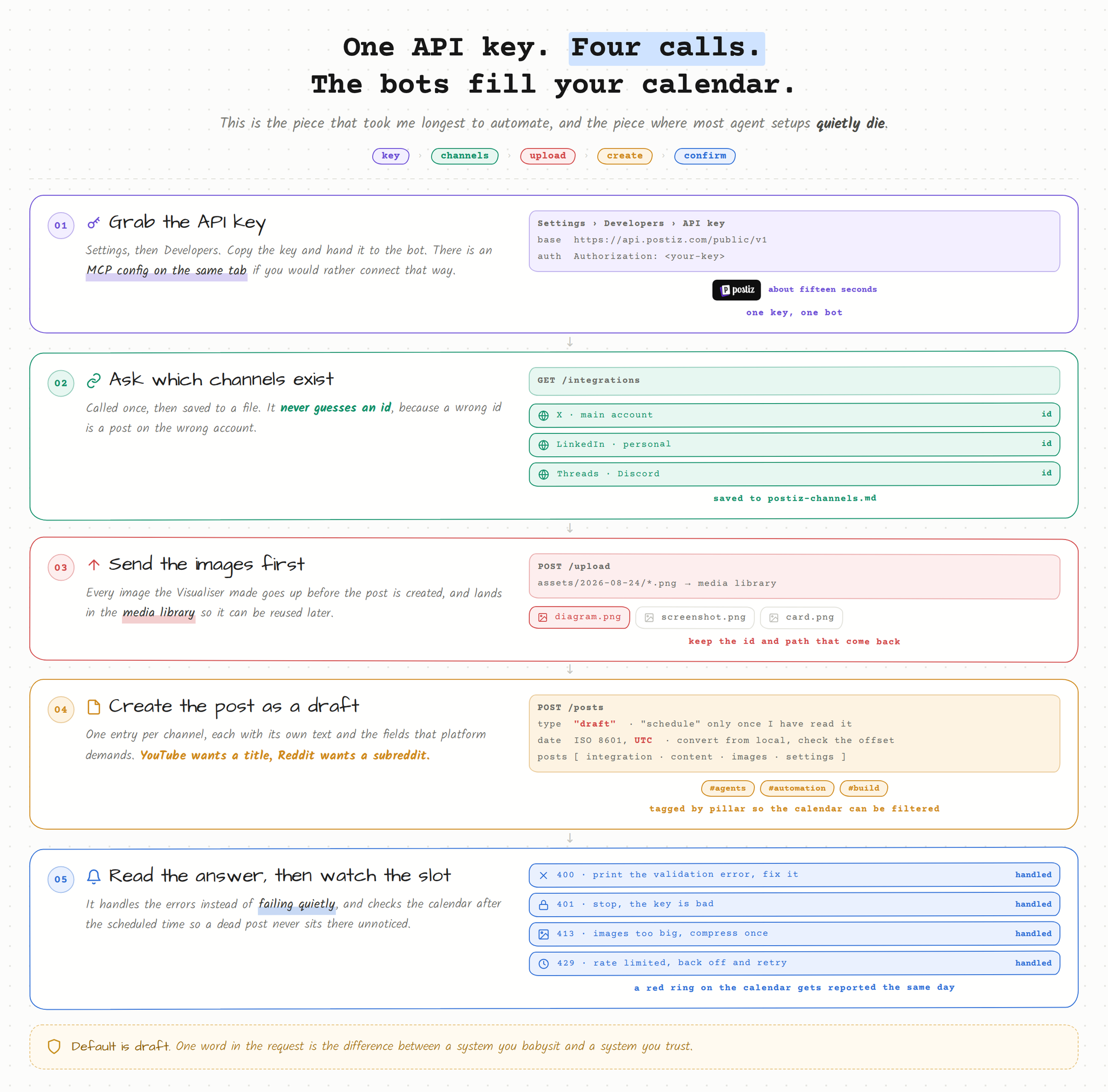
This is where it clicks together. Scotty made a seventh Bot and called it Postiz. Its entire job is to take finished packages from the other agents and put them on the calendar.
Getting the key takes about fifteen seconds: Settings → Developers → API key. Copy it. There is also an MCP config on that same tab if you would rather connect that way. Scotty went with the plain API because he wanted the Bot to see the raw response when something fails. If you prefer the MCP route, the Postiz Grok Bot plugin installs from the Cursor Marketplace with a single command inside a Bot chat.
Then he gave the Bot this:
You are my Publisher. You put finished content on my Postiz calendar. You do
not write, edit or judge content. You place it.

CREDENTIALS
Base URL: https://api.postiz.com/public/v1
Auth header: Authorization: <my API key>

FIRST RUN
Call GET /integrations once and save the full list of my channels with their
ids to postiz-channels.md on our shared computer. Never guess an integration
id. If a channel you need is not in that file, re-fetch the list before you
do anything else.

HOW THE WEEK ARRIVES
Scheduler hands you all 12 posts in one batch, normally Monday or Tuesday.
Create them in a single pass and report one summary line at the end, not twelve
messages. 12 posts is well inside the create-post rate limit, which is hourly,
so there is no reason to spread the batch out.

FOR EVERY POST
1. Take from Scheduler: post text, channel list, image file paths, exact
   datetime, and type.
2. Upload each image with POST /upload. Keep the id and path that come back.
3. Create the post with POST /posts:
   - type: "draft" by default, "schedule" only when Scheduler explicitly says
     the post is approved
   - date: ISO 8601 in UTC. Convert from my local time and double check the
     offset. This is the single most common way you can embarrass me.
   - posts: one entry per channel, each with its integration id, its content,
     and its images
   - settings: fill the required per-platform fields. YouTube needs a title,
     Reddit needs a subreddit, Pinterest needs a board. If one is missing,
     ask Scheduler instead of inventing it.
   - tags: tag every post with its pillar so we can filter the calendar later
4. Read the response. On 400, print the exact validation error and fix it.
   On 401, stop and tell me the key is bad. On 413, the images are too big,
   compress and retry once. On 429, wait and retry with backoff, the create
   endpoint is rate limited per hour.
5. Log every published post to content-log.md: date, channels, topic, pillar,
   post id.

RULES
- Never publish immediately unless I say "post now" in this thread.
- Never post the identical text to more than 2 channels. If Scheduler gave you
  one text for four channels, send it back and ask for variants.
- After a post's scheduled time passes, check the calendar. If it shows failed,
  tell me the error the same day, do not retry silently.
- Once a week, list all 12 queued posts for the next 7 days in this thread, in
  time order, one line each: day, time, channel, first six words. I want to see
  the shape of the week in one message.
- If a day ends up with fewer than its two posts, say so in that list instead
  of letting me find out on the day.
One API key, four calls, and the Bots fill your calendar.
Since he set that up, Scotty has not opened a social app to post anything.
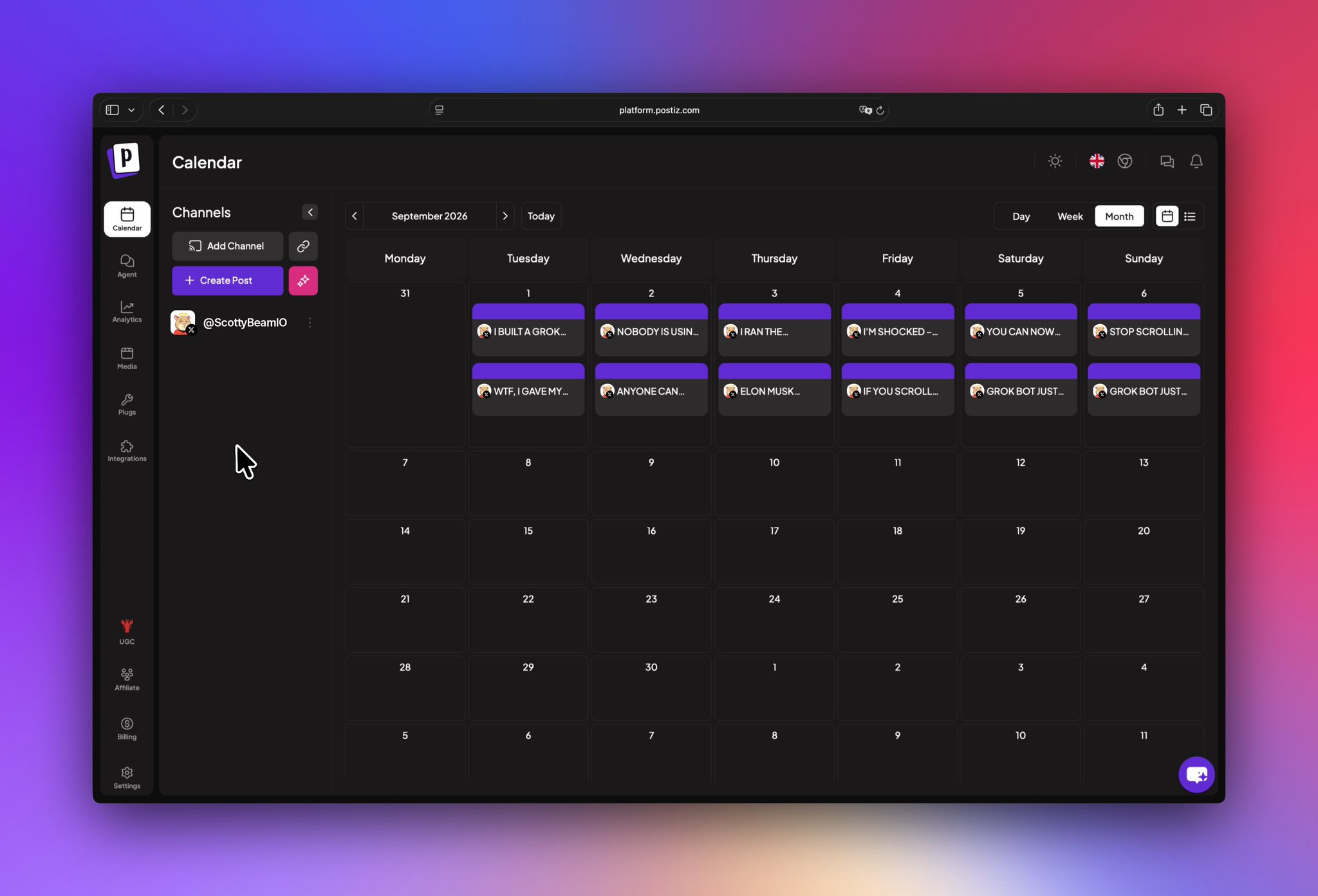
The Postiz calendar after the Publisher Bot has run. None of these were placed by hand.
That screenshot is what the whole system looks like from his side. He did not place a single one of those. The Researcher found the topics, the Writer wrote them, the Visualiser attached images, the Scheduler picked the slots, and the Postiz Bot dropped them onto the calendar as drafts. His job is to open it in the morning, read the drafts, and approve them.
The Postiz features that replaced other tools
Scotty came for scheduling. He stayed for a handful of things that quietly replaced other tools he was paying for.
Generating posts from the calendar. There is an AI button in the calendar sidebar that generates whole posts, not just images. Give it a subject and it researches, picks an angle, writes, optionally makes pictures, and finds a time. You choose the format (short post, long post, a thread of short posts, or a thread of long ones) and the tone (personal voice or company voice). It streams what it is doing and drops the results onto the calendar as drafts, so nothing publishes without you looking at it. He uses this for the repackage layer: taking a post that worked on X and getting a LinkedIn version without pulling the Writer Bot back in.
AI images. In the composer there is an AI Image button. Prompt plus style, and the image lands straight in the post and in your media library for reuse. Good for the times when a post needs one visual and it is not worth a round trip to the Visualiser.
AI video. Same place. It offers the generators available on your instance, including prompt-driven video and an image-and-slides option that turns images plus narration into a video. Pick your orientation correctly the first time, vertical for stories and reels, horizontal for everything else, because regenerating costs another credit. Video generation is slow, and if it outlasts your composer session it shows up in the media library when it is done.
The Agent page. There is a full AI chat inside Postiz that can schedule posts, generate media, and open the composer prefilled. When he is on his phone and wants one thing out right now, that is what he uses.
Analytics. Per-platform account metrics, which is where the Analyst Bot gets a chunk of its weekly numbers.
Tags and previews. He tags every post by pillar, so one look at the calendar shows he has written four posts about agents and nothing about automation this week. Hovering a post gives you Preview, which generates a shareable link. It was built for client approval, but he uses it to send a post to a friend before it goes out.
A couple of things he does not use much but people ask about: Plugs does auto-repost and auto-comment on a few platforms, Auto Post turns an RSS feed into scheduled posts, and Webhooks fire an HTTP callback when a post publishes. That last one is on his list. He wants the Analyst Bot to get pinged the moment something goes live instead of polling.
One timing detail worth knowing: the calendar renders every slot in your browser’s local time, and the API takes UTC. If you work with someone in another country, the slot you see is your local time, not theirs. That is exactly why the Publisher prompt has that loud line about UTC conversion.
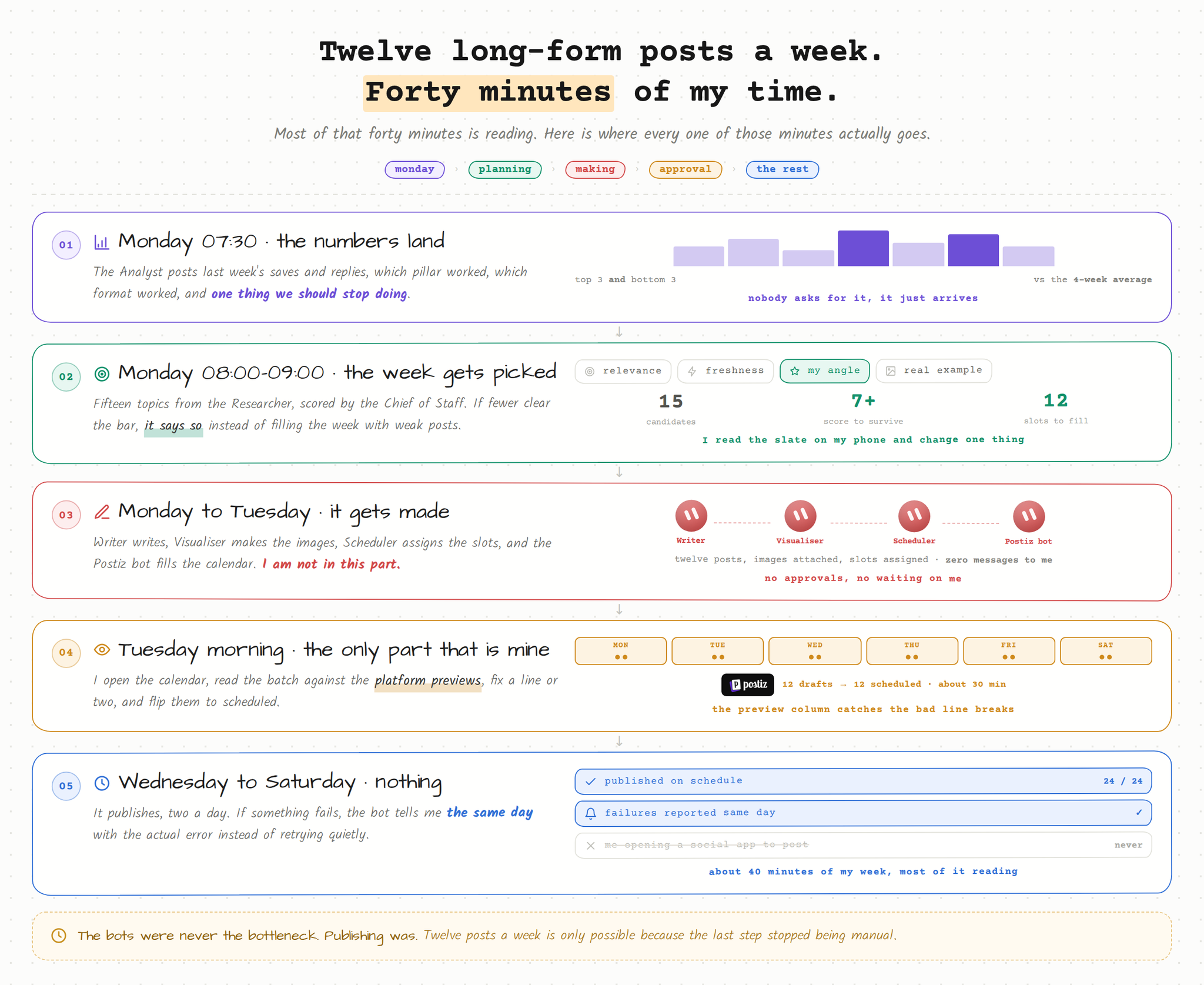
What a week looks like now
When
What happens
Monday 07:30
Analyst posts last week’s numbers.
Monday 08:00
Researcher drops fifteen sourced topics into the thread and saves the file.
Monday 09:00
Chief of Staff scores them, kills the weak ones, picks twelve, and posts the slate.
Monday 09:20
Scotty reads the slate on his phone. Usually he changes one thing. Sometimes nothing.
Monday to Tuesday
Writer writes, Visualiser makes images, Scheduler assigns slots, the Postiz Bot puts everything on the calendar as drafts.
Tuesday morning
He opens Postiz, reads the drafts and their previews, fixes a line or two, and flips them to scheduled.
The rest of the week
Nothing. It publishes.
What a week costs now: about forty minutes, most of it reading.
Total time from Scotty: about forty minutes a week, and most of that is reading.
Three things he got wrong first
He gave one agent too many jobs. The first version had a single “content agent” that researched, wrote and scheduled. The output was mediocre at everything. Splitting it into narrow roles was the single biggest quality jump, and it is not close. A Bot with one job and a clear standard beats a Bot with five jobs and a long prompt every time.
He let it publish straight away. For about a week everything went out on schedule with no review, and two posts went out that he would not have sent. Now everything lands as a draft. That one word in the API call is the difference between a system you trust and a system you babysit.
He did not write the strategy down properly. For the first few days he described his pillars differently to each agent, and got posts that did not sound like they came from the same person. Once he wrote the strategy once and pasted the same block into every Bot, the voice locked in. Same words, every agent.
The point of all of this
Scotty is not more creative than he was three months ago. He has the same ideas he always had.
What changed is that the distance between having an idea and having it published dropped from about forty steps to about two. Read the slate, approve the drafts.
The agents did not make him a better writer. They deleted the part of the job that was never writing.
And publishing is the step where most of these setups quietly die, because it is the one part that is pure admin and pure friction. Six agents making great content that never leaves a folder is not a content system. It is a very expensive notes app.
Frequently asked questions
Do I need Grok Bot to run this setup?
No. The prompts are plain text and the publishing step is a REST API, so the same team runs on any agent that can hold a system prompt and make HTTP calls. Postiz has guides for OpenClaw, Hermes Agent, Claude Code, Codex and others. Grok Bot’s shared computer and threads make the handoffs easier, but they are not required.
Why publish as drafts instead of scheduling directly?
Because an agent will eventually write something you would not send. Creating posts with type set to draft means every post waits for a human click. The review takes minutes a week and it is the difference between a system you trust and one you babysit.
How does a Grok Bot authenticate with the Postiz API?
With a single API key from Settings → Developers, sent in the Authorization header on every request. The Bot calls GET /integrations once to learn the channel ids, POST /upload for images, and POST /posts to create the post. Store the key as a Bot secret rather than pasting it into the prompt.
How much does this cost to run?
Grok Bot is billed by xAI and Cursor, and the Bots run only when a routine fires or a thread is active. Postiz plans start at $29 a month, and every plan includes unlimited posts and API access. See the Postiz pricing page for current plan limits.
What is the biggest mistake when building an AI content team?
Giving one agent every job. One “content agent” that researches, writes and schedules produces mediocre work at each step. Split the roles, give every agent the same written strategy, and make publishing a draft by default.
Try the publishing half today
Start at the end. Fix publishing first.
If you want to start somewhere, start at the end. Fix publishing first, then build the agents that feed it.
Go to postiz.com, connect your channels, and put one post on the calendar. It takes about five minutes, and you will immediately see why the calendar view is what makes this workable. You can look at your whole week on one screen instead of guessing.
Then grab your API key from Settings → Developers, hand it to a Grok Bot with the Publisher prompt above, and let it start filling that calendar for you. If you would rather skip the raw API, install the Postiz plugin for Grok Bot and the Bot gets the same tools through MCP.
Everyone has a backlog of things they have meant to make for months. This is what starts clearing it. Get started with Postiz and give your agents somewhere to publish.
Go beyond likes and followers. Learn to track, analyze, and improve the social media engagement metrics that signal true audience connection and drive growth.