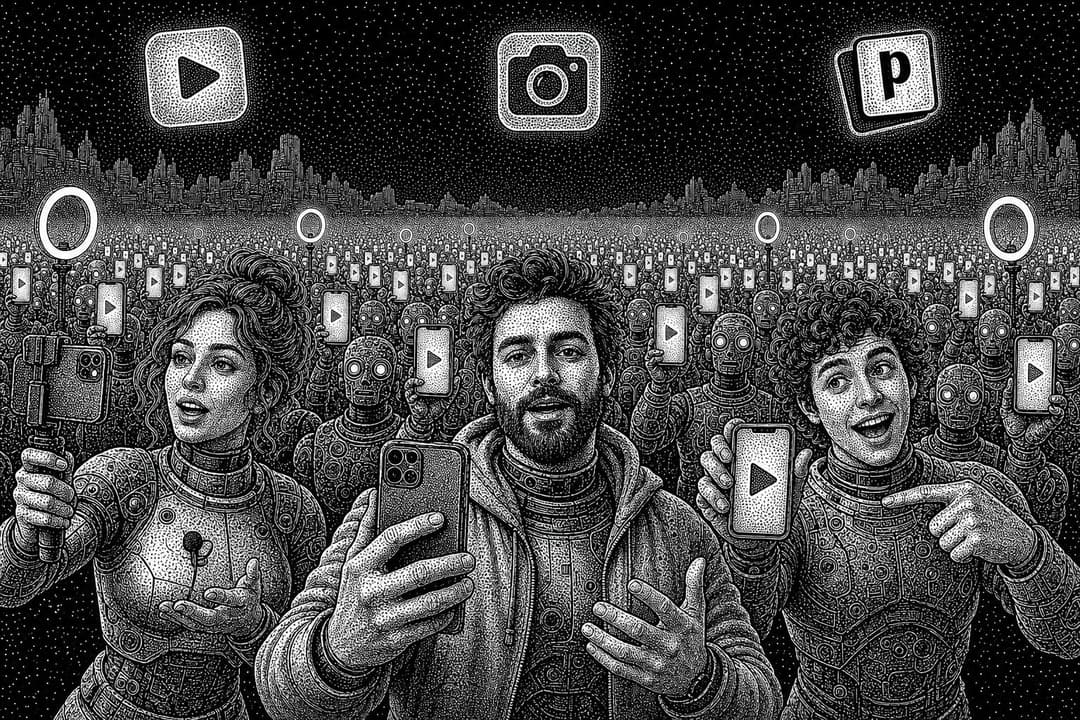
AI UGC, done correctly, is one of the best growth hacks there is for finding and scaling winning videos on organic and paid social.
Most teams do it backwards. They open a video model, type “ultra realistic UGC creator talking to camera”, burn through credits, and post whatever comes out. The teams that win treat AI UGC as a testing machine: research what already earns attention in their niche, rebuild that format around their own product, test one variable at a time, and only pay to scale what the data proves.
This guide is that machine, step by step. It was built by the operator who ran UGC and influencer marketing for Cal AI on the way to a $50M run rate (full credit at the end), and it is the system they wish they had back then, especially for testing new video ideas on organic before turning the winners into paid ads.
It works great for consumer apps, and the same principles apply to tech UGC, ecommerce, and any brand trying to stay competitive in short-form video. Follow it and you go from zero to a full AI UGC video pipeline running (nearly) on autopilot, so you can:
Ideate and research faster
Test faster and fail faster
Find winning angles to scale faster
Rinse and repeat
All you need is Claude Code (or Codex), Apify, Higgsfield and Postiz. All 13 prompts are included below as plain text, so you can paste them straight into Claude Code.
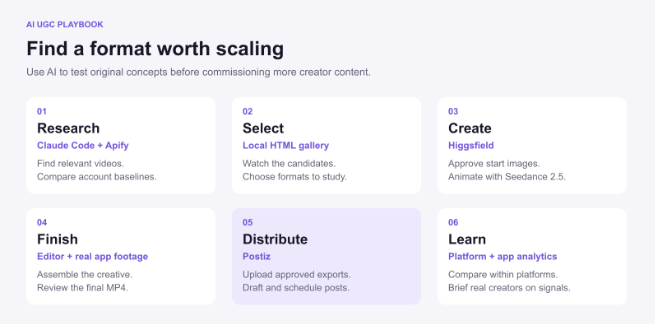
The whole AI UGC workflow on one page: research, select, create, finish, distribute, learn.
The AI UGC workflow in 10 steps (TL;DR)
Write an app brief that names your marketing magic moment before you research anything.
Find outlier videos in your niche with Claude Code and the Apify MCP.
Build a research board so you can watch the candidates and pick formats.
Reverse engineer why people watched, then write original concepts.
Design a test that changes one variable at a time.
Build a believable starting frame and generate it through the Higgsfield MCP.
Animate one test take with Seedance 2.5 before you pay for the batch.
Finish the videos with real app footage, captions and FFmpeg.
Draft and schedule every variant to TikTok, Instagram, YouTube and Facebook with Postiz.
Judge each platform separately, then hand the winners to real creators and paid ads.
What is AI UGC?
AI UGC (AI-generated user-generated content) is short-form video that looks like a real person filmed it on their phone, but the presenter, the scene or the voice is created with AI video models such as Seedance 2.5, Google Omni or Kling 3.0. Brands use it to test hooks, angles and formats quickly and cheaply before paying creators or running ads.
That last part is the whole strategy. AI UGC is a testing ground, not a replacement for real creators. You use it to find the angle that works, then hand the winner to a human creator your audience already trusts.
Manage all your social media in one place with Postiz
All-in-one AI UGC apps such as MakeUGC, Arcads and Creatify turn a script into an AI-avatar video in minutes, which is the fastest way to try AI UGC. Inside Postiz, the Make UGC button opens AgentMedia (agent-media.ai), a separate AI UGC product with its own account and pricing that generates captioned 9:16 videos. This workflow trades some of that speed for control: an original presenter, real app footage, and one variable tested at a time, so every result teaches you something.
The AI UGC stack: Claude Code, Apify, Higgsfield and Postiz
One chat runs everything. Claude Code is the operator, and every other tool plugs into it through MCP or a CLI, so you never leave the terminal:
Tool
Job in the workflow
How Claude Code connects
Claude Code (or Codex)
Runs the research, planning, prompts, editing and publishing
It is the agent you talk to
Apify
Scrapes TikTok and Instagram for outlier videos and analyzes the winners
Apify MCP
Higgsfield
Generates start images and AI UGC video with Seedance 2.5, Google Omni and Kling 3.0
Higgsfield MCP or Higgsfield CLI
FFmpeg or a video editor
Assembles generated clips, real app footage and captions
Local commands
Postiz
Uploads the finished videos, drafts and schedules them to TikTok, Instagram, YouTube and Facebook, and tracks results
Postiz MCP, CLI or agent skill
1. Research beats everything else: start with an app brief
“Find viral video ideas for my app” is a waste of time and credits.
Claude (or Codex) needs to understand who the app is for, what problem it solves, and what someone can see that makes the benefit obvious.
That visible benefit is your marketing magic moment: the “aha” someone gets when they see your product in action and think “damn, that’s cool, I need to try it.” For Cal AI, it was pointing a phone camera at food and watching the calories appear. If you can’t describe your magic moment in one sentence, more budget won’t fix your marketing.
So before you try to recreate videos to scale your app, give your AI of choice as many layers of context as possible. It is about to make big decisions on your behalf, and the rule is simple: garbage in, garbage out.
Open a Claude Code project folder and drop in this prompt with your specifics filled in:
Prompt 1 of 13: the app brief
Help me develop organic short-form video tests for this app.

App: [NAME + DESCRIPTION]
Audience: [WHO, THEIR SITUATION, THEIR PROBLEM]
Core outcome: [WHAT GETS BETTER]
Magic moment: [THE ACTION/RESULT WE CAN SHOW]
Verified features and claims: [LIST]
Real product screenshots or recordings: [FILES]
Markets and language: [DETAILS]
Research budget: [DETAILS]
Generation budget: [DETAILS]

Create app-brief.md. Identify:
- Five situations where this audience naturally needs the app.
- Search terms for content about those situations.
- Likely video formats worth investigating.
- Natural places for the product to enter each story.
- Claims, assets, or details that are still missing.

Treat format ideas as hypotheses until we find evidence.
Don't invent customer stories, results, or product capabilities.
Don't research or generate assets yet.
This is the bare minimum to hand Claude before deep research. If you have more customer data, add it too:
Support tickets
App store reviews
Feedback from your power users
Customer surveys
AI can almost never have too much context.
2. Find outlier videos in your niche with Claude Code and the Apify MCP
Don’t reinvent the wheel when you come up with content ideas. You want examples of people repeatedly earning attention around the problem your app solves.
A big view count is one signal. A much stronger one is an account doing unusually well compared with its own normal videos. If a creator usually gets 10,000 views and one comparable video gets 120,000, you want to know why. That 12x outlier is a reason to investigate, not proof the format will sell your app.
Outlier ratio = a video’s views ÷ the median views of the same creator’s recent comparable posts (leave the video itself out of the baseline). A high ratio suggests the format earned the attention, not just the size of the creator’s audience.
Outlier hunting: one video doing 12x its creator’s normal views tells you more than any big account’s average post. (Illustration animated with Seedance 2.5.)
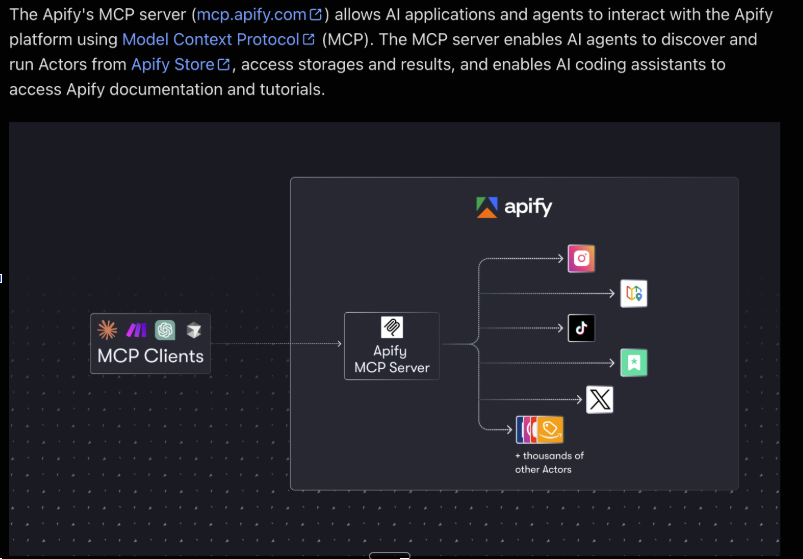
You can ask Claude Code or Codex to research top-performing videos on its own, but the results are inconsistent. Claude Code’s browser can discover accounts and check individual posts, but it doesn’t give you a dependable TikTok or Instagram data feed. That is why Apify is a key part of this process: it exposes its scrapers through MCP, so Claude can run a collection job and work with structured results.
How to connect the Apify MCP to Claude Code
Apify hosts its MCP server at mcp.apify.com. Add it to Claude Code with one command, then type /mcp inside Claude Code and sign in with your Apify account:
claude mcp add --transport http apify https://mcp.apify.com
The Apify MCP docs cover token-based setups and how to limit the server to specific Actors. Actor runs are billed as normal Apify usage, which is why the app brief includes a research budget.
The Apify MCP server lets Claude discover Actors, run scrapers for TikTok, Instagram and more, and read back structured results.
Have Claude inspect each Actor’s current input schema before running it. Then hand it the research prompt:
Prompt 2 of 13: outlier video research
Read app-brief.md. Use the connected Apify MCP to research
TikTok and Instagram content relevant to our audience.

First inspect the available Actors, input schemas, and pricing.
Stay within the research budget. If access or budget prevents
the job, report the gap rather than substituting invented data.

For TikTok, investigate relevant search terms and creator profiles.
For Instagram, discover relevant public profiles/Reel URLs first,
then collect their Reels through a compatible Actor.

Start with the last 30 days. If evidence is sparse, expand to
90 days and label the older examples. Aim for 30 useful candidates;
return fewer if that's all the accessible evidence supports.

Save research/videos.json and a readable summary. For each video:
- Stable ID, source URL, platform, creator, date, collection time.
- Available views, likes, and comments; null for missing values.
- Duration, caption, thumbnail, and accessible preview reference.
- Whether the actual video has been inspected or only metadata.
- Possible format and product relevance, clearly labeled as inference.

Where comparable account data exists, calculate:
outlier ratio = video views / median views of recent comparable posts.
Exclude the candidate from its baseline. Record sample size and
post ages. Flag tiny samples and unstable/zero baselines.

Deduplicate reposts. Keep ranking within each platform.
Do not invent saves, retention, sales, or conversion figures.
Shortlist candidates with repeated format evidence and app relevance.
3. Turn the research into a board you can actually use
When the research is done, have Claude build a local HTML gallery so you can watch the videos it found, compare them, and pick the ones worth replicating. Each card should show the source, the available metrics, why it made the shortlist, and a selection button.
A local hook board built by Claude: 23 fitness posts from TikTok and Instagram ranked by outlier score, with a Pick button that saves your choices for Claude to read.
Prompt 3 of 13: the research board
Read research/videos.json and app-brief.md. Build a self-contained
research-board.html I can open locally. No external services, no logins.

One card per video: thumbnail or playable preview linking to the source,
platform, creator, post date, available views/likes/comments, outlier
ratio with its sample size, and one line on why it made the shortlist.
Label anything inferred as inference. Show missing values as "n/a".

Add filters for platform and situation, plus sorting by outlier ratio,
views, comments, and date. Give every card a Pick button and a notes
field. Save my picks and notes to selected-videos.json so you can read
them in the next step.

Don't invent metrics. Don't analyze or generate anything yet.
4. Reverse engineer why someone watched
Once you’ve picked your references, Claude needs the content itself to have any chance of recreating the format. A caption and a view count can’t explain pacing, delivery or the product reveal.
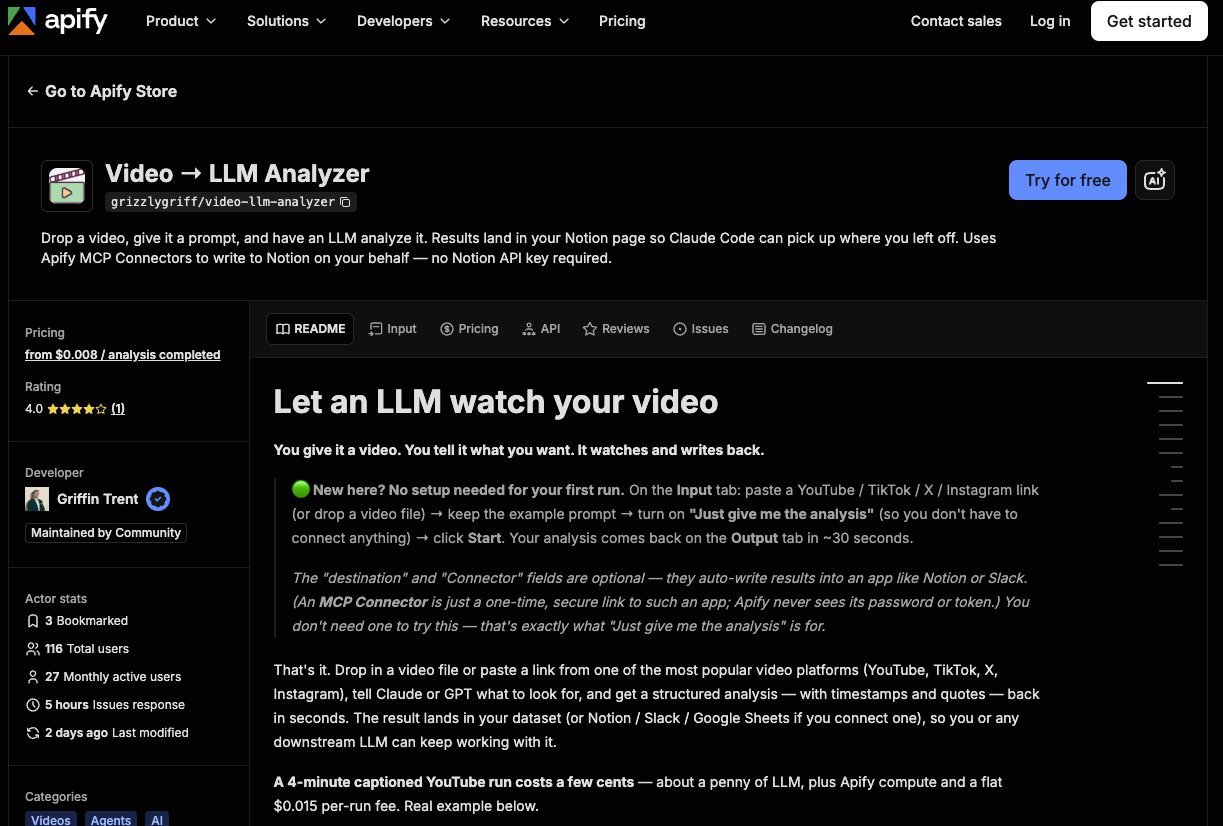
The easiest way to run this step is Apify’s Video → LLM Analyzer. Paste a TikTok, Instagram, YouTube or X link, add your prompt, and it returns a structured analysis with timestamps and quotes. Ask it to break down the hook and opening scene, the unanswered question, the sequence, the payoff, and anything else you want to know.
Video → LLM Analyzer on Apify: drop in a video link and a prompt, get a timestamped breakdown back.
For transcripts, Descript is a solid paid option that’s fast and reliable, and there are free transcription tools if you’re on a budget.
Descript handles fast, reliable transcription when you want a clean script of every reference video.
Gemini can also watch and analyze videos when you give it the actual file. You can download each TikTok or Instagram video and run it through Gemini, but it’s far more manual and tedious.
Pick your videos, then run this analysis prompt:
Prompt 4 of 13: video breakdown and original concepts
Read selected-videos.json, my selection notes, and app-brief.md.
Inspect each selected video through the Apify video analyzer.
Report access gaps.
Never imply you watched a video from its caption alone.

Create a timestamped breakdown of:
- Opening visual, spoken hook, and on-screen text.
- The question/tension that encourages continued watching.
- Story beats, cuts, delivery, and payoff.
- Where a product naturally belongs.
- What appears reusable versus specific to the original creator.

Separate observations from explanations you are inferring.

Propose three ORIGINAL concepts for our app from the selected formats.
For each, provide a spoken script, timed shot list, visual-reference
brief, actual app footage needed, and CTA. Target 20-30 seconds,
but check whether the dialogue fits a natural spoken pace.

Do not copy the creator's wording or personal story. Don't turn an
AI presenter into a fake customer giving a fabricated testimonial.
Use only product behavior and claims in app-brief.md.

Save concepts.md and stop for my selection.
Once this step is done, it’s time to adapt those winning formats to your own app.
5. Design an AI UGC test you can actually learn from
AI lets you change the hook, character, setting, format, length, product placement and CTA. Change all of them at once and you’ll never know what worked.
Once you’ve picked your formats and understood why they were outliers, give each one a fair attempt: your product integrated into a version of the winning angle. Then take the strongest candidates and test more specific changes, like three opening hooks on the same body. The hook is usually the variable that moves results most, and the psychology behind viral hooks is a good place to find variants worth testing.
Prompt 5 of 13: the test plan
Take the concept I approved and create a first test batch.

Stage A: propose a small format-exploration batch from the references.
Stage B: for the format I select, create three opening-hook variants
with the same body, character, product demo, and CTA.

Assign each creative a stable ID. Record its hypothesis, changed
variable, fixed elements, assets, generation-cost estimate, and
the result that would justify another test.

Recommend an observation window and repeat-test plan appropriate
to the account's available baseline. Label these as proposed rules,
not universal performance thresholds.

Stay inside the generation budget. Save test-matrix.csv.
Do not generate anything until the batch is approved.
Organic posting won’t give you a perfectly controlled experiment. Timing, account history and the audience a platform chooses to show your video all affect the result. You’re looking for a pattern strong enough to justify the next investment.
6. Build a believable starting frame with the Higgsfield MCP
This is where a lot of AI UGC starts going wrong. People spend ten minutes writing “ultra realistic” and almost no time deciding what the shot should look like.
The old trick was searching “UGC creator” on Pinterest for reference images. Today many of those images are AI-generated themselves and have too much polish to feel believable.
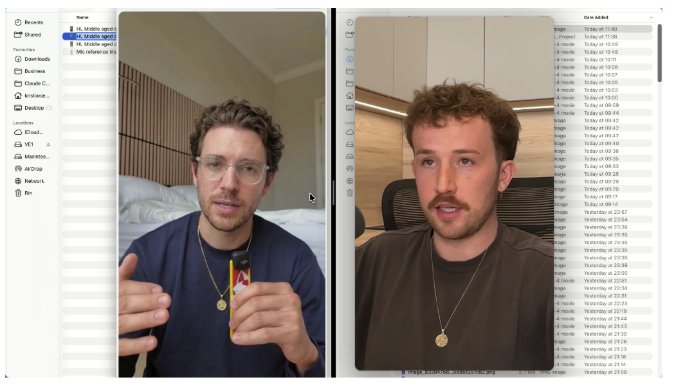
Kristian Jennings has a useful workaround. He starts from a frame of a real UGC creator video, then builds a new character around deliberate choices on framing, light and setting.
Start from a real UGC frame for composition and light, then build a new, clearly different character. Technique by Kristian Jennings.
The techniques worth taking from his example:
Choose the camera angle and body position before generating.
Look for visible skin detail and avoid blown-out highlights on the face.
Give the background a little personality without making it distracting.
Choose natural hand positions and a frame with no text across the face.
Make the sound believable for the setting: a visible mic or close phone framing explains clear dialogue.
He also recommends getting the major image changes into one coherent prompt, and going back to the source reference for fresh attempts if successive edits degrade the result. Treat these as production techniques to test, not a guarantee of a perfect generation.
This reference shot-selection prompt keeps videos with multiple shots far more consistent:
Prompt 6 of 13: reference shot selection
Read the approved shot list. For each generated shot, write a reference
brief specifying camera height, crop, pose, lighting, background,
hands, props, and how audio would plausibly be recorded.

From the authorized videos in references/, extract candidate PNG
frames with timestamps. Prefer clear faces, natural hands, retained
skin detail, and no captions covering the subject.

Make a local contact sheet with selection controls. Explain strengths
and problems for each frame. Save my choices to selected-frames.json.
Use these as composition/lighting references, not identity targets.
An AI UGC army is a production line of believable shots, not a pile of random generations. (Illustration animated with Seedance 2.5.)
How to connect the Higgsfield MCP to Claude Code
The Higgsfield MCP is Higgsfield’s hosted MCP server (https://mcp.higgsfield.ai/mcp) that lets AI agents like Claude Code, Claude, ChatGPT and Cursor generate images and videos, check jobs and pull finished assets from one chat, instead of switching tabs every two minutes. Connect it before you generate a single frame.
Add it to Claude Code, then type /mcp and sign in to Higgsfield in your browser. There is no API key to paste:
claude mcp add --transport http higgsfield https://mcp.higgsfield.ai/mcp
Higgsfield’s help center also documents a CLI route for Claude Code, with agent skills that teach Claude how to use it:
On Claude for web or desktop, go to Settings → Connectors → Add custom connector, name it Higgsfield and paste the same URL. Either way, the MCP needs a paid Higgsfield plan and every generation your agent runs uses credits (Higgsfield’s unlimited and free generations only apply on higgsfield.ai itself), so keep the generation budget in your app brief. Higgsfield’s MCP page lists the current models.
The best AI video models for AI UGC
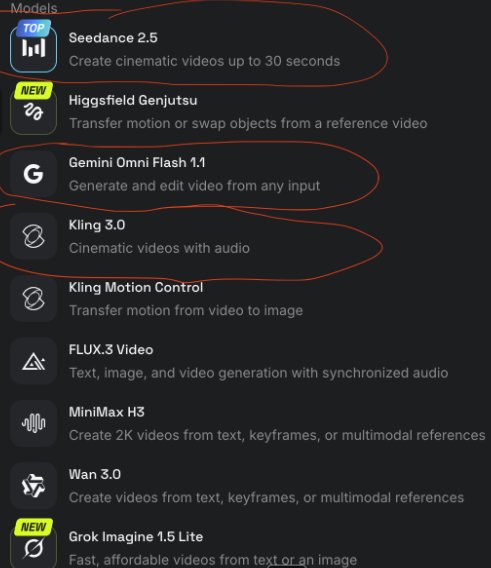
Based on hands-on use in this workflow, here is what each video model is best at:
Model
Best for
Seedance 2.5
The most robust, reliable output and the highest-quality AI UGC in testing. Also the most expensive. Supports clips up to 30 seconds.
Google Omni (Gemini Omni Flash on Higgsfield)
A very capable model that can challenge Seedance on quality, depending on the request and the reference images.
Kling 3.0
Still a quality option, and cheaper than Seedance, which makes it the pick for B-roll footage.
Seedance 2.5, Gemini Omni Flash and Kling 3.0 in Higgsfield’s model list: the three worth testing first.
Now give Claude this image-generation instruction:
Prompt 7 of 13: start images through the Higgsfield MCP
Use the Higgsfield MCP. Inspect the current image models and select one
that supports image references and the requested aspect ratio.

Use selected-frames.json and the approved shot list. Show the model,
reference mapping, prompts, and cost before starting a paid batch.
Upload local reference files through the supported upload flow;
do not pass a local filesystem path as a remote media URL.

Create candidate start images for my approved character. Use the
image prompt below, adapting it to each scene. Save job IDs and
completed asset references to assets.json, and show the images.

Wait for image selection before animating.
Prompt 7 points Claude at an image prompt. Here is a starter you can adapt to each scene:
Prompt 8 of 13: starter image prompt (example)
Create an original fictional adult for a [NICHE] video.
Use the supplied authorized reference for camera angle, framing,
lighting direction, and photographic texture only. Create a clearly
different identity, not a recognizable version of the reference person.

Vertical 9:16 smartphone frame. Presenter in their early thirties,
relaxed expression, ordinary lived-in kitchen, soft window light,
natural skin texture and unevenness, subtle camera noise.
Medium close-up, eye-level phone camera, natural hand position.
One simple personal accessory. A small visible lavalier microphone.

Retain detail in facial highlights. No beauty-filter smoothing,
glossy skin, studio glamour lighting, text, logos, or invented app UI.
For a multi-scene video, create a starting image for each generated shot from the approved character reference. Keep wardrobe, identity and recurring props consistent.
7. Animate a test take with Seedance 2.5 before you generate the batch
Seedance 2.5 supports clips up to 30 seconds (on Higgsfield, the maximum clip length depends on your plan). That gives you room to work, but you don’t have to put an entire video into one generation. (New to the model family? The Seedance creator playbook covers what it can do beyond talking heads.)
Another useful lesson from Kristian’s walkthrough: stabilize the scene direction and the performance before you swap in the rest of the dialogue. His demo used a different video model, but the production principle carries straight over to Seedance:
Specify whether the camera is static or handheld.
Describe the energy.
Write the exact dialogue being said.
State what should stay consistent.
Prompt 9 of 13: the Seedance 2.5 test take
Use Higgsfield MCP to inspect the current Seedance 2.5 schema.
Use the supported reference mode and map our approved image to the
appropriate starting-image role. Confirm duration, aspect ratio,
audio settings, reference limits, and cost from the live tool schema.

Generate ONE test take for [CREATIVE ID / SHOT ID] within my approved
budget. Use 9:16 and the approved start image. Choose a duration that
fits the actual dialogue; keep every generated clip within 30 seconds.

Poll the returned job until it completes or fails. Don't resubmit a
running job. Save its ID, settings, prompt, and final asset reference.
Show me the output before generating the remaining variations.
And here is an example of the animation prompt Seedance actually receives for that take:
Prompt 10 of 13: Seedance 2.5 animation prompt (example)
Static, locked-off smartphone shot matching the supplied start image.
The fictional adult presenter speaks directly to camera in a relaxed,
conversational way, with natural blinking and restrained hand movement.
Preserve the approved face, clothing, microphone, lighting, and room.

Exact dialogue:
"[INSERT DIALOGUE]"

Delivery: curious and practical, speaking to one friend. Slight emphasis
on "already." Natural pace with a short pause at the end.

No camera drift, added zooms, scene changes, music, captions, or new
objects. Natural lip movement. Clear speech appropriate to the visible
microphone, with subtle room ambience.
After the test generation, check three things:
Does the lip sync look believable?
Do the hands stay coherent?
Does the face change halfway through?
If it keeps falling apart, revisit the starting frame or simplify the action before you pay for more failed takes.
8. Finish the videos with real app footage (Claude Code video editing)
A generated clip isn’t a finished video yet. It may still need real app footage, cuts, captions and a clear ending.
Record the app doing exactly what the script promises, and use that recording in the edit. Never let an image model invent a beautiful interface your product doesn’t have.
Have Claude assemble the approved clips with a configured editor or a local FFmpeg workflow.
Review every export at phone size with the sound on.
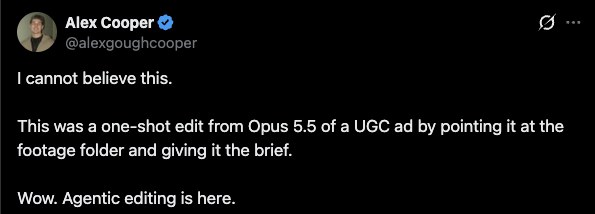
If you’d rather skip the editor, Claude Code is getting very good at editing UGC on its own. Alex Cooper shared an ad that Claude Opus 5.5 edited in one shot, just by being pointed at the footage folder and given the brief:
“Agentic editing is here”: a one-shot UGC ad edit from Claude Opus 5.5.The finished ad from that one-shot Claude Code edit. Press play with the sound on.
Try this video editor assembly prompt yourself:
Prompt 11 of 13: assemble and review the edits
Assemble the approved assets according to the timed shot list using
the available editing tool or a reproducible local FFmpeg workflow.
Tell me if a required editing capability is unavailable.

Use actual app recordings for all product UI. Match cuts to the spoken
script. Add checked captions in a readable style, leaving space for
platform UI. Export clean 9:16 MP4s without platform watermarks.

Keep the fixed sections identical across the hook-test variants.
Preserve voice/room continuity as far as possible; flag audible changes.
Do not assume separate generations will maintain the same voice.

Create final-review.html with playable exports, creative IDs, scripts,
changed variables, and approve/reject controls. Persist my decisions
to approved-videos.json. Flag artifacts, clipped dialogue, incorrect
product claims, and remaining edit problems. Do not publish.
9. Use Postiz to get the videos into the market
This is where the workflow needs a publishing system, and that is where Postiz comes in. Postiz is the social media scheduler built for AI agents: it turns approved exports into drafts and scheduled posts across every channel you’re testing, and your agent can drive the whole thing.
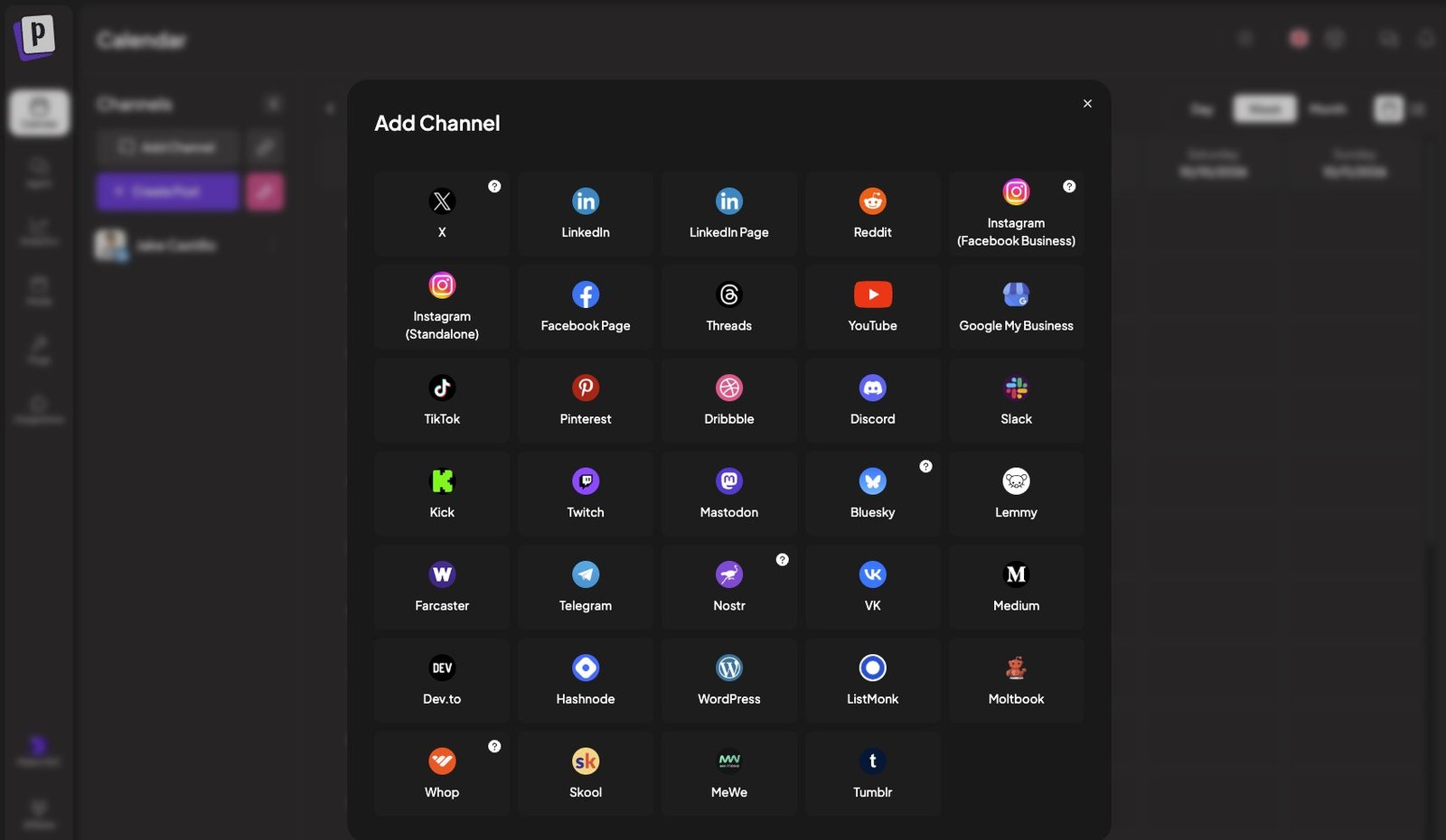
Connect the accounts you want to test. For AI UGC that usually means TikTok, Instagram, YouTube Shorts and your Facebook Page to start. Postiz supports more than 30 channels, so X, LinkedIn, Threads, Pinterest and the rest are there when you’re ready.
Connect TikTok, Instagram, YouTube and Facebook, plus 30+ other channels, from the Postiz Add Channel screen.
That upload step isn’t optional. Postiz only publishes media it hosts (TikTok, for example, only pulls video from verified domains), so every video goes through Postiz first and gets a verified URL.
Connect Postiz to Claude Code
Pick whichever interface your agent likes best. The Postiz MCP gives Claude tools to list your channels, read each platform’s posting rules, create drafts or scheduled posts, pull analytics, and even generate images and videos. You sign in to Postiz in the browser, so there is no API key to manage. The CLI and the agent skill do the same from the terminal, and the Postiz for Claude Code page has the full setup. (Prefer an API key? It lives under Settings → Developers → Public API.)
# Option A (recommended): the Postiz MCP server, with browser sign-in
claude mcp add --transport http postiz https://mcp.postiz.com/mcp-oauth-dynamic

# Option B: the Postiz CLI, plus the agent skill that teaches Claude to use it
npm install -g postiz
postiz auth:login
npx skills add gitroomhq/postiz-agent
Here is the CLI handoff for a single TikTok variant. Note video_made_with_ai: Postiz passes it to TikTok as the AI-generated content label, and brand_organic_toggle marks the post as promoting your own brand.
# 1. Upload the approved export and keep the Postiz-hosted URL
VIDEO=$(postiz upload exports/hook-a.mp4 | jq -r '.path')

# 2. Read TikTok's posting rules and settings before drafting
postiz integrations:settings <tiktok-integration-id>

# 3. Create a draft. Nothing publishes until you approve it.
postiz posts:create \
  -c "Caption for hook A" \
  -m "$VIDEO" \
  -s "2026-10-14T16:00:00Z" \
  -t draft \
  --settings '{"privacy_level":"PUBLIC_TO_EVERYONE","content_posting_method":"DIRECT_POST","duet":true,"stitch":true,"comment":true,"video_made_with_ai":true,"brand_organic_toggle":true,"brand_content_toggle":false}' \
  -i <tiktok-integration-id>

# 4. After review, move the draft into the publishing queue
postiz posts:status <post-id> --status schedule
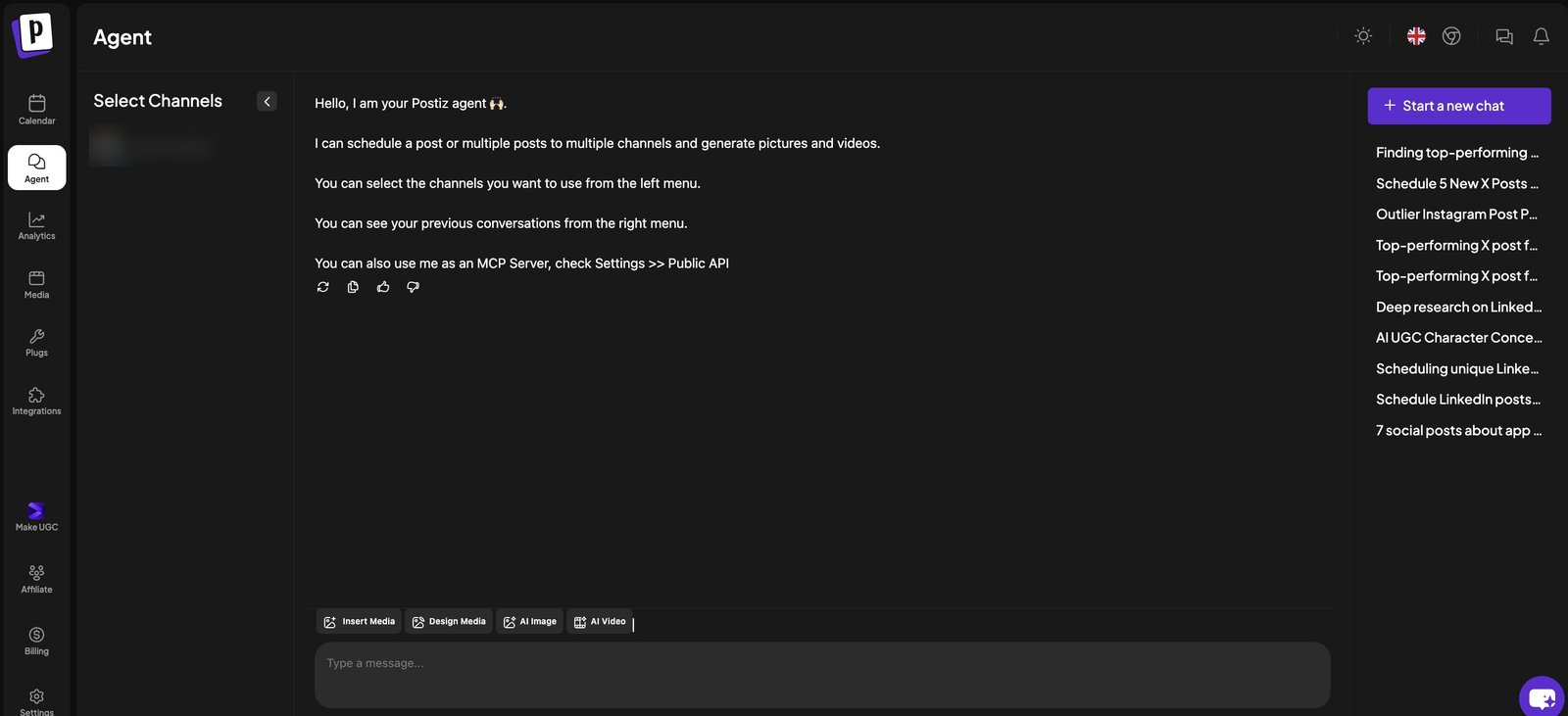
Postiz also has its own AI agent built in. Tell it you need help creating, scheduling or posting content, and it works through the content workflow with you. It can schedule posts to multiple channels, generate pictures and videos, and it doubles as an MCP server.
The Postiz agent schedules posts across channels, generates images and videos, and can also be used as an MCP server.
Here is the Postiz content draft prompt to run from Claude Code:
Prompt 12 of 13: draft every approved video in Postiz
Read approved-videos.json and test-matrix.csv. Use only approved exports.

List my connected Postiz channels. Retrieve the posting schema and
requirements for TikTok, Instagram Reels, YouTube, and Facebook Reels.
Flag missing or ineligible accounts and unsupported settings.

Upload each unique finished MP4 into Postiz, through the authenticated
CLI/API if needed. Use the returned Postiz media reference in drafts.
Use the configured CLI login or API secret environment. Keep
credentials out of this prompt, the HTML gallery, and the repository.

Prepare one draft per approved creative per eligible target platform.
Adapt captions/titles to each platform without changing the tested
hook or inventing claims. Include applicable commercial-content and
synthetic-media disclosures through supported settings and copy.

Propose dates and times in [TIME ZONE] within [DATE RANGE], preserving
comparable test conditions where practical. If required controls must
be set natively, flag the exact remaining action.

Save a publishing manifest: creative ID, file, Postiz media reference,
channel ID, platform, draft ID, caption, intended time, and status.
Check for existing IDs before creating anything to avoid duplicates.
Return the drafts for review. Do not schedule or publish yet.
Once the drafts and calendar look right, run this:
Prompt 13 of 13: schedule the approved drafts
Schedule only these approved Postiz draft IDs: [IDS].
Use the approved dates and [TIME ZONE]. Convert times correctly.
Preserve the approved media, captions, and platform settings.
Verify the resulting scheduled state and update the publishing manifest.
Report failed or blocked items. Do not create duplicate posts.
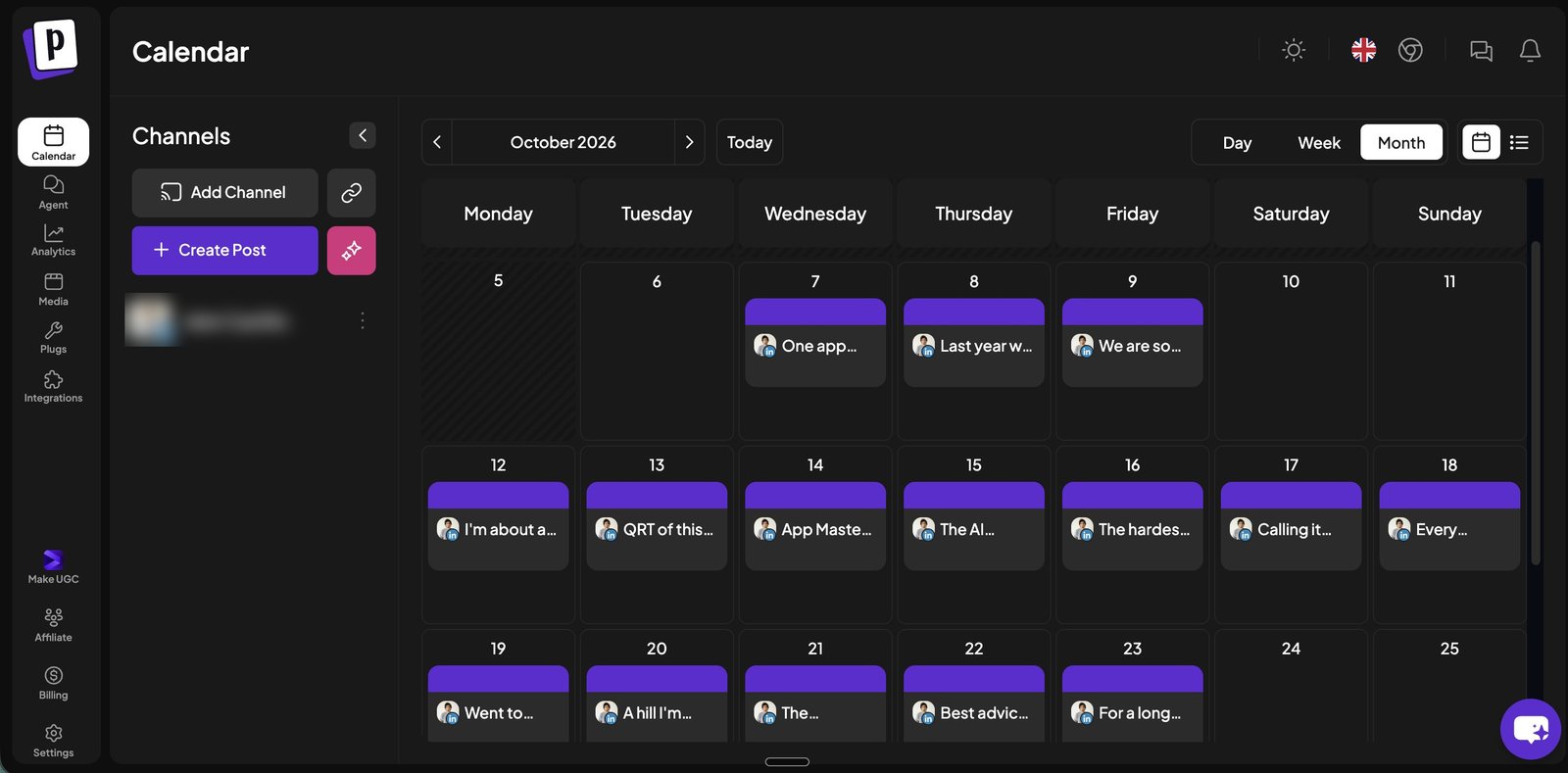
The Postiz calendar: every scheduled post in one view, ready to review before it goes live.
The Postiz MCP prepares drafts and schedules, and the CLI can promote a draft into the publishing queue. Now the batch has a home, and you can review it and track results from one dashboard.
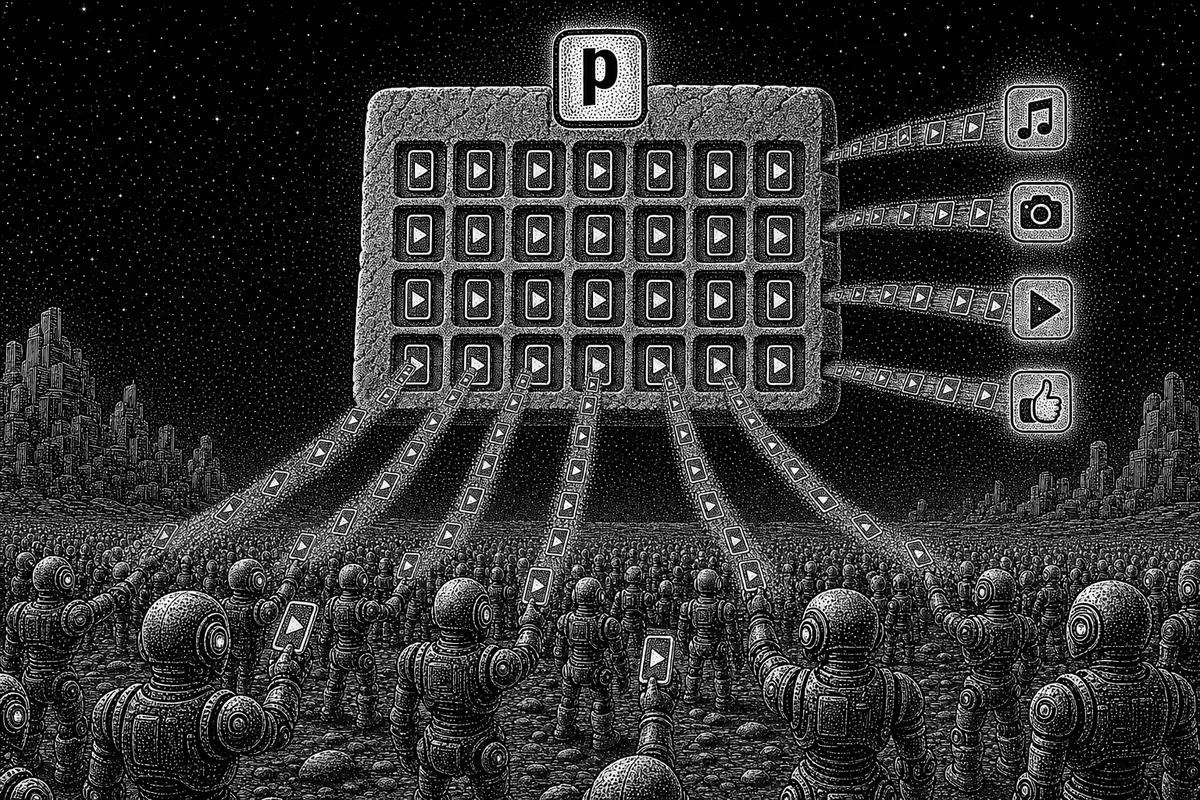
From AI UGC army to calendar to every platform: Postiz is the last mile of the workflow.
10. Let each platform tell you what to make next
Run the videos across the four channels (or however many you’re focusing on), then judge each platform separately. A weak TikTok result doesn’t erase a promising Instagram result, and a big Facebook view count doesn’t automatically mean the app is acquiring customers.
Use consistent observation windows, and compare against each account’s own history where you can. The questions that matter:
Did the opening earn attention?
Did people understand the product?
Did that attention lead to useful action?
Is the signal repeatable enough to spend real money on it?
Postiz exposes post-level and channel analytics through the same CLI, so Claude can pull the numbers back without a single screenshot:
Bonus prompt: read the results back with Postiz analytics
Read the publishing manifest. For every published post, pull post-level
analytics with "postiz analytics:post <post-id> -d 7" and each channel's
baseline with "postiz analytics:platform <integration-id> -d 30".
If a post returns {"missing": true}, list the candidates with
"postiz posts:missing <post-id>" and ask me which one to connect.

Build results.csv: creative ID, platform, hook variant, the metrics each
platform returns (views, likes, comments, shares where available), and
the ratio against that channel's recent median.
Compare variants only within the same platform and observation window.
Flag samples too small to judge.

Recommend which creative IDs earn a real-creator brief, which earn
another AI test, and which to drop. Don't schedule or publish anything.
Once a concept shows promise, give it to a real creator who already makes content your audience watches. Use AI as your testing ground to find winning angles, hooks and formats, then remake the top performers with real creators for the authenticity and trust only a real person brings.
Keep producing useful variations while the data shows they’re still performing.
The advantage of this workflow is how much you test and learn before you turn on ad spend. You’ve studied what the niche watches, chosen the formats yourself and tested original variations. Start with a few formats and a batch of content you can actually learn from. Then earn the right to scale it with paid ads.
The prompts above bake these rules in. Here they are in one place:
No fake testimonials. Never turn an AI presenter into a fake customer giving a fabricated review.
Only verified claims. Every claim and feature in a video must come from your app brief.
Real UI only. Every piece of product interface on screen is a real recording of your app.
Label synthetic media. TikTok, YouTube and Meta all have rules for disclosing realistic AI-generated content, and promotional posts can need a commercial-content disclosure too. In Postiz, TikTok posts can carry both the AI-generated label and the brand content toggles.
Keep credentials out of prompts. API keys belong in your CLI login or environment, never in prompts, HTML galleries or your repository.
FAQ
How do you make AI UGC videos?
Find outlier videos in your niche, generate a believable start frame of an original presenter, animate one test take with a model like Seedance 2.5, add real app footage and captions, then publish the variants and scale only what the data proves. The 13 prompts above run each of those steps from Claude Code.
Is AI UGC legal?
In most markets, yes, as long as you follow advertising rules and platform policies: label realistic AI-generated content where the platform requires it, disclose paid or promotional content, never present an AI presenter as a real customer, and only make claims your product can back up. In the US, the FTC’s rule on fake reviews and testimonials bans testimonials that “misrepresent that they are by someone who does not exist, such as AI-generated fake reviews”, so an AI presenter can demo your app but can’t pose as a customer. This isn’t legal advice, so check the rules for your market and category.
Does Higgsfield have an MCP?
Yes. Higgsfield’s hosted MCP server lives at https://mcp.higgsfield.ai/mcp and works with Claude, ChatGPT, Cursor and other MCP-compatible clients. In Claude Code, add it with claude mcp add --transport http higgsfield https://mcp.higgsfield.ai/mcp or use the Higgsfield CLI. You sign in through your browser, with no API key.
Can you use the Higgsfield MCP for free?
No. Connecting it doesn’t need an API key, but the MCP requires an active paid Higgsfield subscription, and every image or video your agent generates through it uses credits. Higgsfield’s unlimited models and free generations only apply on higgsfield.ai itself, so budget credits even on an unlimited plan (as of October 2026).
Which AI video model is best for AI UGC?
In this workflow’s testing, Seedance 2.5 gave the most reliable, highest-quality AI UGC and supports clips up to 30 seconds, but it is also the most expensive. Google Omni can match it depending on the request and the reference images, and Kling 3.0 is a cheaper option that works well for B-roll.
Can Claude Code edit UGC videos?
Yes. Point Claude Code at a footage folder with a brief and it can assemble generated clips, real app recordings and captions with FFmpeg or a configured editor. Claude Opus 5.5 has already produced a one-shot UGC ad edit this way. Always review the exports at phone size with the sound on before anything is scheduled.
Where can I auto-publish AI UGC on a schedule?
With Postiz. Upload each approved export to Postiz, create one draft per platform with the right settings, then schedule from the Postiz calendar, the built-in AI agent, or straight from Claude Code through the Postiz MCP or CLI. Postiz then tracks each post’s analytics so you can compare variants platform by platform.
Give your AI UGC army somewhere to publish
Everything before step 9 is creative work, and the creative calls should stay with you. The last mile is different. Once the videos are approved, someone has to upload, caption, schedule and track every variant on every platform, and that part is worth handing to an agent completely.
Try Postiz for free, connect TikTok, Instagram, YouTube and Facebook, plug it into Claude Code with the MCP or CLI, and let your agent fill next week’s test calendar while you approve it.
Credit: this workflow was originally shared on X by Jake Castillo, co-founder and COO of Cal AI (acquired by MyFitnessPal), who ran UGC and influencer marketing on Cal AI’s way to a $50M run rate. Jake writes about AI and scaling consumer apps in his free newsletter, Operator’s Notebook.
Tired of marketing chaos? Discover how marketing workflow management software streamlines tasks, boosts team productivity, and delivers measurable results.
Level up your feed with our ultimate guide to witty captions for photos. Discover 8 actionable caption types, examples, and tips to boost engagement today.