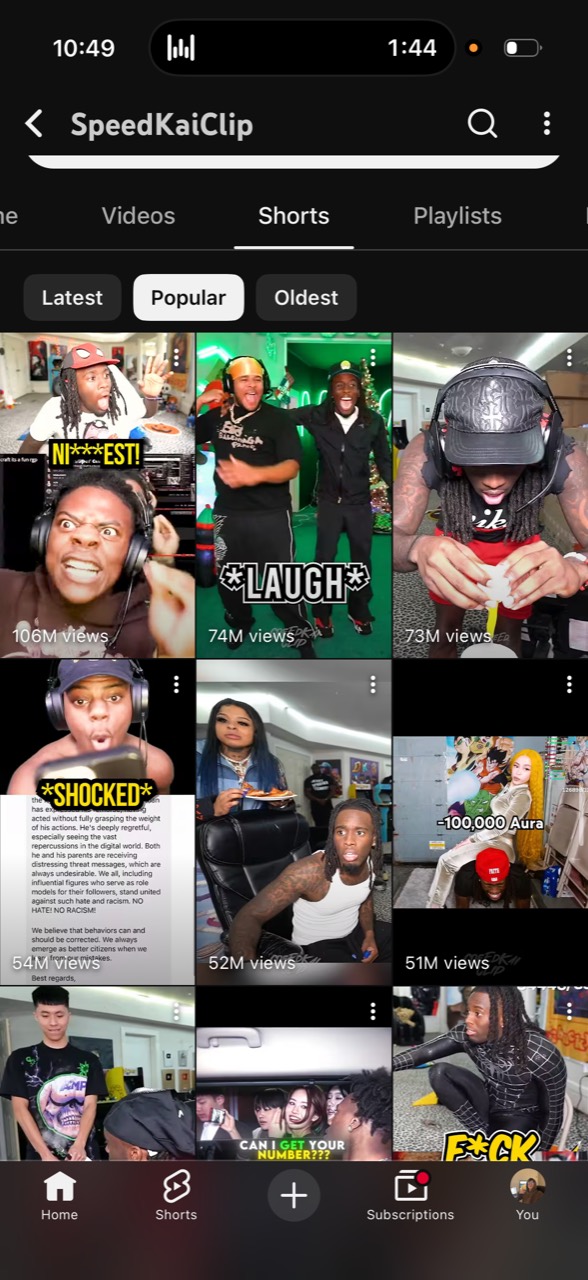
Six YouTube Shorts on the SpeedKaiClip channel have 410 million views between them. The channel has 1.2 million subscribers and more than 1,100 uploads, and the person running it has never needed to be on camera. Vadim Strizheus, who writes about AI agents on X, estimates the channel earns over $120,000 a month from clips of other people’s streams. That number is his estimate, not a published figure, but the view counts are public and you can check them yourself.
You can run the same kind of faceless YouTube channel for Shorts and Facebook Reels with one Grok Bot doing the operations work and Postiz doing the clipping and publishing. Vadim’s original guide used a separate clipping tool and then handed the finished files to Postiz. Postiz now clips long videos itself, so the whole loop, from YouTube link to scheduled Short, runs through a single account. This article is his playbook, updated for that stack.
The Popular tab on SpeedKaiClip. Six clips, 410 million views, more than 1,100 attempts behind them.
What is a faceless YouTube clipping channel?
A faceless YouTube clipping channel takes long-form footage from streamers, podcasters, or interview shows and republishes the best 20 to 60 seconds as vertical Shorts, usually with burned-in captions. The operator never appears on screen. Revenue comes from the YouTube Partner Program, affiliate offers, sponsors, or paid clipping work for the original creator.
Every one of those uploads has to be clipped, reframed, captioned, titled, uploaded, and scheduled. A week later, somebody has to check which posts were worth repeating. SpeedKaiClip has run that loop more than 1,100 times. At that volume, the channel stops being a creative project and becomes an operations job, and operations jobs are exactly what AI agents are good at.
The stack: one Grok Bot, one Postiz account
Vadim’s version of this setup ran three tools: Grok Bot for the workflow, a standalone clipping app for the video work, and Postiz for scheduling. Since Postiz added AI video clipping, the middle tool is gone. Here is who does what now.
Job
Handled by
Choosing the source video, running the daily routine, writing titles, asking for approval
Grok Bot (a Bot named Clip Operator)
Turning a YouTube link into vertical 9:16 clips with captions
Postiz clipping
Saving the clips, creating draft posts, filling the calendar
Postiz media library and calendar
Reporting which clips pulled views before the next batch
Postiz analytics, read by the Bot
Approving what gets published
You
Grok Bot is the always-on agent product from xAI and Cursor. All of your Bots share one persistent cloud computer, while each Bot keeps its own conversation and screen. That computer holds the files, logged-in browser sessions, and connected tools the operator needs, so once the workflow becomes a routine it keeps running in the background while your laptop is closed.
You will create one Bot called Clip Operator and give it the whole loop. You only step in to choose the source and approve what gets published.
Manage all your social media in one place with Postiz
The first six Shorts on SpeedKaiClip’s Popular page have 106M, 74M, 73M, 54M, 52M, and 51M views. That is 410M views from six clips, and those six sit on top of more than 1,100 attempts. The streaming and gaming niche keeps producing hits because the source creators go live for hours every day, so there is always new footage with a reaction in it.
Start with one creator or one tight niche that already produces hours of long-form footage every week. Streams, podcasts, interviews, and live shows all work because another source video is always waiting. A channel becomes much harder to operate when the Bot has to hunt for a different person every morning.
Before clipping anything, open the Popular tab on a few channels in your target niche. Note which people and topics keep returning, then watch how quickly each clip gets to its moment. For the first batch, lock in one caption style and one framing choice. You need a consistent baseline before the view counts can tell you whether the source and clip choices are working.
2. Give one Bot the operation
Clip Operator has one job: take a long source video and move it all the way to reviewed drafts for YouTube Shorts and Facebook Reels. It sends the YouTube link to Postiz clipping, waits for the job to finish, reads the clips back, writes or edits the titles, and leaves every approved clip as a draft on the right channels.
Each Grok Bot keeps its own conversation and job. Clip Operator gets the clipping loop and nothing else.
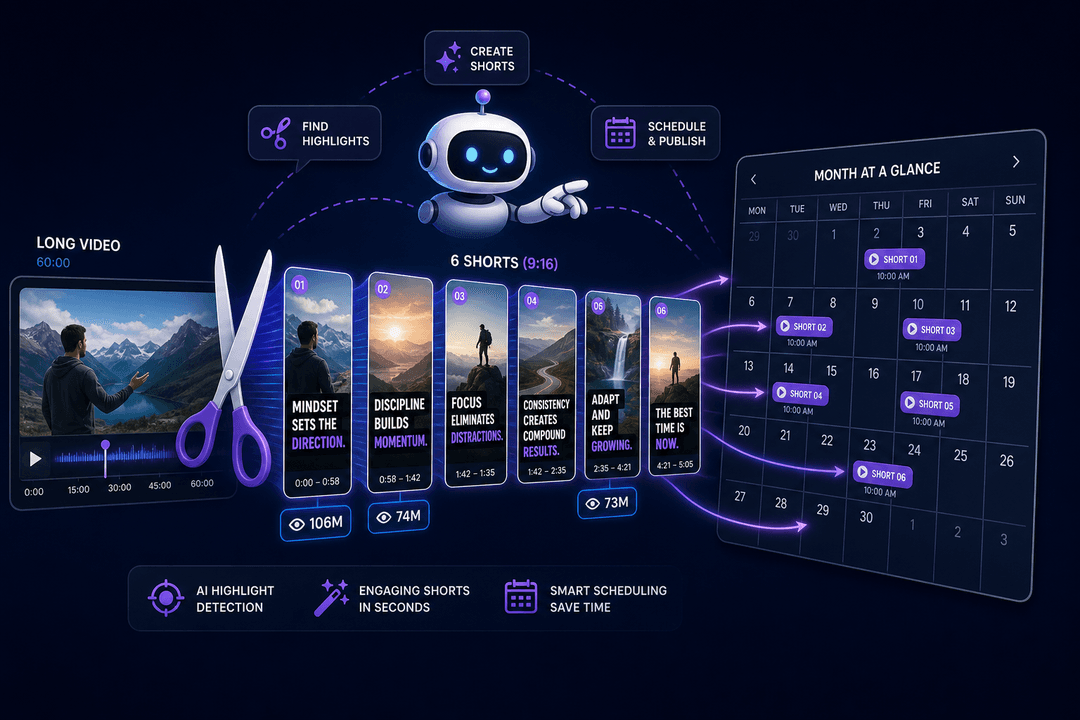
The Postiz tools cover every step after the source is chosen. Clipping picks the strongest moments automatically, renders them vertical, burns in captions, saves them to the media library, and creates a draft post for each clip on each channel you name. The same connection lets the Bot read the calendar, move posts, and pull analytics for the weekly review. One connector, no file handoffs between apps.
3. Connect Postiz to Grok Bot
Connect your YouTube and Facebook accounts inside Postiz first. Each platform authorizes through its own OAuth screen, and the Bot never sees those logins. It only gets access to Postiz.
Grok Bot can reach Postiz two ways. The official Postiz plugin installs the Postiz CLI and skill on the Bot’s cloud computer for posting and scheduling. The Postiz MCP server adds the clipping and media generation tools on top. For this workflow you want the MCP, because clipping is the whole point. Send Clip Operator this:
Install this MCP: https://mcp.postiz.com/mcp-oauth-dynamic
Grok Bot will add Postiz as a custom connector and show an Authorize card. Click Authorize, sign in to Postiz in the browser tab that opens, and approve the connection. When the browser says the authorization is complete, go back to Grok Bot. Postiz should now appear as a connected tool. Ask Clip Operator to list the tools it received before you move on. You should see clipping, upload, scheduling, calendar, and analytics tools in the list.
If you would rather use an API key, open Settings in Postiz, go to Developers, open Public API, and create a key. Then send the Bot this:
Add the Postiz plugin with /add-plugin postiz. You are running inside a VM, so skip the browser login. Open a secure input and ask me to paste my Postiz API key there as the POSTIZ_API_KEY secret. Never ask me to paste the key into chat. Once it is saved, list my connected YouTube and Facebook accounts. Do not upload or schedule anything yet.
Grok Bot shows a private input for the key. Paste it there, not in the chat. When the correct account names come back, Postiz is connected.
4. Teach the process once
Run one complete batch before creating a routine. The first job is where you correct the clip choices, caption style, framing, and posting times. It is also where you catch anything the Bot misunderstood about the channel. Send Clip Operator a brief like this:
You are running a faceless clipping channel for [CREATOR OR NICHE].

Use this long video: [LINK]

Send it to Postiz clipping. Ask for six clips and use the "blur" fit so the whole picture stays visible. Wait for the clipping job to finish, then read the clips back with their titles and captions.

Keep the six that make sense without the full video. Rewrite any title that only works if you saw the whole stream.

Postiz has already created a draft post for each clip on my YouTube and Facebook channels. Do not schedule any of them. Show me the account, clip, title, caption, and a proposed posting time for each one, and wait for my approval.
Two details in that brief matter. First, the fit. Postiz clipping asks how a horizontal video should fill a vertical frame: blur keeps the whole picture over a blurred copy of itself, while crop fills the frame with the centre of the picture and cuts the sides away. Crop looks cleaner, but there is no face tracking, so a streamer sitting off-centre gets cut out. Start with blur, then switch to crop once you know the source keeps the speaker in the middle.
Second, the drafts. Postiz creates a draft for every clip on every channel you pass. Nothing is scheduled or published until you say so, which is what makes it safe to hand the loop to a Bot.
Review that first batch like work from a new editor. Fix any clip that starts too late or needs too much context. Keep the posts in draft until the six clips look like they belong on the same page. Once the run is right, ask the Bot to save it:
Save the process we just completed as a skill called Faceless Channel Operator.

Include the Postiz clipping step with the blur fit, how many clips to request, my title and caption rules, the duplicate check against the existing calendar, and the final review step where I approve before anything is scheduled.
A skill stores the repeatable instructions. A routine decides when the skill runs. Test the saved skill once more on a second video, then give the Bot this routine:
Every day at 8:00 AM, run the Faceless Channel Operator skill.

Keep two posts per day scheduled on YouTube Shorts and Facebook Reels, never reuse the same moment, and keep the next 14 days full.

Every Friday, use the Postiz analytics tools to report which clips received the most views before choosing the next source video.
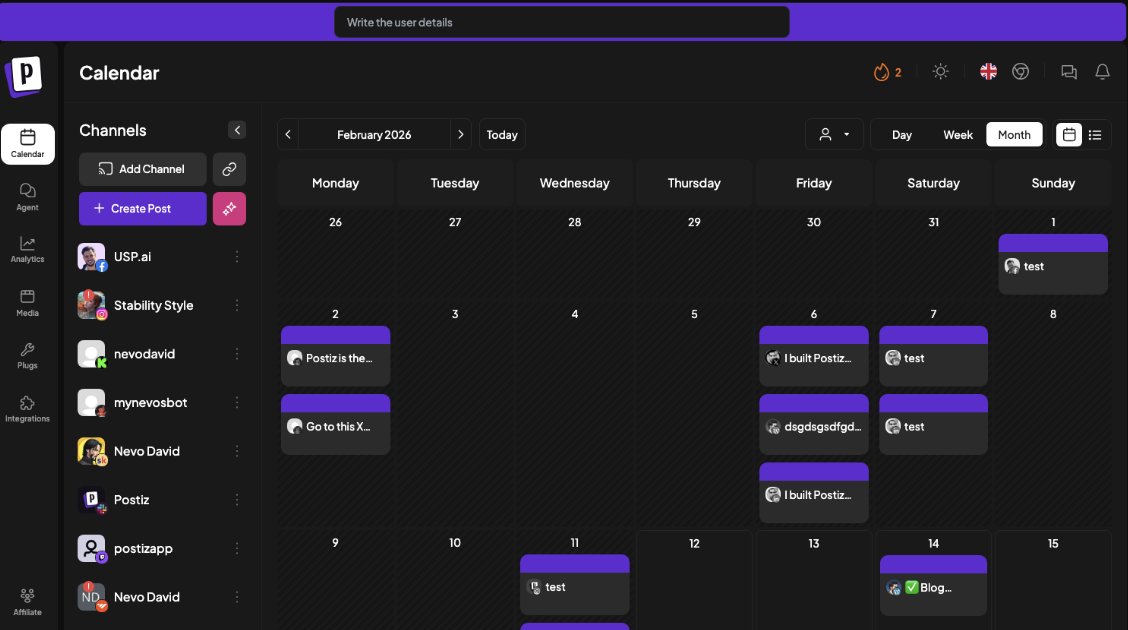
The Postiz calendar is what the Bot fills and what you check. Every clip lands here as a draft first.
Run the routine’s test once. After that, Grok Bot keeps the work moving from its cloud computer even when your laptop is closed, and you get a batch of drafts to approve each morning.
5. Build the first 30 posts
Have Clip Operator make 30 posts for the first channel. At two posts per day, that gives you 15 days of scheduled content and enough footage to compare more than one or two lucky uploads. A single Postiz clipping run returns up to 10 clips, so 30 posts is three to five source videos.
Keep every post in draft until the first batch establishes the look of the page. Every clip should work for somebody who has no idea what happened five minutes earlier. The opening needs to make sense immediately, even when the source came from a four-hour stream. Look for moments with an obvious reaction, a strong opinion, or a question that makes the viewer wait for the answer.
After seven days, ask the Bot to pull Postiz analytics and check which person keeps pulling views and which openings stop the scroll. Add those observations to the skill before the next batch.
Change one variable at a time. If the source, the fit, the clip length, the opening, and the posting time all change together, the numbers will not tell you what caused the improvement. Once a format starts working, keep the 14-day buffer full. SpeedKaiClip’s six biggest Shorts reached 410M views because the channel created more than 1,100 chances for those six to happen.
6. Make the $21,534/month target real
A view count is not income. Your $21,534/month target needs a clear way for attention to turn into money, and the channel can earn through platform revenue, an affiliate offer, a sponsor, a product, or paid clipping work for the original creator. Choose one path before trying to scale a second page. Most channels that stall have views and no offer.
Once the first channel repeatedly pulls views and has a way to monetize them, duplicate the Bot and give the copy a new source with new connected accounts. A duplicated Bot keeps its profile, settings, enabled skills, and routines. It does not inherit the old conversation or learned memory, so the second operator starts with the working system without carrying over the first channel’s context. On the Postiz side, add the new channels to the same workspace or split them into a customer group so each Bot only sees its own accounts.
How Postiz clipping works
Postiz clipping takes a YouTube URL, picks the strongest moments automatically, renders each one as a vertical 9:16 clip with burned-in captions, and saves the results to your media library. If you pass channel IDs, it also creates a draft post for every clip on every channel. Nothing is scheduled or published by the clipping step itself.
Clipping uses the minutes included in your plan: one minute for every minute of the source video, refunded if a job fails. A job takes several minutes, so the Bot starts it, gets a clipping ID back, and checks the status until the clips are ready. You can also run the same clipping from the Postiz dashboard without an agent.
Postiz plan
Price per month
Channels
AI clipping minutes per month
Standard
$29
5
60
Team
$39
10
120
Pro
$49
30
300
Ultimate
$99
100
600
Every plan has unlimited posts and a 7-day free trial. Check the Postiz pricing page for the current limits, because the clipping minutes decide how many hours of source footage you can process each month. A two-hour stream costs 120 minutes, so a channel clipping one stream a week fits the Pro plan.
Frequently asked questions
Do I need Grok Bot to run this setup?
No. Grok Bot is convenient because routines run on its cloud computer while you are away. Any agent that can call an MCP server, including Claude, ChatGPT, Cursor, and Gemini CLI, gets the same Postiz clipping and scheduling tools from the Postiz MCP. You can also run clipping by hand from the Postiz dashboard.
Does Postiz replace a separate clipping tool?
For this workflow, yes. Postiz clipping picks the moments, renders vertical clips with captions, stores them, and creates the draft posts, so there is no download and re-upload step between apps. If you already have clips from another tool, the Bot can upload those MP4s to Postiz and schedule them the same way.
Should I choose blur or crop?
Start with blur. It keeps the whole horizontal frame visible over a blurred background and never cuts a speaker out. Crop fills the vertical frame with the centre of the picture and looks more native, but there is no face tracking, so use it only when the source keeps the subject in the middle.
Why leave every clip as a draft?
Because a clip pulled from a four-hour stream can start too late, carry a title that needs context, or duplicate a moment you already posted. Drafts let the Bot do all the work and let you do a two-minute review before anything reaches your channels.
How many clipping minutes do I need?
Add up the length of the source videos you plan to clip each month. One 90-minute stream a week is roughly 360 minutes, which fits the Ultimate plan. Two 30-minute podcasts a week is about 240 minutes, which fits Pro. Minutes are only charged for jobs that complete.
Start with one video
Download Grok Bot and create Clip Operator. Connect your YouTube and Facebook accounts in Postiz, then tell the Bot to install the Postiz MCP.
Give it one long video and keep the first six clips in draft while you correct the process. Once the batch is right, tell Clip Operator to fill the next seven days in Postiz.
Start your free Postiz trial, connect your channels, and give the Bot somewhere to put the first batch. The trial takes about five minutes to set up, and the first clipping job runs while you write the brief.
A breakdown of the Claude Code + Claude Skills workflow that replaces a social media team — and how to close the loop with a publishing layer that actually ships posts.