One WhatsApp chat, one quit-drinking app and a TikTok account opened the same week. For 24 hours, an app marketer handed most of the organic marketing workflow to the Meta Muse AI agent and ran it the way you would run a new hire: by texting it.
There was no dashboard to learn and no stack of separate AI tools. Muse researched what was already working on TikTok, rebuilt one proven format around the app, produced the slideshows, wrote variations and lined everything up in a Postiz publishing calendar. A human kept the final say on every creative decision. The posts that came out of that single chat passed 1.1M views within a week.
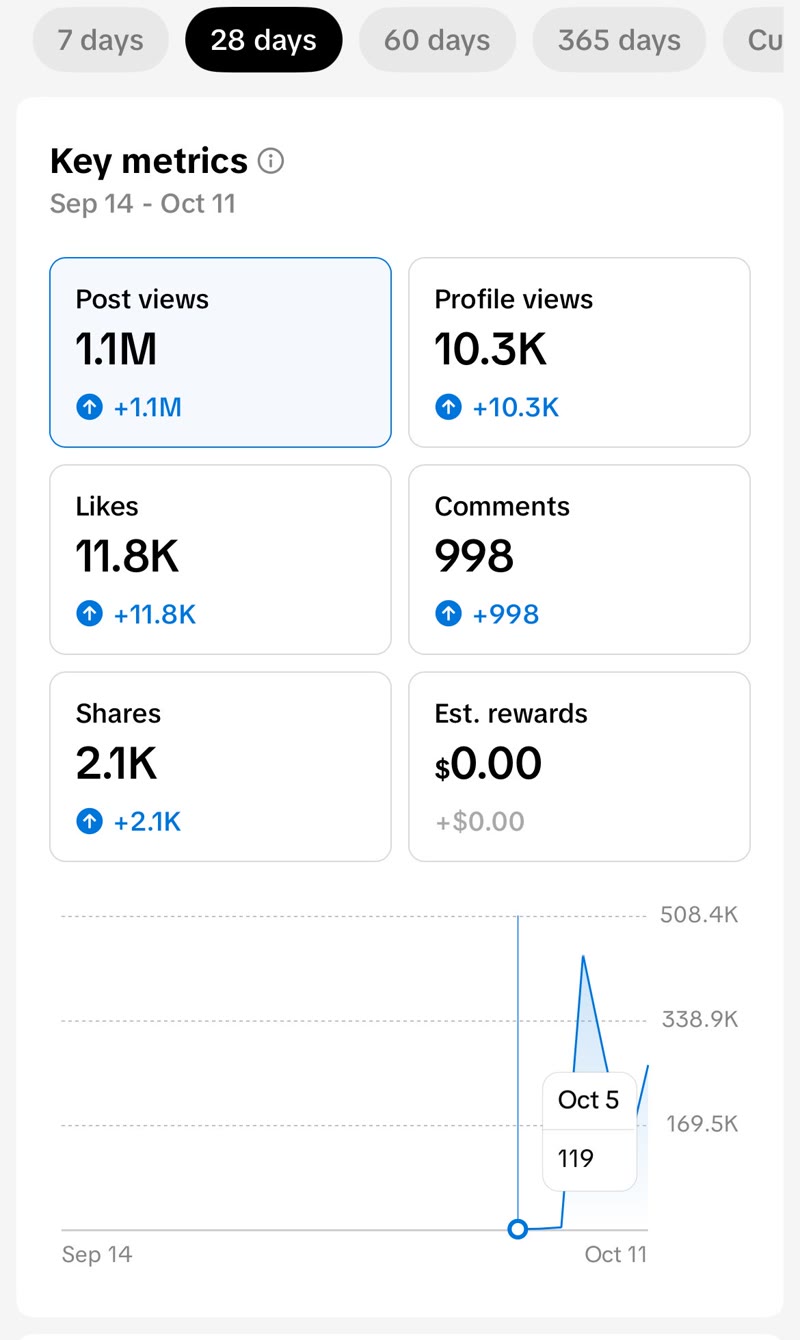
TikTok analytics for the account from September 14 to October 11: flat until the first posts went out on October 5, then 1.1M post views.
The account had nothing going for it. It was created for the experiment, so there were no followers, no back catalog and no earlier hit to ride. In its first week of posting it collected:
1.1M post views
10.3K profile views
11.8K likes
998 comments
2.1K shares
This guide walks through the workflow step by step: the Meta Muse prompts that went in (rewritten as reusable templates), what came back, what still got fixed by hand, and how the finished slideshows reached a Postiz calendar instead of sitting on a phone. It also covers how to connect Muse to Postiz so you can run the same loop yourself.
Key takeaways
One thread, whole workflow. Muse handled research, concepts, slide production, variations and scheduling inside a single WhatsApp conversation, while a human made every creative call.
Research beats ideas. Muse was asked for 10 real posts that were already performing, plus why each one worked, not for a list of viral ideas.
Borrow the mechanism, not the topic. The winning concept put the app on slide 2 as a phone notification inside the story, never on slide 1.
Variations are the multiplier. One approved concept became several posts by changing the scenario and keeping the curiosity structure.
Postiz is the last mile. Muse spread the posts across the week, two a day at most, and the calendar got a final human review before anything went live.
What is Meta Muse?
Meta Muse (also called Muse AI) is the personal AI agent Meta launched on September 8, 2026. Instead of only answering questions, Muse carries out tasks, such as researching, drafting, booking and buying, through connectors to the apps you already use. It runs in its own iOS and Android apps, on the web at muse.ai and inside WhatsApp, powered by Meta’s Muse Spark model.
Two things make it interesting for marketing work. The first is the interface. On WhatsApp, you can brief Muse in short messages throughout the day, the way you would brief a freelancer, and it keeps the context of the whole thread. The second is its approval model: according to a Reuters report, Meta says Muse will not publish content, send messages or make purchases without the user’s approval. That is exactly the split this experiment used. The agent prepares, the human signs off.
Muse has a free tier, plus Power ($20 a month) and Maximum ($100 a month) plans for heavier use, according to The Neuron’s setup guide. What it does not have, as of October 2026, is a TikTok connector. Its connector directory covers services such as Gmail, Google Calendar, Instagram, Threads and Facebook. The small-business version Meta announced in late September adds tools like Shopify, Canva, Notion and Meta ad accounts. Publishing to TikTok, or to most networks outside Meta’s own, needs a custom connector. That gap is where Postiz enters the workflow in step 6. For the bigger picture, see our guide to Meta Muse AI connectors.
Manage all your social media in one place with Postiz
The setup: one WhatsApp chat, a sobriety app and a brand-new account
The app in this experiment helps people drink less or quit entirely. Its app marketing strategy runs on organic short-form content, mostly TikTok, and the formats that work are photo slideshows and UGC-style posts that do not look like ads: emotional, curiosity-driven stories built around conversations, messages and moments viewers recognize instantly.
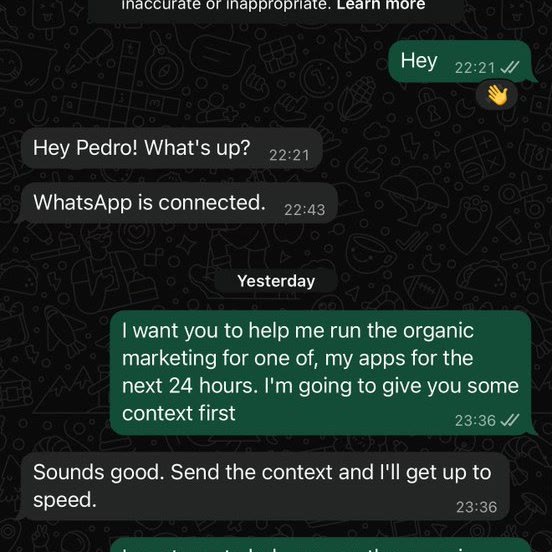
The unusual part was the interface. Muse works as a WhatsApp AI agent: it sat in the chat list like any other contact, so working with it felt less like operating software and more like messaging a colleague. Instead of opening an AI tool and composing one long, formal prompt, the marketer opened the chat with one plain request: help run the organic marketing for one app over the next 24 hours, with context to follow.
The first message to Muse on WhatsApp: no mega-prompt, just the job and a promise of context.
That choice mattered more than it seems. The plan was to teach Muse how the marketer works once, build the context up gradually over the day, and keep every later instruction short. If you have ever pasted the same background paragraph into ten different AI prompts, you know why that is appealing.
Step 1: Onboard Muse like a new marketing hire
The most common way to use AI for content is to ask for twenty viral TikTok ideas and then wonder why they are bland. Generic input gets generic output. If the model knows nothing about your product, your customer or the content that already works for you, it can only guess.
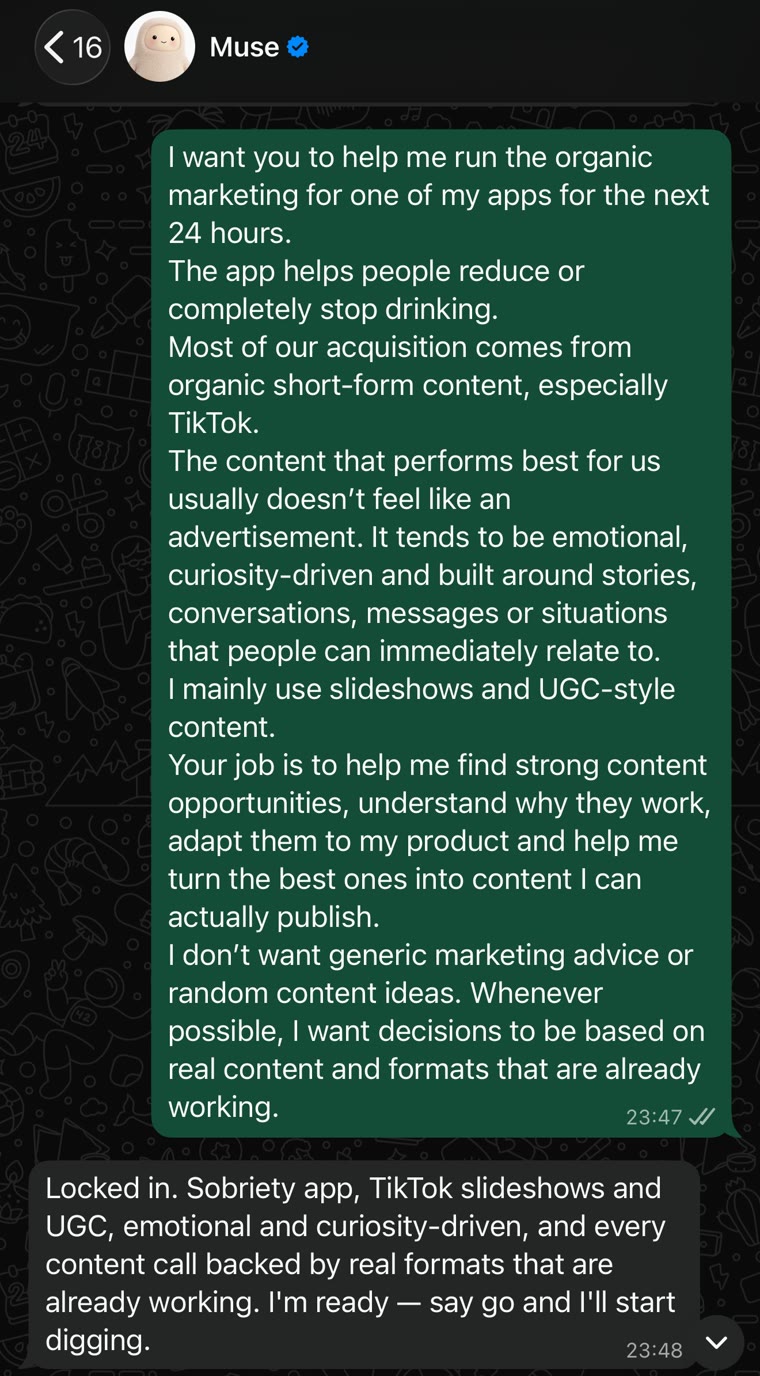
So before asking for anything, the marketer gave Muse the orientation a new team member would get on day one. A brief along these lines does the job:
For the next 24 hours, you're helping me run organic marketing for one of my apps.

Product: an app that helps people drink less or quit completely.
Growth channel: organic short-form content, mostly TikTok.
What performs: posts that don't feel like ads. Emotional, curiosity-led stories built on conversations, messages and situations people recognize right away.
Formats: photo slideshows and UGC-style posts.

Your job: find strong content opportunities, explain why they work, adapt them to the product and help me turn the best ones into posts I can publish.

Rules:
- No generic marketing advice and no random ideas. Base every decision on real posts and formats that are already working.
- Don't force the app into every post.
- If a concept reads like an ad, drop it.
- You do the research and the preparation. I make the final creative calls.
The last rule carries the most weight. Finding opportunities, collecting references, explaining why something works, drafting variations and keeping it all organized are worth delegating. Deciding whether a post feels native enough to publish is not. Muse replied by summarizing the brief in one line and asking for the go-ahead to start digging.
The onboarding brief went in once. Every instruction after it could stay short.
Step 2: Ask Muse for research, not TikTok content ideas
For most apps, finding the right idea takes longer than making the post. There are thousands of videos you could make and only a handful worth testing. So the first real assignment was research, framed so Muse could not simply make things up:
Research content opportunities for this app.

Find 10 real short-form posts that are performing well in this niche or a neighboring one. Don't stop at other quit-drinking apps: look at relationships, personal stories, text-message stories, confessions, transformations, health and habits, anywhere the format could realistically work for this product.

For each post, send me:
- a link to the original
- the hook
- the format
- what happens in the first seconds or on the first slide
- where the curiosity comes from
- why people keep watching or swiping
- how you'd adapt the idea to our app without copying it

Five strong opportunities beat fifty generic ones.
Two choices in that request do most of the work. The first is the volume cap: asking for fewer, better-evidenced opportunities stops the agent from padding the list. The second is looking outside the niche. Some of the strongest concepts for a sobriety app come from accounts that have nothing to do with sobriety. A relationship slideshow can become a wellness post, and a text-message story can become the hook for a habit app. The topic is not what you borrow. The mechanism is.
That means asking four questions of every reference:
Why did someone stop scrolling?
Why did they need to see the second slide?
What did the hook deliberately leave out?
Where was the payoff?
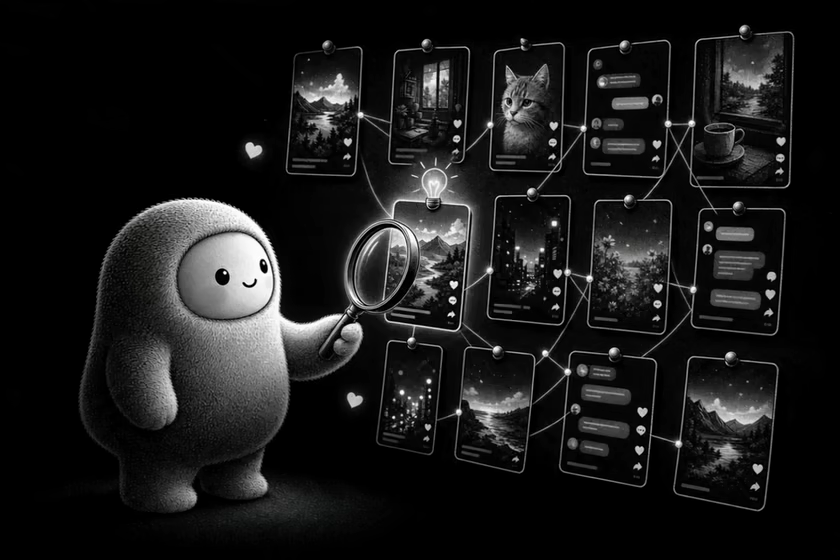
Research first: the agent hunts for the mechanism behind a post, not its topic. (Illustration animated with Seedance 2.5.)
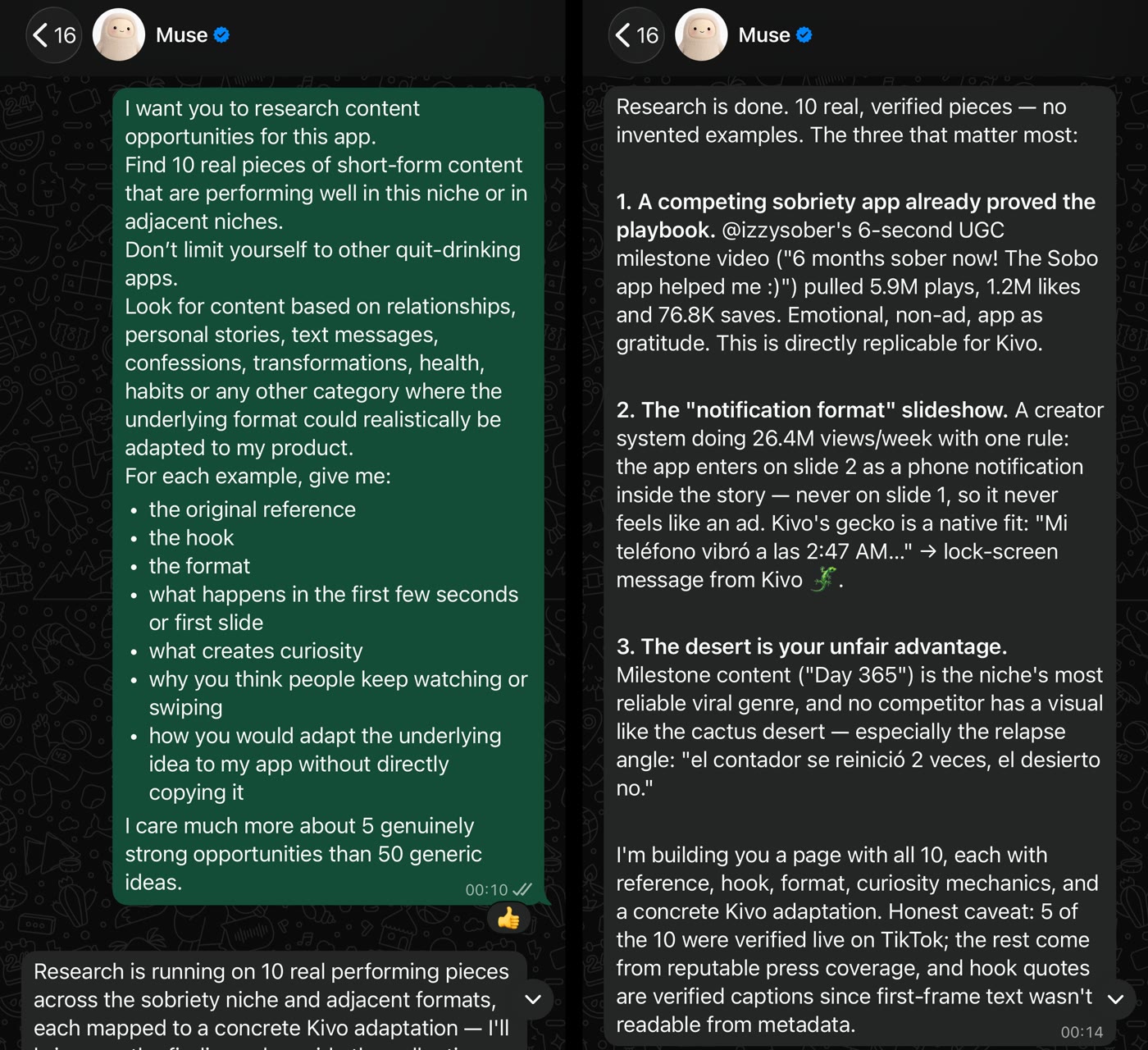
Muse came back with ten references and was upfront about its sourcing: five were verified live on TikTok, and the rest came from press coverage. Ask any research agent for that kind of caveat. The three it ranked highest:
A competitor’s milestone video. A rival sobriety app’s six-second UGC clip, a user celebrating six months sober and thanking the app, had pulled 5.9M plays, 1.2M likes and 76.8K saves. Emotional, not an ad, with the app showing up as gratitude.
The notification-format slideshow. A creator system doing 26.4M views a week on one rule: the app enters on slide 2 as a phone notification inside the story, never on slide 1, so the post never reads like an ad. We broke that system down in our guide to AI UGC TikTok slideshows.
Milestone and relapse stories. “Day 365” posts are among the most dependable viral formats in the sobriety niche, and the app’s distinctive visuals gave it an angle competitors could not copy.
Left: the research request. Right: Muse’s top three findings, with a note that only five of the ten references were verified live on TikTok.
That is where the human part started. The pick was not the reference with the most views. It was the one with the clearest path from the original mechanism to this app, while keeping the final post natural.
Step 3: Rebuild one proven mechanism around your app
The marketer chose opportunity #2, the notification format, and sent it back with a clear instruction: keep the reason it works and replace everything else.
Let's work with opportunity #2.

Keep the reason the original works, but write a completely new story around our app. It should feel native to TikTok, not like an ad.

Send me:
- the exact hook for slide 1
- the number of slides
- what's on screen in each slide
- the text for each slide
- how the story progresses
- where the app appears
- why someone keeps swiping

Keep it simple enough to produce today.
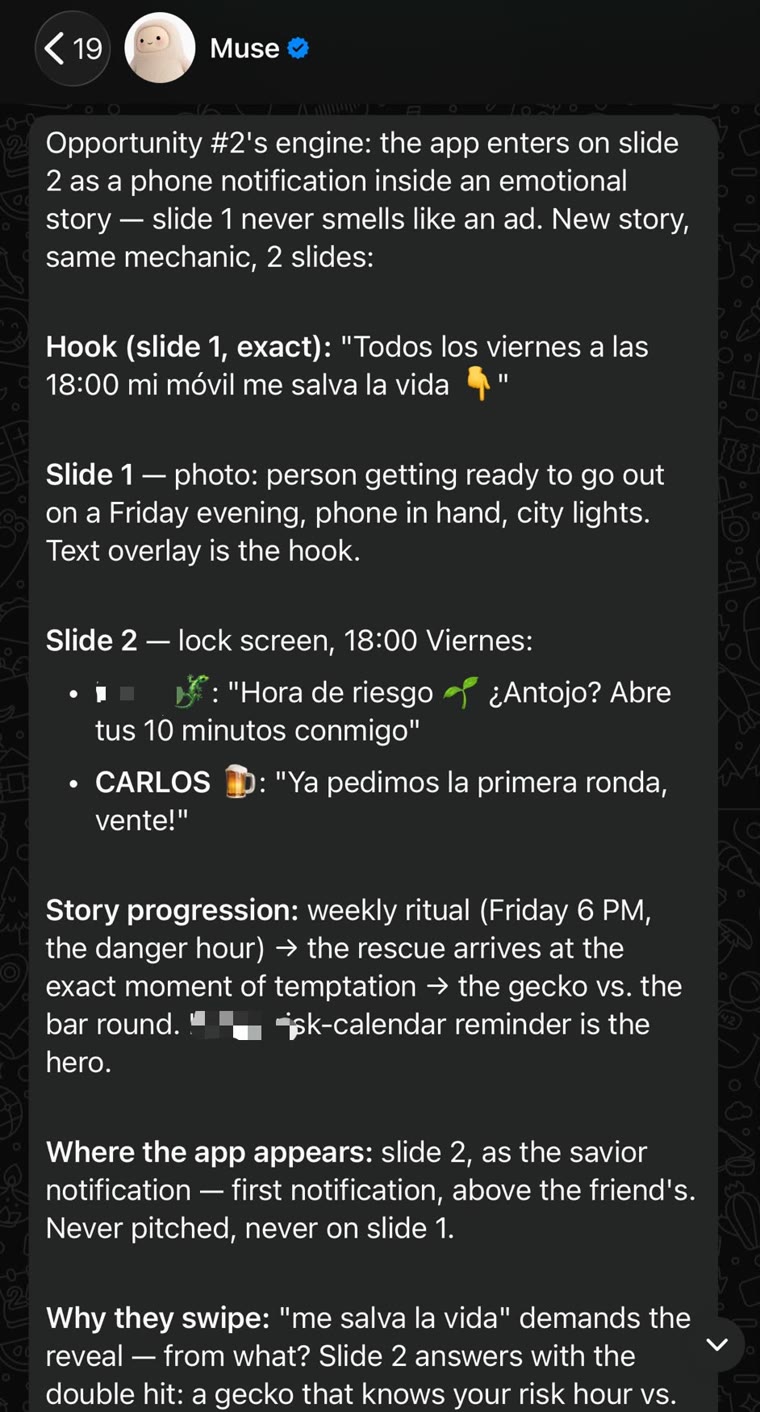
Muse returned a concept that was ready to produce. The account posted in Spanish, and the first hook read “Todos los viernes a las 18:00 mi móvil me salva la vida 👇” (every Friday at 6 p.m., my phone saves my life). Slide 1 was a photo of someone getting ready for a Friday night out, phone in hand. Slide 2 was a lock screen at 6 p.m.: the app checking in at the risky hour, sitting just above a friend’s message saying the first round was already ordered. The app appears once, on slide 2, as the rescue instead of the pitch.
One reference rebuilt as a two-slide concept: exact hook, visuals, story beats, where the app appears and why people swipe.
A first draft is where most people either accept everything or start over. The faster route is one quick read, hunting for anything that smells like marketing, then small and specific corrections:
If the app shows up too early, move it later.
If the hook explains too much, cut it down.
If the story sounds like a marketing team wrote it, ask for a version a real person would post.
A typical correction was a single message: the product appears too early, so keep slide 1 pure curiosity with no mention of the app, and let slide 2 deliver the payoff and introduce the product. Because the whole exchange lived in one WhatsApp thread, none of these fixes needed a new mega-prompt. A few messages later, the concept was close to something worth posting.
Step 4: Let Muse produce the slides, then fix only what is wrong
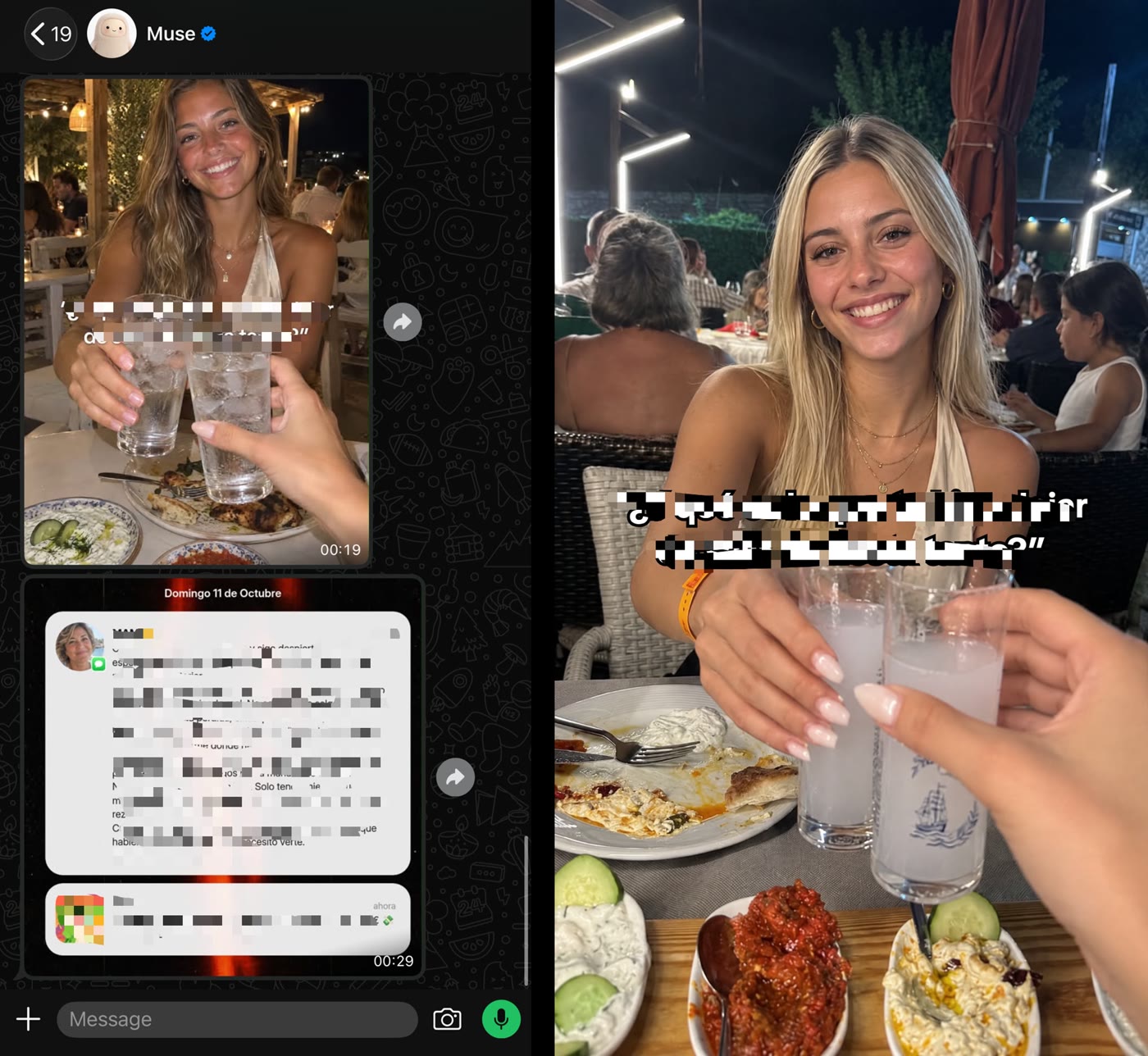
With the structure approved, Muse made the slideshow itself, generating the hook image and the payoff slide right in the chat. The production request asked for something that looked like a real person’s post rather than a polished ad, with lighting and framing imperfect enough to feel natural.
The first version was close. The payoff slide was right and stayed exactly as it was. The hook was not: the composition worked, but the text styling did not match the slideshows that perform best on TikTok. The fix took one sentence: match the original hook style with white text and a black outline, and leave slide 2 alone.
Left: Muse’s first draft in WhatsApp, hook and payoff slide. Right: the reworked hook with white outlined text. Text and app details were blurred by the marketer.
Muse did not regenerate the whole post. It kept the approved slide and reworked only the hook, with white outlined text in a more natural position on the image. That habit is what makes AI creative work fast: expect the first generation to be imperfect, find exactly what feels off and correct only that. It is usually one of four things:
the font
the text position
framing that looks too polished
an image that reads as an ad instead of a phone photo
Small fixes like these decide whether a slideshow feels native. Keeping what already works is how “I have an idea” becomes “this is ready to publish” in a few messages instead of an afternoon.
Step 5: Spin one concept into several posts
When a concept is strong, the next move is not a brand-new idea. It is variations. In the same thread, the next request was:
This concept works. Give me three variations that keep the mechanism that makes it interesting.

Change the scenario, the hook or the story, but keep the same curiosity structure. I don't want three rewrites of one post: each one should feel like a different piece of content I could publish on the same account.
Muse came back with several directions, and again not all of them got made. The marketer kept the two with the best odds. AI is great at generating options. That does not mean every option deserves to be published.
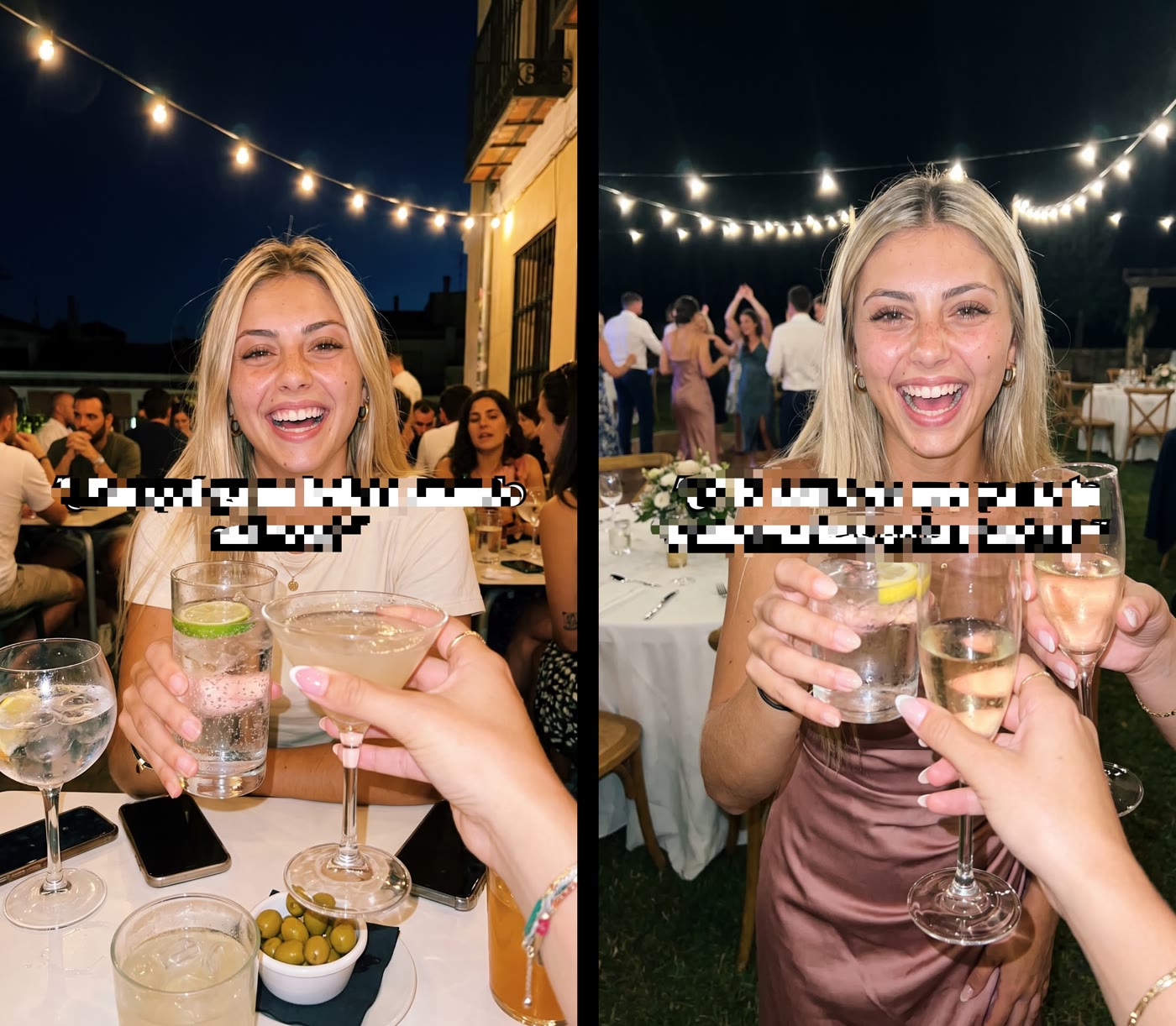
Producing the two winners took one line, because the visual rules already lived in the conversation: make variations 2 and 4 with the same style, avatar and realism rules as the original post.
Variations 2 and 4: new scenes, the same curiosity structure and the same visual rules as the first post (text blurred by the marketer).
This step matters because organic content is still a numbers game. A concept you love can flop, while a small variation of the same idea picks up hundreds of thousands of views. A few smart variations of a proven mechanism beat forcing a brand-new idea every day.
Step 6: Schedule TikTok posts in Postiz, then review the calendar
By now there were concepts, finished slides and several variations. The remaining problem was distribution. Finished posts sitting on a phone do not grow an account, and uploading every slideshow by hand, one account at a time, would have eaten the rest of the experiment.
The marketer already used Postiz to schedule organic content across several accounts, so the instruction to Muse was short:
These are the final posts. Spread them across the next few days in Postiz.

- No more than two posts per day.
- Leave plenty of time between posts.
- Don't publish the strongest variations back to back.

Set everything up so I only need to review the schedule before it goes live.
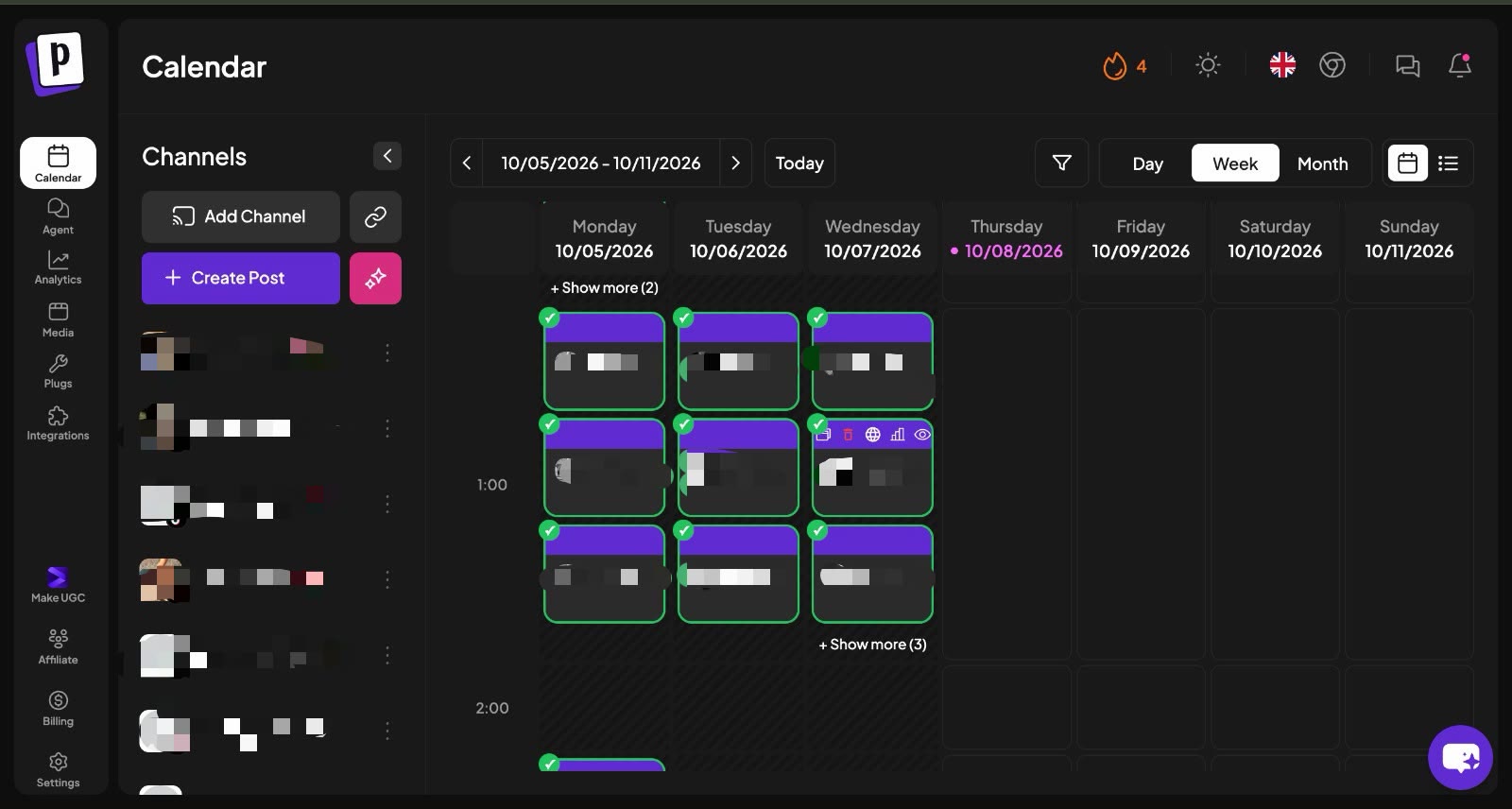
The calendar still got a human review before anything went out: which post leads, how close the variations sit to each other and whether the week makes sense as a whole. What disappeared was the most repetitive job in organic marketing: moving finished files from a phone into upload screens one post at a time. With Postiz as the TikTok scheduler, the whole week sat in one view, easy to adjust and quick to approve.
The Postiz week view for October 5 to 11: the slideshows across the connected accounts in one calendar, checked off as they published (channels blurred by the marketer).
How to connect Meta Muse to Postiz with a custom MCP connector
Muse has no settings screen for custom MCP servers, so you add Postiz by sending Muse a message with the Postiz MCP link. It works from WhatsApp too, and because Postiz uses OAuth for this connection, there is no API key to paste.
Create a Postiz account and connect the channels you want Muse to post to: TikTok, Instagram, YouTube, X, LinkedIn and 25+ more.
Open Muse on WhatsApp, in the app or at muse.ai, and start a new conversation.
Paste the setup prompt below.
Open the sign-in link Muse sends back and approve access with your Postiz account.
Muse saves the connector and a skill, then lists your connected channels.
Add my Postiz connector:
https://mcp.postiz.com/mcp-oauth-dynamic
- Setup: standard MCP over HTTP with OAuth, send me the sign-in link and I will approve it.
- Skill: save one so every question about social media posting, scheduling or content goes through Postiz tools first.
Once you are in, list my connected channels.
The skill line is what lets a request like “spread these over the next few days” land in Postiz without reminding Muse every time. The full walkthrough lives on the Postiz page for Meta Muse.
The last mile: the agent fills the calendar, two posts a day at most, and a human approves it. (Illustration animated with Seedance 2.5.)
What Muse sends to Postiz for a TikTok slideshow
Under the hood, Muse calls the same Postiz MCP tools as any other agent. It lists your channels, reads TikTok’s rules with integrationSchema, attaches the slides and creates the post with schedulePostTool. A two-slide photo post scheduled for 6 p.m. on a Friday in Spain looks roughly like this:
content_posting_method: DIRECT_POST publishes the post. UPLOAD sends it to the TikTok app’s inbox as a draft you finish by hand within 24 hours, which is useful when you want to add a trending sound in the app. With UPLOAD, TikTok ignores every setting except the title.
autoAddMusic: photo posts only. yes lets TikTok attach music automatically.
type: use draft instead of schedule if you want Muse to fill the calendar and leave the final approval to you inside Postiz. Our breakdown of TikTok draft mode for AI agents covers when that is the safer choice.
If you would rather run the same loop from Claude, ChatGPT or the built-in Postiz AI agent, the same tools are available there, so the workflow is not tied to one assistant.
Step 7: Stop touching it and read the TikTok analytics
Once the calendar was approved, the campaign was frozen. No more edits and no caption tweaks after posting. Up to this point the workflow could only be judged on taste: was the research useful, did the concepts hold up, did the slides look right? None of that matters if nobody watches, so the slideshows went out and the next 24 hours were spent tracking how each variation performed.
The results were a reminder of why one version of an idea is never enough: posts built on almost the same concept can land very differently. Sometimes the hook makes the difference, sometimes the first image, sometimes a small change in the story that makes people curious enough to keep swiping. One variation can barely move while another gets pushed almost immediately.
Views make the headline, but they are not the scoreboard. When the data is available, profile visits, downloads and trials say much more about whether the attention turned into something useful for the app. That is why the 10.3K profile views matter as much as the 1.1M views.
Muse did not find a secret strategy, and it did not need to. The marketer already had a TikTok marketing strategy that worked. What changed was the speed of everything around it: finding opportunities, shaping concepts, producing variations and getting them scheduled without starting from zero each time, mostly from a phone.
Who did what: Muse vs. the human
Stage
What Muse did
What the human did
Onboarding
Absorbed the brief once and kept the context all day
Wrote the brief: product, channel, formats and rules
Research
Found 10 real references, broke down each hook and flagged its sourcing
Picked the one concept worth testing
Concept
Rebuilt the mechanism as a two-slide story with hook, visuals and app placement
Cut anything that felt like an ad
Production
Generated both slides and reworked only the hook
Spotted the text style that did not feel native
Variations
Wrote three variations and produced the chosen two
Chose which variations to make
Scheduling
Spread the posts across the week in Postiz, two a day at most
Reviewed and approved the calendar
Results
Hands off: no edits after publishing
Tracked views, profile visits, downloads and trials
The pattern is clear. Muse took every step that is slow but mechanical, and the human kept every step that needs taste.
What stays manual
Even with most of the workflow running through Muse, three jobs stayed human:
Choosing which ideas are worth pursuing.
Reviewing every final creative before it goes live.
Judging when a post feels native, when the app is pushed too hard and when a concept needs another pass.
AI made the process faster, but it did not get to make the creative calls. As the marketer behind the experiment put it, “I don’t need AI to replace my judgment.” The value of an AI marketing agent is not replacing the person who knows what works. It is removing the friction around those decisions, so research, organization, structure, variations and scheduling stop eating the day.
Meta Muse review: is it a good AI marketing agent?
Based on this experiment, Muse is a strong AI marketing assistant for operators who already know what works and want to move faster. It is not a replacement for that knowledge. Here is how it stacked up.
Where Muse is strong
The WhatsApp interface. Briefing an agent in short messages over a whole day is more natural than writing one giant prompt, and the thread keeps the context.
Research with receipts. It returned real references with performance numbers and flagged which ones it had verified itself.
Surgical edits. It kept an approved slide and changed only the part that was wrong, instead of regenerating everything.
Production in the chat. It generated the slideshow images directly in the conversation.
Where it needs help
No native TikTok publishing. You need a custom connector such as Postiz to schedule and publish outside Meta’s own apps.
Research still needs checking. Half of its ten references came from press coverage rather than live posts.
Taste stays human. A concept can introduce the app too early or explain too much in the hook, and someone has to catch that.
It will make mistakes. Meta acknowledges that, along with prompt injection still being an unsolved problem, according to The Neuron. Keep approvals on, or keep posts as drafts until you sign off.
How to use Meta Muse for app marketing in 7 steps
If you are working out how to market an app on TikTok with an AI agent, here is the whole loop on one screen:
Onboard it. Send one brief with the product, channel, formats and rules, including who makes the final calls.
Ask for research. Request 10 real posts that are already performing, with the hook, the format and the reason each one works.
Pick one mechanism. Choose the reference you can adapt most naturally and have Muse rebuild it as a concept for your app.
Produce and correct. Let Muse generate the slides, then fix only the parts that feel off.
Multiply. Ask for three variations of the winning concept and produce the best two.
Schedule in Postiz. Connect Postiz to Muse, have it spread the posts across the week, then review the calendar.
Measure. Track views, profile visits, downloads and trials per variation, and feed the winners into the next round.
FAQ
What can Meta Muse do?
Meta Muse researches, drafts, generates images and takes actions in connected apps such as Gmail, Google Calendar and Instagram, asking for your approval before it publishes or sends anything. In this experiment it researched TikTok references, wrote slideshow concepts, generated the slides, produced variations and scheduled the posts through the Postiz connector.
Can Meta Muse post to TikTok?
Not on its own. As of October 2026, Muse’s connector directory has no TikTok connector. You can add Postiz as a custom MCP connector by sending Muse the Postiz MCP link, and Muse can then schedule TikTok slideshows and videos, plus posts for 30+ other platforms, through Postiz.
Can you use Meta Muse on WhatsApp?
Yes. Muse is available inside WhatsApp as well as in its iOS and Android apps and at muse.ai. The whole experiment in this article ran from one WhatsApp chat, and the Postiz connector setup works from WhatsApp too.
Is Meta Muse free? How much does it cost?
Muse has a free tier. Meta Muse pricing then adds Power at $20 a month and Maximum at $100 a month for heavier use, according to The Neuron. The Postiz connector itself adds no extra cost. You only need a Postiz account, which you can try for free.
Is Meta Muse safe to use for social media?
Meta says Muse will not publish content, send messages or make purchases without the user’s approval, and the Postiz connector signs in with OAuth, so you never paste an API key into the chat. Meta also acknowledges that Muse will make mistakes and that prompt injection is not solved yet. The safe setup is to have Muse create posts as drafts and approve them from the Postiz calendar.
Meta Muse vs ChatGPT: which is better for marketing?
For this workflow, Muse’s edge was the WhatsApp thread: short briefs across a whole day, with the context kept and the slides generated inside the chat. ChatGPT can run a similar research and content loop and also connects to Postiz, so the better pick is the assistant your team already works in. Either way, Postiz handles the scheduling.
How often should you post on TikTok with a new account?
There is no official number. This experiment capped a brand-new account at two posts a day, spaced them out and kept the strongest variations from publishing back to back. The account reached 1.1M views in its first week of posting.
Give Muse a publishing layer
Muse can research, write and produce. What it cannot do on its own, yet, is put finished TikTok slideshows on a schedule across every account you run. That last layer is Postiz: one calendar for 30+ platforms that any agent, Muse included, can fill.
Try Postiz for free, connect your TikTok accounts, paste the setup prompt into Muse on WhatsApp (no API key needed) and let your agent fill next week’s calendar while you keep the final say.
Credit: this experiment was originally shared on X by Pedro Pérez (@PerezHatesAI), a mechanical engineer who grows apps with organic short-form content and has generated more than 250M organic views.
Discover the best free social media management tools to plan, schedule, and automate your content. Compare features and pick the right tool for your brand.
Discover 10 actionable marketing ideas for social media in 2025. Boost engagement, reach, and conversions with these proven strategies and real examples.
Discover 9 proven content marketing best practices for 2026. Learn how to plan, optimize, distribute, and measure content that drives traffic, engagement, and ROI.