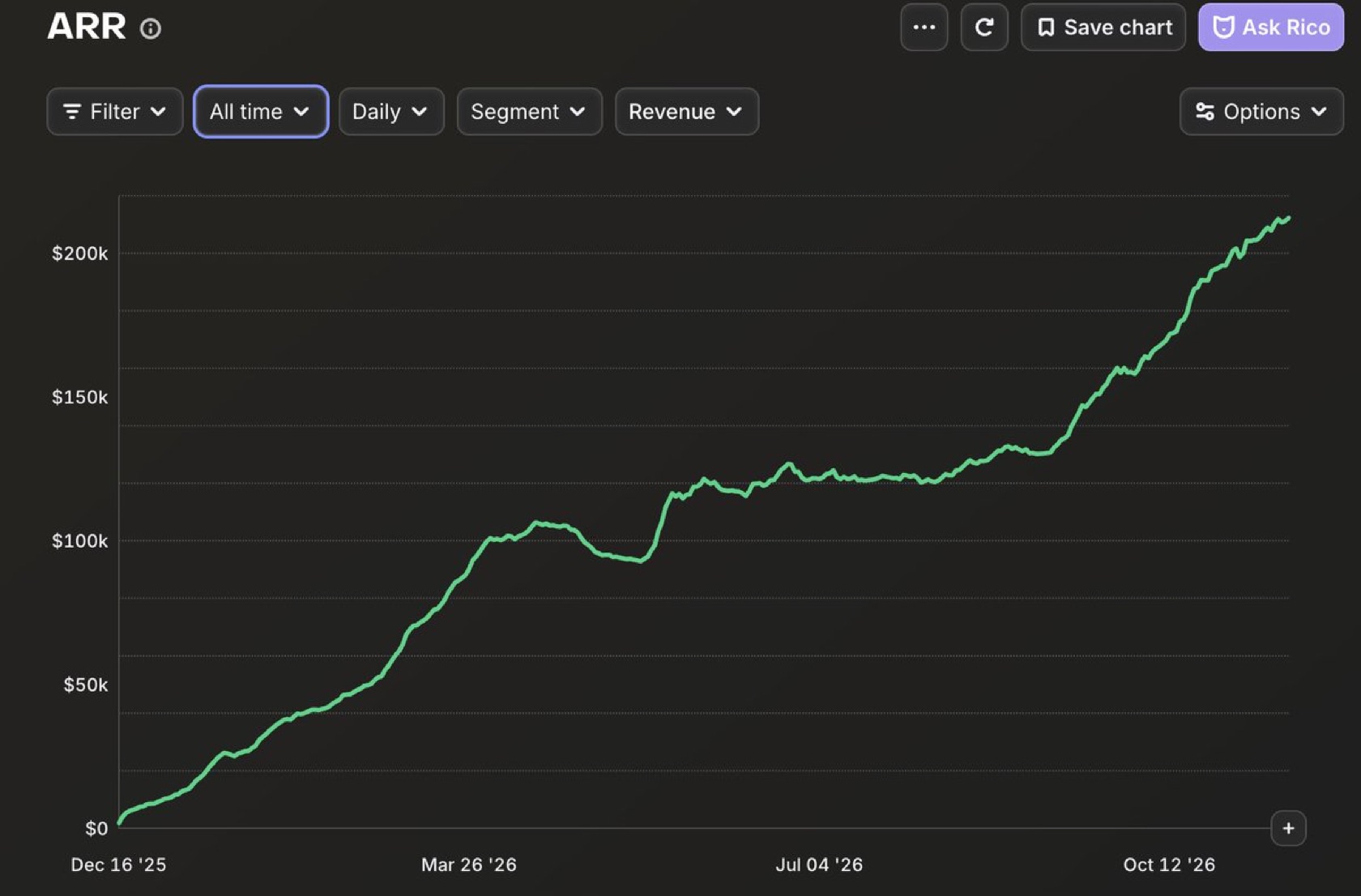
A subscription app just crossed $200k in annual recurring revenue. Every dollar of it came from short form video: Instagram trial reels and TikTok. No paid ads, no agency, and nobody sitting on a phone uploading videos all day.
The team films for a few days, Claude Code cuts every video into 6 versions, and Postiz posts a full month of content on its own. Every version of every video, every trial reel and every TikTok posts on time, every day, while they work on the app.
Annual recurring revenue for the app. Every dollar came from organic short form video.
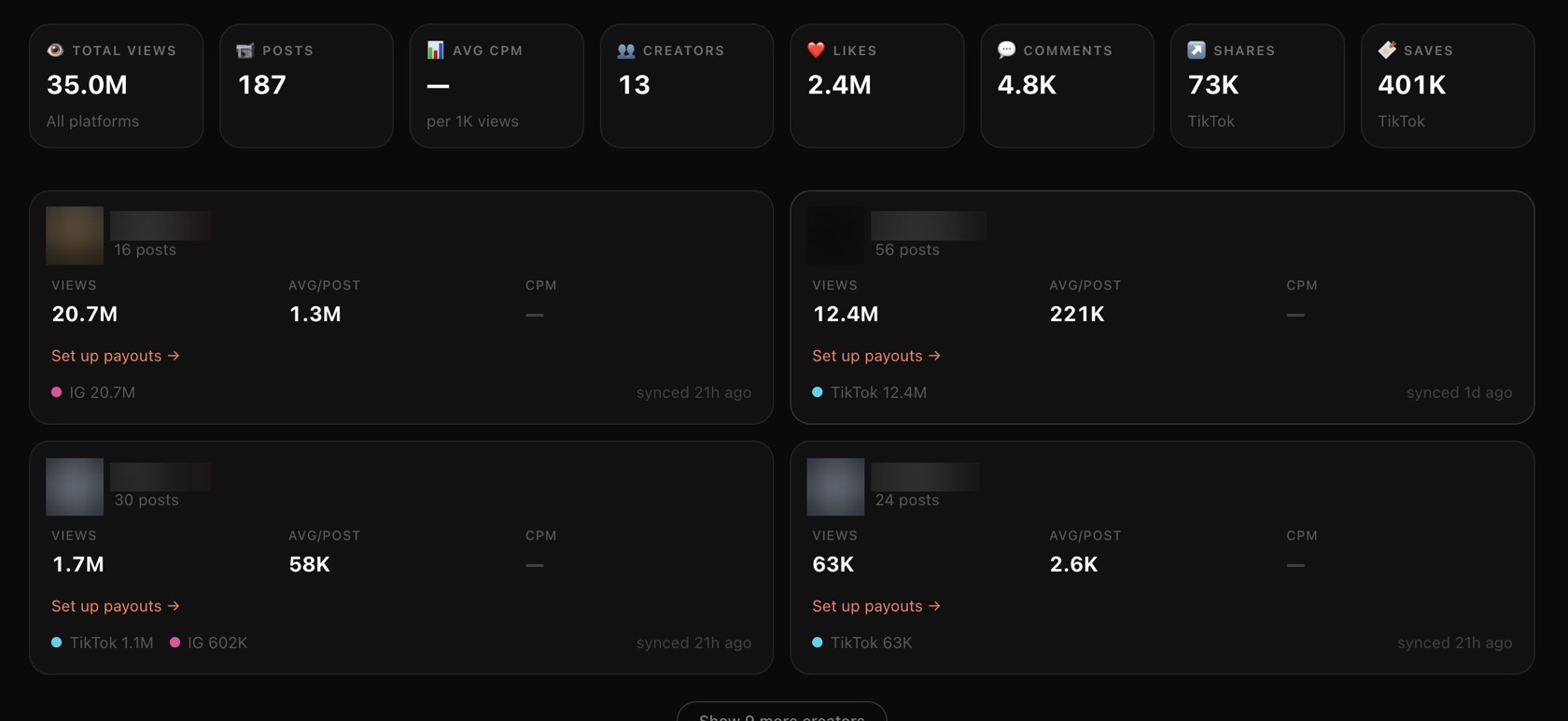
The output adds up fast. Across 13 creator accounts, the 187 posts tracked in this dashboard have pulled 35 million views, and the best Instagram account averages 1.3 million views per post. The founder says the whole system now automates about a million views a day.
35.0M views across 187 posts from 13 accounts, all platforms.
This guide is the full machine behind those numbers. How they film a month in a few days, how Claude Code turns one video into 6, how every version gets finished, and how Postiz publishes 200+ posts a month without anyone touching it.
What are Instagram trial reels?
Instagram trial reels are Reels shown only to people who don’t follow you. They skip your profile grid and your followers’ feeds, so every video is judged by strangers on its own merit. Instagram launched them in December 2024 as a way to test content without risking your main account’s reach.
That makes trial reels the perfect testing lab for an AI-driven content system. You can post 6 versions of the same idea, see which hook wins, and only push the winner to your followers.
Key takeaways
Film in bulk. 2 or 3 days of shooting covers a full month, about 30 videos.
Let Claude Code do the cutting. With ffmpeg and one recipe file, every video becomes about 6 versions with different hooks, lengths and clip orders.
Test on trial reels, publish winners on the main account. About 180 trial reels, 30 TikToks and 15 main Reels go out every month.
Distribution is the real bottleneck. Claude schedules the whole month in Postiz in one message, and Postiz publishes everything even with the laptop closed.
The main recurring job is picking the winner. 5 minutes every second day, plus 10 minutes a day on comments.
Manage all your social media in one place with Postiz
This is a description of one team’s system, not a rule book. Your content might be slideshows, static images or UGC. Take the flow and apply it to yours.
The team behind it are not automation experts. They figured it out by thinking about three questions:
What do you want automated?
What has to happen at each step?
What does the end result look like?
Then they talked it through with their LLM. How to build it, which prompts it needs, how to test it. Once it was running they kept noticing things like “this would be way better if X happened here”, went back and added it.
That is the real lesson. An AI agent system keeps getting better the more you use it. Use this guide as inspiration, then build your own version.
Step 1: The trial reels system in one picture
Here is what goes out, every single day:
Every version of that day’s video as an Instagram trial reel (about 6, fewer if your account has a lower daily cap)
1 TikTok, with its own cut
And every second day, the trial reel with the most views goes up on the main Instagram account as a brand new upload.
Do the math on a month: about 180 trial reels, 30 TikToks and 15 main Reels. That is 200+ posts a month.
Trial reels are the testing lab. Followers are out of the equation, so every video wins or loses on its own. Main Reels only get the proven stuff.
Doing all of that by hand is a full time job. Film, edit, export 6 versions, add sounds, upload one by one, write captions, check views, re-upload the winner. Miss two days and the whole thing stalls.
So the team built a system around it. Humans do the creative work. The system does the rest:
Film in bulk
Claude Code cuts every video into 6 versions
Sound goes on in Instagram’s Edits app
Claude schedules the whole month in Postiz in one go
Everything posts automatically
A human picks a winner every second day
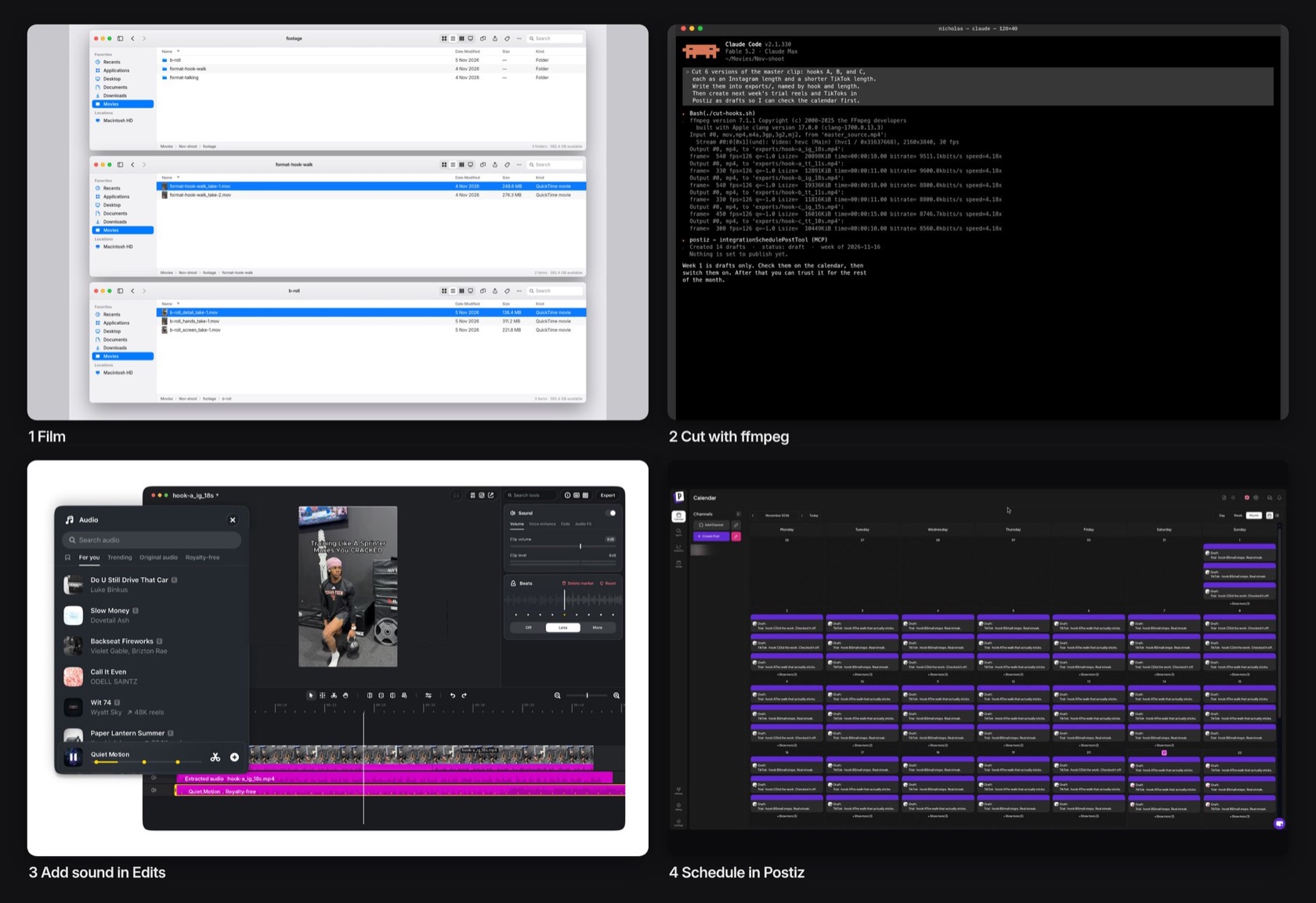
The pipeline: footage folders, ffmpeg cuts, Edits, and the Postiz calendar.
Step 2: Film a month of short form video in a few days
Filming every day is the first thing that breaks. Sick day, travel day, lazy day, and there is no video.
So the team films in bulk. They block 2 or 3 days and film everything for the month, about 30 videos. Here is how:
Write a shot list first. Look at what’s working for competitors, what’s working in other niches, and what’s already winning on your own trial reels. Turn each one into a format on the list.
Film each format a few ways. Different angles, different openings, different energy. More raw material per format means more versions later.
Film extra B-roll. Hands, screens, reactions, walking shots, close ups. B-roll is what lets one video become six.
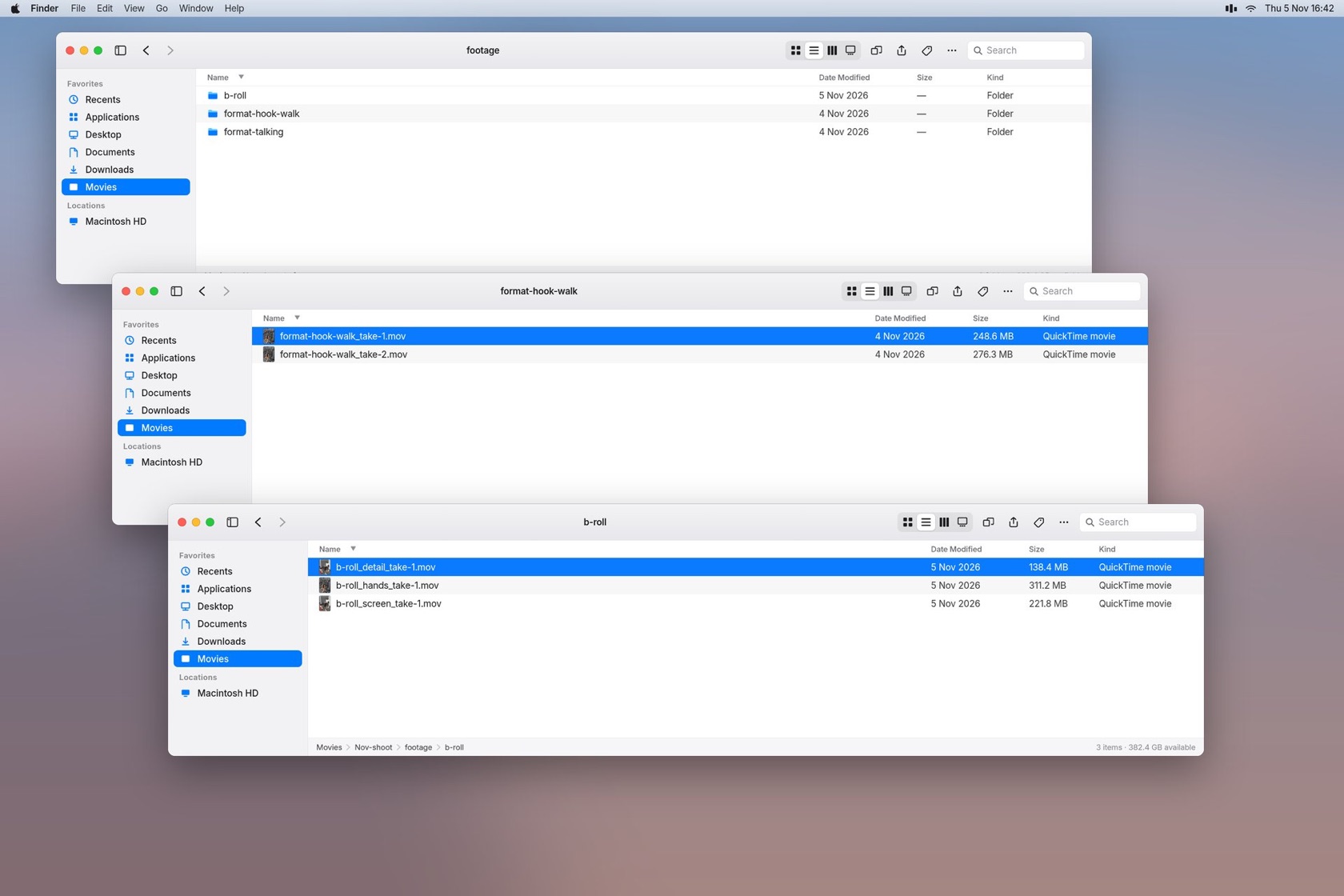
Name your files properly. Something like format-name_take-1.mov. Boring, but it’s what lets Claude sort your footage without you babysitting it.
Change outfits between formats. A month of content shot in 3 days shouldn’t look like it was shot in 3 days.
Everything goes into one folder per format. That folder is the input for the whole system.
Footage folders from a shoot day. One folder per format, files named like format-name_take-1.mov.
Step 3: Claude Code video editing turns every video into 6
This is where the speed comes from. By the team’s own estimate, Claude now cuts 6 videos in the time a hand edit of half of one used to take.
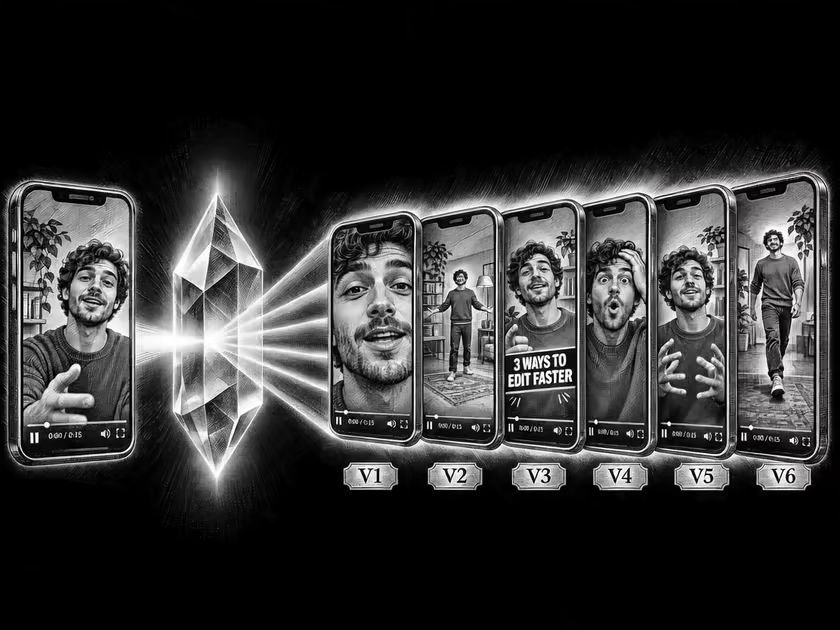
One raw video in, six testable versions out.
Every video becomes about 6 versions. Each version changes:
The hook (the first 1 to 3 seconds)
The length
Which clips get used
The order of the clips
The on-screen text
Every version is a test. After a week you know which hooks hit, which lengths hold people, and which openings flop. If you want a head start on the hooks themselves, our guide on how to write viral hooks breaks down the patterns that stop the scroll.
The setup: Claude Code + ffmpeg
Claude Code runs on your computer, so it can open your footage folders and run ffmpeg, the free tool that trims, joins and adds text to video from the command line. You don’t need to know ffmpeg. Claude writes and runs the commands.
Install ffmpeg (free) and Claude Code
Create one folder per format with the raw clips inside
Write one recipe file Claude follows every time
Their recipe looks something like this:
For each folder in /footage, make 6 vertical 9:16 versions.
Version 1: 7 seconds, fast cuts, hook text from hooks.txt line 1.
Version 2: 12 seconds, open on the reaction clip, a different hook.
Version 3: 15 seconds, original clip order, no text for the first second.
Versions 4 to 6: shuffle the clip order and test 3 new hooks from hooks.txt.
Also make one shorter, faster TikTok cut per format.
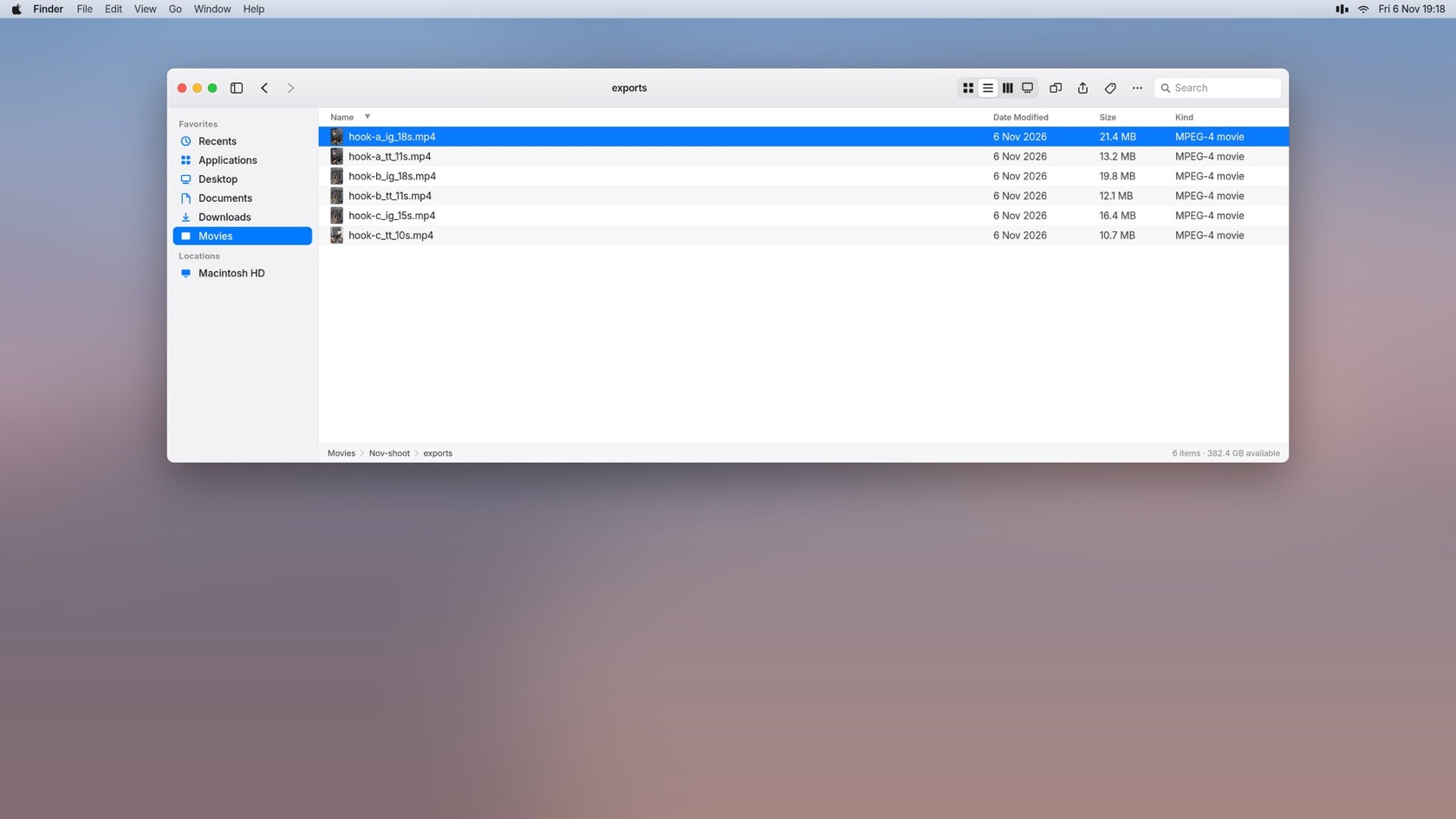
Save to /exports/[format]/ and name each file with the hook and length.
30 videos go in. About 180 Instagram versions and 30 TikTok cuts come out. They run it at night and wake up to a full month of versions.
Two things make the system better every week:
hooks.txt. Every time a hook wins on trial reels, it goes in this file. Claude pulls from it next time, so the hook bank gets stronger every single week.
Separate platform cuts. TikTok wants shorter, faster, rougher cuts. Instagram wants longer, higher quality, slower. It’s in the recipe, so the team never exports one version for both.
Some videos are too messy for Claude to cut well. The team edits those by hand, and it still saves hours.
Why not a clipping tool? Most clipping tools are built to pull short clips out of long podcasts and YouTube videos. These videos are already short. They need the same video re-cut 6 different ways, and that is exactly what Claude Code + ffmpeg does.
Exports folder: 6 versions of one video, named by hook and length, cut with ffmpeg.
Step 4: Finish every version in Edits
Claude gets you the cuts. Sound is the finishing step. Every version goes through Instagram’s Edits app before it’s scheduled. Why Edits:
It’s free and it’s Instagram’s own editor
It exports clean, with no watermark
In the team’s experience, versions finished in Edits get flagged as duplicates less often (Instagram hasn’t confirmed this)
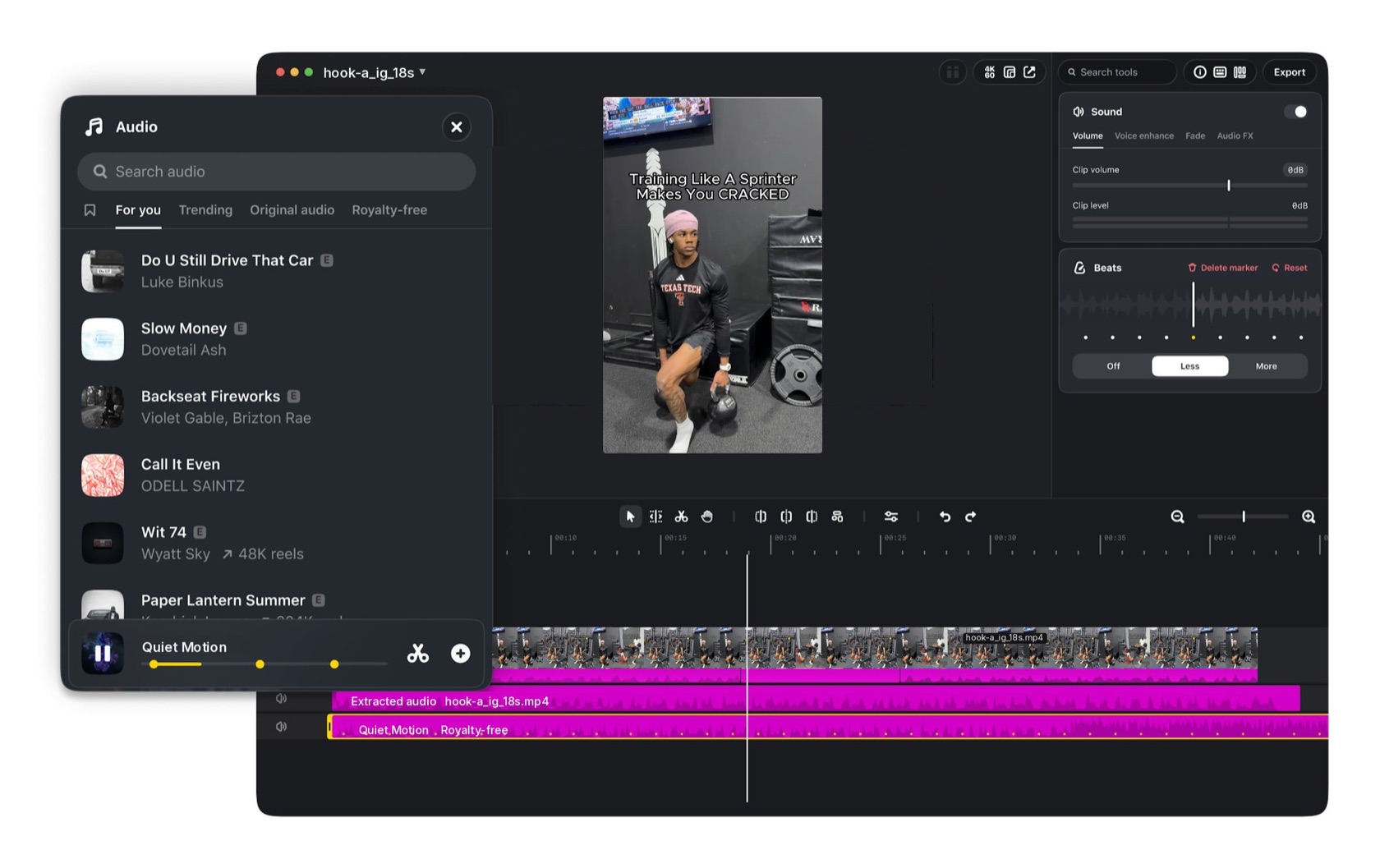
Edits now runs on Mac too, so this is a desk job. Footage folder on one side, Edits on the other. The flow:
Import the version
Add the sound
Add auto captions if the version needs them
Export into one folder called /ready
Sound is one of your biggest testing levers, so the team picks it by hand. A tool picking sounds blind will cost you views.
One rule on sound: use the royalty-free tracks in the Edits library or your own audio. Licensed songs can get dropped from exports and muted later, and you’ll only find out after the post is live.
For the TikTok cut, bake the sound into the file. A scheduled TikTok goes up with the audio that’s already in the video.
This is the only part of the month that takes real sitting time. One focused day covers the whole batch.
Edits for Mac, with a sound being added to a reel.
Step 5: Distribution is the real bottleneck
Here is what nobody tells you. Once you can film in bulk and cut 6 versions of everything, making content stops being the problem. Posting it becomes the problem.
200+ uploads a month. Each one needs the right cut, the right platform, the right caption, the right time and the right setting (trial reel or main Reel). Doing that from your phone every day is where consistency dies. The first time around, posting without a structure cost this team about $20k a month.
So posting is the part they handed off completely, to Postiz. Postiz is a social media scheduler that posts to Instagram, TikTok, YouTube, X and 20+ other channels from one calendar. You schedule it, it publishes on time. No phone, no reminders. Here is what they use it for:
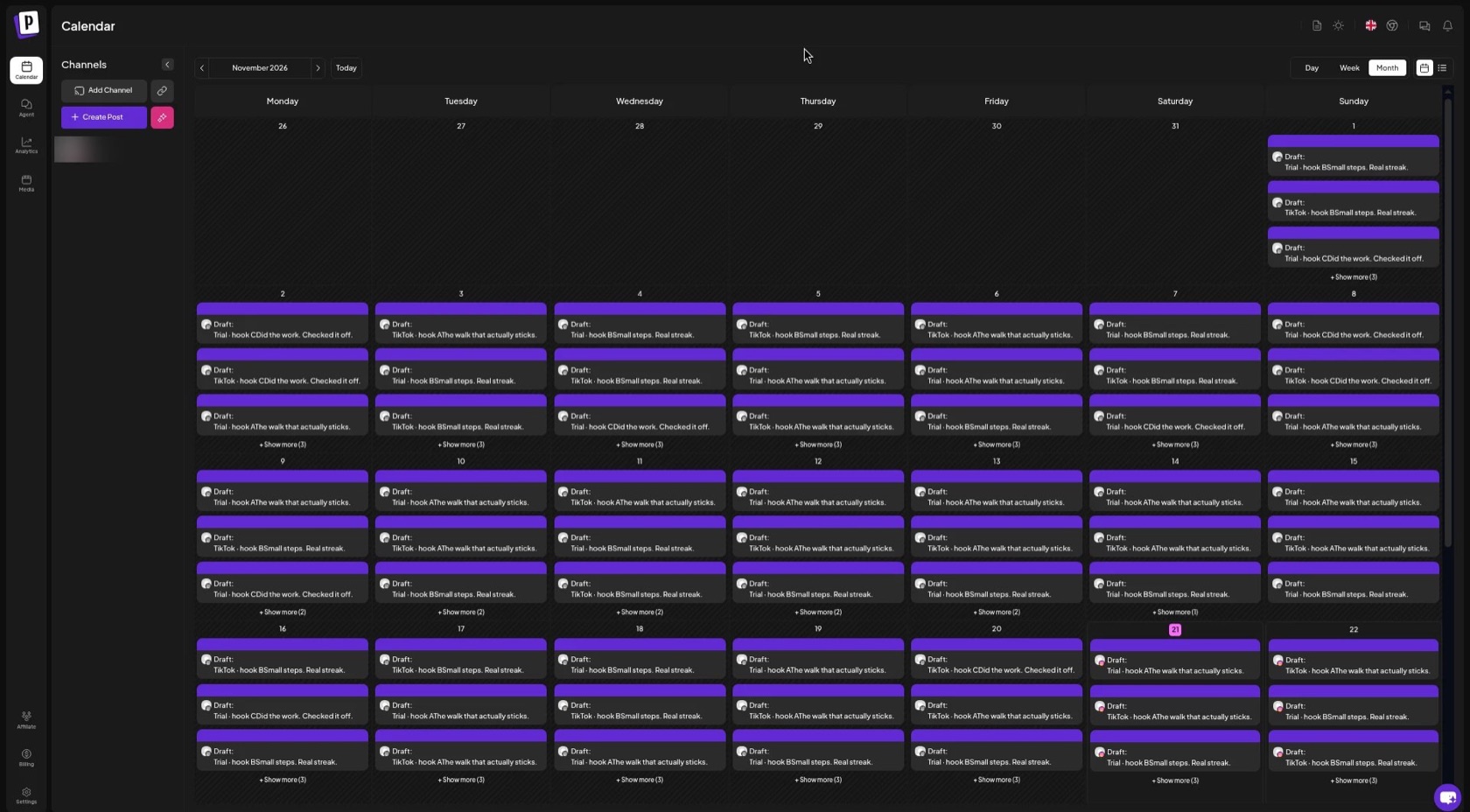
One calendar for the month. Every trial reel, every TikTok, every main Reel on one screen. Gaps jump out instantly.
Trial reels, automatically. When you schedule an Instagram Reel in Postiz there is a Trial Reel toggle (share only to non-followers first). You choose how it graduates: manually, or automatically based on performance. The team leaves it on manual because they re-upload winners fresh.
TikTok direct post. It publishes straight to the profile at the time you set. Nothing sits in your inbox waiting for you to finish it.
Different cuts per platform. Each channel gets its own video and caption, so the TikTok cut goes to TikTok and the Instagram cut goes to Instagram.
Time slots. Set the times each account normally posts, and the calendar plans around them. Not sure which times? Start with our guide to the best time to post Reels on Instagram.
A first comment on Instagram. Schedule a comment on your own post, anywhere from 1 minute to 2 hours after it goes live. Good for a short CTA on every post without remembering to do it.
Analytics per post. Views, likes, comments and shares for each post and each account, in one place.
Postiz month calendar for November 2026, filled with scheduled trial reels and TikToks.
Step 6: Schedule a month of trial reels with Claude in one go
This is where the AI agent takes over. Postiz connects to Claude. You can add Postiz from Claude’s connectors, and Claude Code picks it up too. Or run one command in the terminal:
claude mcp add --transport http postiz https://mcp.postiz.com/mcp-oauth-dynamic
It opens a browser tab, you sign in to Postiz, and you’re in. No API key. The full setup lives on the Claude Code for Instagram page.
The team also installed the Postiz CLI (npm install -g postiz) so Claude can upload files straight from the /ready folder. Now Claude can see the accounts, upload the videos and schedule every post. Scheduling a month is one message:
Upload everything in /ready to Postiz. For each day, schedule that day's 6 Instagram versions as trial reels with manual graduation, spaced out across our time slots. Schedule the TikTok cut of that day's video as a direct post at 6pm. Use the caption in each file name.
Claude builds the month. Every trial reel goes out with this setting:
Swap MANUAL for SS_PERFORMANCE if you want Instagram to share a trial reel with your followers automatically when it performs well.
One message to Claude fills the whole month.
Then they open the calendar in month view, check it, drag anything they don’t like, and they’re done. Postiz publishes everything at the set time, even with the laptop closed. Three tips from setting this up:
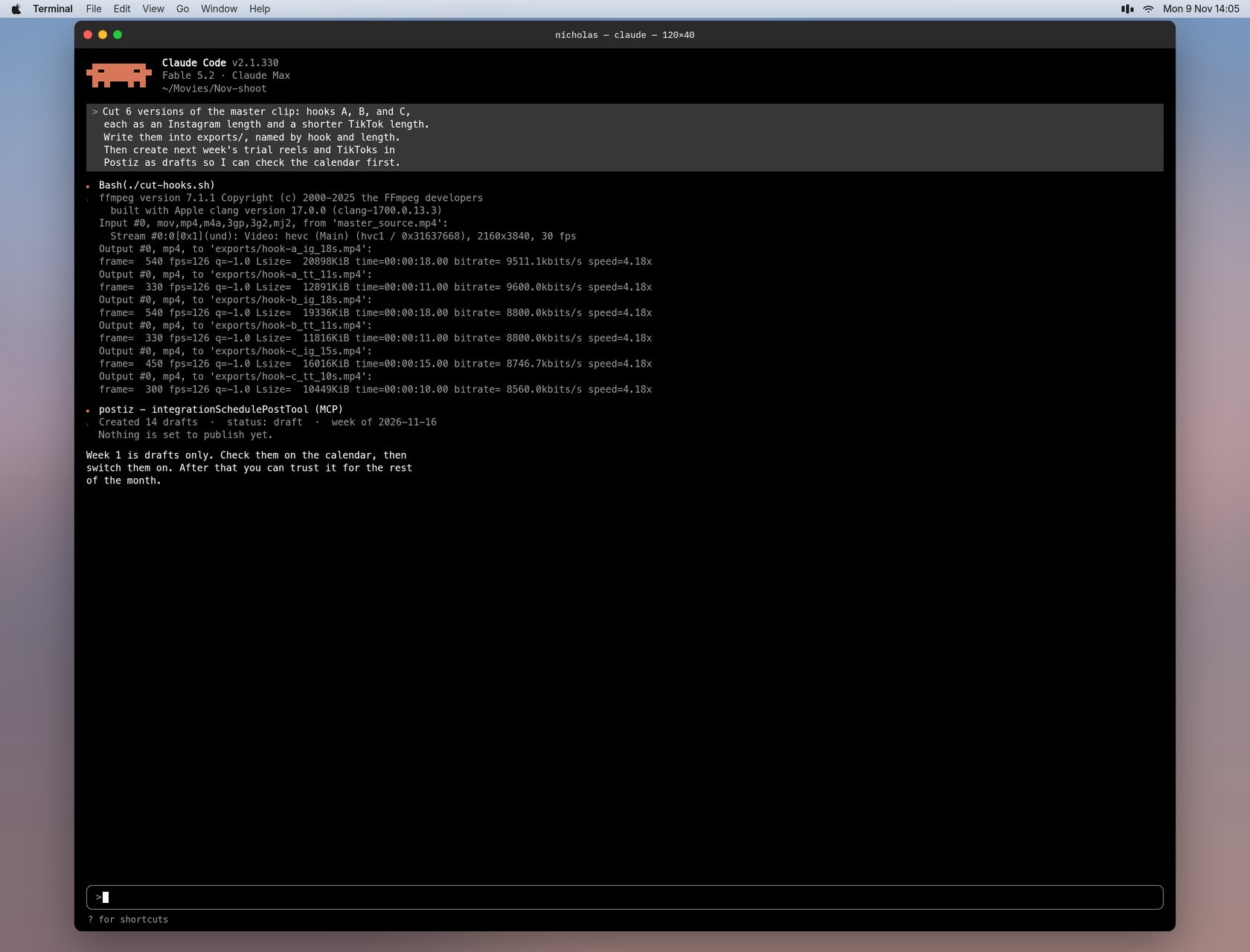
Make the first week drafts. Tell Claude to schedule week one as drafts. Check them on the calendar, then switch them on. After that you’ll trust it.
Watch your timezone. Postiz uses your browser’s timezone. If your audience lives somewhere else, set your slots for their time.
Keep the files in Postiz. Everything you upload sits in the media library, so re-uploading a winner in Step 7 is one click.
The posting month goes from hours on the phone every day to one afternoon of setup.
Claude Code cuts 6 hook versions with ffmpeg, then creates next week’s trial reels in Postiz as drafts.
Step 7: Pick the winning trial reel every second day
The whole system feeds this one decision. It’s the main call the team makes during the month. Every second day:
Check trial reel views in Instagram insights
Find the version with the most views
Schedule that file as a normal Reel on the main account in Postiz (or tell Claude: “schedule this one as a main Reel at 7pm tonight”)
Add its hook to hooks.txt
Six versions go out. The data picks the one that goes to the main account.
Upload the winner as a brand new video. Don’t publish the trial reel itself to your followers. Sometimes the fresh upload gets fewer views. If the trial already has decent views, sharing it can give it a bigger push. Feel it out.
Then write down why it won. The hook? The sound? The length? The first clip? That note decides what gets filmed next month.
And judge every winner by money too. A video with fewer views can still make more if it converts better. Check downloads and revenue on the days your winners go out.
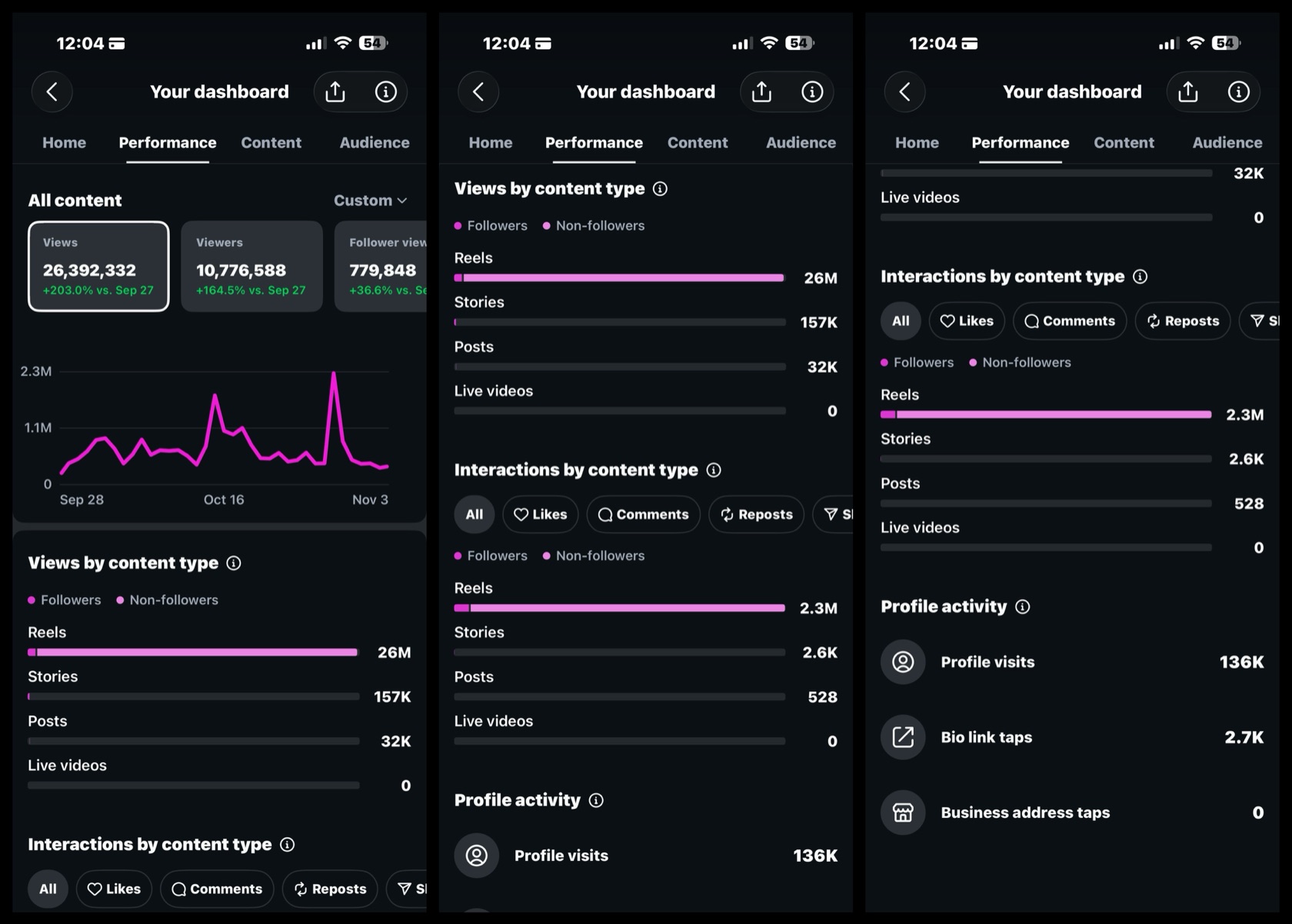
Instagram insights for one account: 26.4M views in about five weeks, almost all of it from non-followers.
The month at a glance
Days 1 and 2: Film. Shot list done the night before. Film everything. Dump it into format folders.
Day 3: Cut. Claude Code runs the recipe overnight. About 180 Instagram versions and 30 TikTok cuts.
Day 4: Finish and schedule. Sound and captions in Edits. Everything into /ready. Claude loads the month into Postiz. Check the calendar.
Every day: 10 minutes. Reply to comments. Glance at views.
Every second day: 5 minutes. Pick the winner. Schedule it on the main account.
End of each week: 30 minutes. Review what won. Update hooks.txt. Start next month’s shot list.
A few days of work. A full month of posts.
The complete system
Film in bulk. 2 or 3 days covers the month.
Claude Code cuts every video into 6. Different hooks, lengths and clip orders, plus a separate TikTok cut.
Finish in Edits. Sound and captions, exported to /ready.
Claude loads the month into Postiz. Trial reels, TikToks, captions and time slots.
Postiz posts everything automatically. Every day, on time, on every account.
Winner every second day. The best trial reel goes to the main account as a fresh upload.
Weekly review. Update the hook bank, write the next shot list, run it again.
Filming, cutting, testing and picking winners is what grew this app to $200k ARR with $0 spent on ads. The automation is what keeps it running every day. Once you can make content in bulk, the bottleneck is getting all of it out on time without falling off, and that is the part Postiz runs.
Instagram trial reels FAQ
How do trial reels work on Instagram?
When you publish a Reel, you switch on the Trial option. Instagram then shows it only to non-followers, and it stays off your profile grid and Reels tab. You watch its views and engagement in insights, then decide whether to share it with your followers, either manually or automatically when it performs well.
How do you post trial reels on Instagram?
You need a professional (creator or business) account. Create a Reel as usual, then turn on the Trial toggle on the final share screen before posting. Instagram shows it to non-followers only. To schedule trial reels ahead of time, turn on the Trial Reel toggle in Postiz and pick manual or performance-based graduation.
How many trial reels can you post a day?
Instagram doesn’t publish an official limit. Kapwing reports a cap of about 20 a day, while many creators see a lower allowance of around 5. Creators also report that going over the cap can block trial reels for a day or more. The team in this guide posts about 6 a day, spaced across their time slots. If your account hits a lower cap, post 4 or 5 versions per video instead of risking a 24-hour block.
Are trial reels worth it?
Yes, if you test hooks. Trial reels let you post 6 versions of one idea without spamming your followers, and the winner tells you exactly what to film next. In this system, one account reached 26.4M views in about five weeks, almost all from non-followers, with trial reels picking which videos went to the main feed.
Can you schedule trial reels?
Yes. In Postiz, turn on the Trial Reel toggle when you schedule an Instagram Reel and pick manual or performance-based graduation. Through the API, MCP or CLI, it is the is_trial_reel and graduation_strategy settings, which is how Claude schedules a whole month in one message.
Can Claude Code edit videos?
Claude Code can’t watch your video the way a human editor does, but it can drive ffmpeg. Give it organized footage folders and a recipe file, and it trims, reorders, adds text and exports every version. It works best for short clips with clear structure. Messy footage still needs a human.
Should I share the trial reel or re-upload the winner?
This team re-uploads the winner as a brand new Reel on the main account, because the fresh upload gets its own push. If a trial reel is already pulling strong views, sharing it with followers can work too. Test both on your account.
Start this week
Write a shot list and bulk film for one day
Set up Claude Code and ffmpeg, and make 6 versions of your first video
Start a Postiz trial, connect Instagram and TikTok, and schedule one week as drafts
Every second day, pick the winner and upload it fresh
It won’t be perfect the first month. It doesn’t need to be. The system makes posting automatic, but it doesn’t film the videos for you. The hardest part is consistency, and that is exactly what the system protects.
Try Postiz for free, connect your Instagram and TikTok accounts, add the Postiz connector to Claude, and let your agent schedule next week’s trial reels while you get back to building your app.
Credit: this system was originally shared on X by Nicholas (@nicholascalez), who posts his app’s numbers and tests as he scales.
Learn how to create a social media strategy that drives real results with practical steps on goals, audience research, and content. Start optimizing today.