For the last few months I have been quietly running an experiment on the Postiz blog.
I let one of those “AI writes a blog post a day” services run unattended. It was cheap, the dashboard looked busy, and Google was crawling new URLs every morning. For a few weeks the line went up. Then it flattened. Then it started leaking traffic.
I was not surprised. The content was the same kind of thing you would get if you typed your keyword into ChatGPT and copy-pasted the first answer — except with worse formatting. AI slop. And Google has gotten very good at sniffing it out.
So I shut the service off, sat down with Claude Code, and built two Claude Code skills that write SEO content I am actually willing to publish under my name. A few days later, traffic started doing this:
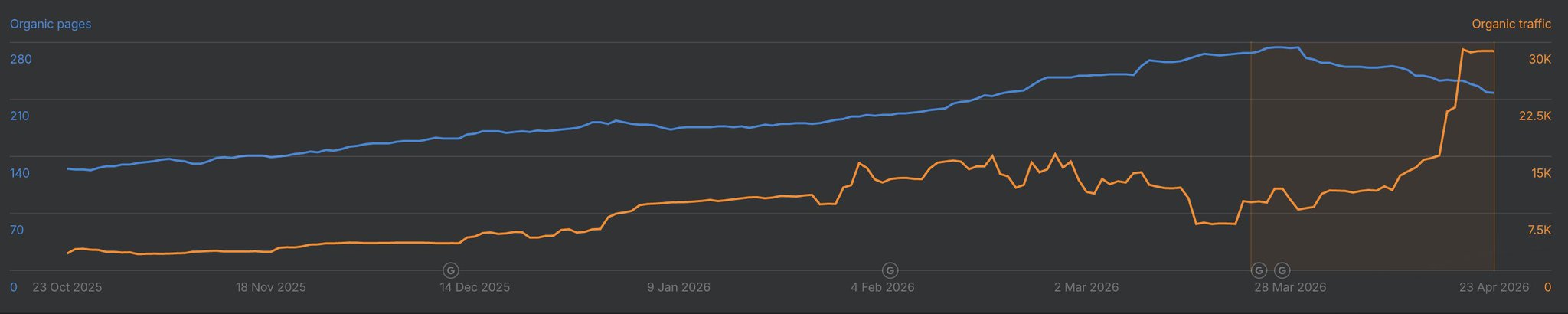
The orange line is organic traffic. The blue is indexed pages. That ~3x jump on the right side of the chart is what happens when you stop publishing slop and start publishing content that someone — a human or an LLM — could actually learn something from.
This post is the full breakdown of how I did it, including the two skills you can copy-paste into your own Claude Code setup today.
Why “AI Slop” Is Killing Your SEO
The cheap “one post a day” services almost all share the same architecture:
- Pull cheap keyword data from DataForSEO.
- Feed the keyword to a generic LLM prompt.
- Publish whatever comes out.
That worked in 2023. It does not work in 2026 because:
- Google’s helpful content updates explicitly target low-effort AI content.
- LLM-driven discovery (ChatGPT, Perplexity, Claude, Google AI Overviews) cite original sources, not summary mills.
- Domain quality is now a vector. A few hundred slop pages can drag your whole site down.
The fix is not “stop using AI.” The fix is to give the AI something worth writing about — a real story, a real perspective, a real piece of source material — and then let it do the heavy formatting, structuring, and SEO work.
That is exactly what these two skills do.
The Idea: Use What’s Already Good
Look at what is already winning attention online:
- X long-form posts that get bookmarks and replies — those are signals that the content is valuable.
- YouTube videos with high view counts, watch time, and comment density — also a signal.
If a piece of content is already proving its quality with humans, it is a much better seed for an article than a keyword from a database. Both of my skills follow the same pattern:
Take one piece of proven content → enrich it with technical depth → SEO-optimize it → publish it.
I now have two flavors of this:
seo-builder-skill — turns one of my X long-form posts into a polished blog post.seo-youtube-builder-skill — turns someone else’s YouTube video into a credited, original article.
Let’s build both.
Part 1: The Toolkit
Both skills lean on the same underlying CLI stack. Install these once and the rest is reusable.
agent-browser — for fetching content the agent can’t normally see
X long-form posts have no public API and they hate scrapers. agent-browser drives a real Chromium instance, so Cloudflare and X’s anti-bot layer treat it like a browser, not a script.
npm install -g agent-browser
agent-browser install
npx skills add vercel-labs/agent-browser
Keyword research: SEMrush MCP, Ahrefs MCP, or DataForSEO
You need some keyword signal. I tend to default to SEMrush because the MCP integration into Claude Code is clean:
# SEMrush MCP
claude mcp add semrush https://mcp.semrush.com/v1/mcp -t http

# Ahrefs MCP (alternative)
claude mcp add ahrefs https://api.ahrefs.com/mcp/mcp -t http
If you would rather pay per request, DataForSEO is much cheaper but does not have an official skill. There is a community one I have used:
npm install -g dataforseo-cli
dataforseo-cli --set-credentials login=YOUR_LOGIN password=YOUR_PASSWORD
npx skills add alexgusevski/dataforseo-cli
Then add the marketing skill set so the agent knows how to actually structure for SEO (H1/H2 hierarchy, intent, internal links, etc.):
npx skillkit install coreyhaines31/marketingskills --skill ai-seo
Cover image generation
gpt-image-2 is genuinely good for blog covers. I built a tiny skill around it:
npx skills add nevo-david/openai-image
You will need python3 and OPENAI_API_KEY in your ~/.claude/settings.json:

A small but important note: putting raw API keys in settings.json is risky because the agent can pull them into its context. Create a dedicated, scoped key for image generation only — never reuse a billing-wide key.
Publishing to WordPress
I publish to a WordPress instance, so I wrote a skill for that too:
npx skills add nevo-david/wordpress-skill
Add WORDPRESS_API_URL and WORDPRESS_API_KEY (the latter is Basic base64("user:password")).
Image hosting via the Postiz CLI
When you import images from X or anywhere else, you cannot just hotlink them — pbs.twimg.com blocks hotlinking, expires URLs, and tanks your Lighthouse score. You need somewhere stable to put them.
I use the Postiz CLI as my upload target because I already have it installed for scheduling posts. One command, you get a CDN URL back:
npm install -g postiz
postiz auth:login

# Upload any file → returns a public URL
postiz upload ./my-image.jpg
The response includes a path field (e.g. https://uploads.postiz.com/xxxxx.jpg) that you can drop straight into the article. R2 CLI works too if you would rather host on Cloudflare.
Part 2: The X-to-Blog Skill
Here is the full skill definition. Drop it in ~/.claude/skills/seo-builder-skill/SKILL.md:
---
name: seo-builder-skill
description: Create SEO-optimized articles from X long-form posts
metadata: {"openclaw":{"emoji":"🌎","requires":{"bins":[],"env":[]}}}
---

This skill takes an X article URL and turns it into a polished, SEO-
optimized blog post.

# Workflow

1. Load the X URL with `agent-browser` to bypass anti-bot.
2. Extract every image and re-upload to a stable CDN with `postiz upload`.
3. Re-tell the story in a third-person, blog-ready voice. Keep the
   storyline; do not just paraphrase. Do not present yourself as the
   author of the original — credit the source.
4. Use the `ai-seo` skill plus SEMrush / Ahrefs / DataForSEO to pick
   one primary keyword and 3-5 supporting keywords. Naturally weave
   them into the H1, H2s, intro, and conclusion.
5. Generate a cover image with `imagegen-gpt-image-2`.
6. Enrich the technical sections with concrete code samples — pull
   from ~/Projects/postiz-agent and ~/Projects/new-postiz-docs for
   anything Postiz-related.
7. Add a CTA to try Postiz at the end.
8. Publish to WordPress via `wp-rest-api` with `author=1` (Nevo David).
You trigger it from Claude Code with:
/seo-builder-skill https://x.com/wickedguro/status/2046261869963587636
A few examples of articles I have published with it:
Part 3: The YouTube-to-Blog Skill
This one is more interesting because YouTube videos have a much higher information density than X posts — but the AI has to extract the good parts.
The pipeline:
- Download the video.
- Transcribe it with timestamps.
- Identify the best segments.
- Clip those segments and embed them in the article.
- Write the article around the clips.
- Run the same SEO + cover + publish flow as before.
Downloading the video — yt-dlp
# Mac
curl -L https://github.com/yt-dlp/yt-dlp/releases/latest/download/yt-dlp_macos -o yt-dlp
sudo mv yt-dlp /usr/local/bin/yt-dlp
sudo chmod a+rx /usr/local/bin/yt-dlp
sudo xattr -d com.apple.quarantine /usr/local/bin/yt-dlp
yt-dlp --version
Transcription — Deepgram
Deepgram gives you free credits to start, and the MCP integration is a one-liner:
curl -fsSL deepgram.com/install.sh | sh
dg login
claude mcp add deepgram --scope user --command dg --args mcp
Ask the agent to transcribe with timestamps so it can map quotes back to clip ranges.
Clipping — ffmpeg
# Mac
brew install ffmpeg

# Ubuntu / Debian
sudo apt update && sudo apt install ffmpeg

# Arch
sudo pacman -S ffmpeg
If you would rather skip the manual setup, browser-use/video-use bundles yt-dlp, transcription, and Remotion-style clipping into one project.
The skill itself
---
name: seo-youtube-builder-skill
description: Create SEO-optimized articles from YouTube videos
metadata: {"openclaw":{"emoji":"🌎","requires":{"bins":[],"env":[]}}}
---

# Workflow

1. `yt-dlp "https://www.youtube.com/watch?v=VIDEO_ID"` to grab the video.
2. Transcribe with Deepgram MCP, requesting word-level timestamps.
3. Read the transcript and pick 2-4 of the strongest moments.
4. Use ffmpeg to clip them into short MP4s. Upload each via
   `postiz upload`. Embed at the relevant point in the article.
5. Rewrite the storyline with a clear angle — not a quote dump.
6. Always credit the original creator and link the source video.
7. Keyword research with SEMrush / Ahrefs / DataForSEO. Include
   emerging "AI agent" terms even if volume is currently low.
8. Generate a cover image with `imagegen-gpt-image-2`.
9. Enrich with technical context from ~/Projects/postiz-agent
   and ~/Projects/new-postiz-docs.
10. Add a Postiz CTA at the end.
11. Publish to WordPress via `wp-rest-api` with `author=1`.
Trigger:
/seo-youtube-builder-skill https://www.youtube.com/watch?v=LnNB_vs4HvM
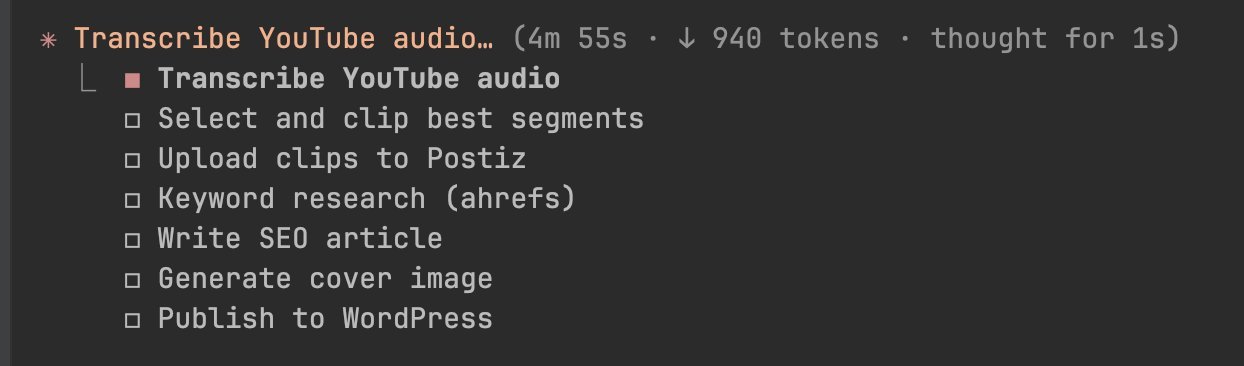
Watching Claude Code execute the plan is unreasonably satisfying:
A couple of articles I built this way:
Why This Beats Generic AI Content
The reason this works — and the reason a generic “AI blog post a day” service does not — comes down to three things:
- Real source material. Each article starts from something a human already validated (a high-engagement post, a popular video). The agent enriches; it does not invent.
- Tooling depth. Pulling code samples directly from
~/Projects/postiz-agent and ~/Projects/new-postiz-docs means the technical sections are accurate, current, and copy-pasteable. Most AI content fails here.
- Distribution baked in. Because the publishing step uses the Postiz CLI (and optionally the Postiz MCP), the same article can be repurposed into LinkedIn, Reddit, and X posts the same day. Social signals feed back into AEO/SEO rankings.
Try It on Your Own Stack
If you want to use this exact stack:
- The Postiz CLI for image hosting + cross-posting →
npm install -g postiz
- The Postiz MCP for fully agentic publishing → docs.postiz.com/cli/introduction
- The skills above are open — fork them, change the brand voice, change the CMS.
And if you want to skip the CMS entirely and let your articles compound on social media instead, give Postiz a try. It is open-source, self-hostable, and built for exactly this kind of agentic, multi-platform workflow — connect 28+ platforms, schedule, automate, and let your content do the heavy lifting.
See you at the next one.