You’re probably dealing with some version of this already. A designer uploads three Instagram graphics to a shared drive. A social manager grabs one for scheduling, but it’s the old version with last month’s offer. Someone else asks for the “final” logo, finds five files named final, final-new, final-v2, and FINAL-USE-THIS, then sends the wrong one to a freelancer.
Nothing is technically lost. But everything feels hard to find, hard to trust, and hard to reuse.
That’s where marketing asset management comes in. Not as a big, intimidating enterprise project, but as a practical way to organize the files, approvals, rules, and workflows your team already depends on every day.
For social teams, creators, agencies, and small businesses, this matters more than is generally understood. Existing coverage on MAM often focuses on enterprise setups, even though 68% of small marketing teams report asset discovery taking over 20% of weekly time, according to LucidLink’s discussion of marketing asset management gaps for smaller teams. If your week keeps disappearing into search, rework, and “can you resend that file?”, you’re not disorganized. You’re missing a system.
If content is one of the main ways you’re attracting leads with content, then the assets behind that content need just as much structure as the strategy itself. Social posts, brand templates, short videos, campaign graphics, customer quotes, and ad creatives all need to be easy to find and safe to reuse.
From Content Chaos to Calm Control
A growing team usually doesn’t notice the problem at first.
In the beginning, a few folders feel manageable. One person remembers where the Canva exports live. Another knows which Dropbox folder has the approved headshots. The founder has the latest pitch deck “somewhere.” It works, until the team adds more channels, more campaigns, and more people touching the same files.
Then small breakdowns start piling up.
A community manager republishes an outdated promo tile. An agency asks for product visuals and gets six conflicting files. A freelancer creates a new ad variation because nobody could find the original layered file. A short-form video performs well, but no one tags it clearly, so the team never reuses the winning hook.
That’s the daily pain MAM is meant to solve.
What marketing asset management actually means
Marketing asset management is the discipline of organizing, approving, storing, finding, reusing, and measuring the assets your marketing team uses. The keyword is discipline.
A tool can help. A shared folder can help. A DAM platform can help. But the true value comes from the rules around the files:
What counts as approved
Who can edit what
How assets are named
How versions are tracked
How performance is tied back to creative
Consider a shared kitchen. You don’t need a giant commercial setup to work efficiently. You need ingredients in the right place, labels on containers, clean stations, and a clear idea of what’s ready to serve. Without that, even a small kitchen turns chaotic fast.
Practical rule: If your team often asks “Where’s the latest version?” you don’t have an asset problem. You have a system problem.
Manage all your social media in one place with Postiz
A lot of MAM advice assumes a large company with multiple departments, long approval chains, and expensive software. Small teams often read that and think, “That’s not for us.”
It is for you. In fact, smaller teams often feel the pain sooner because they have less time to waste and fewer people to catch mistakes. A solo creator juggling brand deals, reels, carousels, and thumbnails still needs a way to separate drafts from approved assets. A three-person agency still needs naming rules, permissions, and a repeatable handoff process.
Good marketing asset management starts small. One shared system. One naming convention. One approved-assets folder. One clear workflow from draft to published.
That’s enough to move from chaos to control.
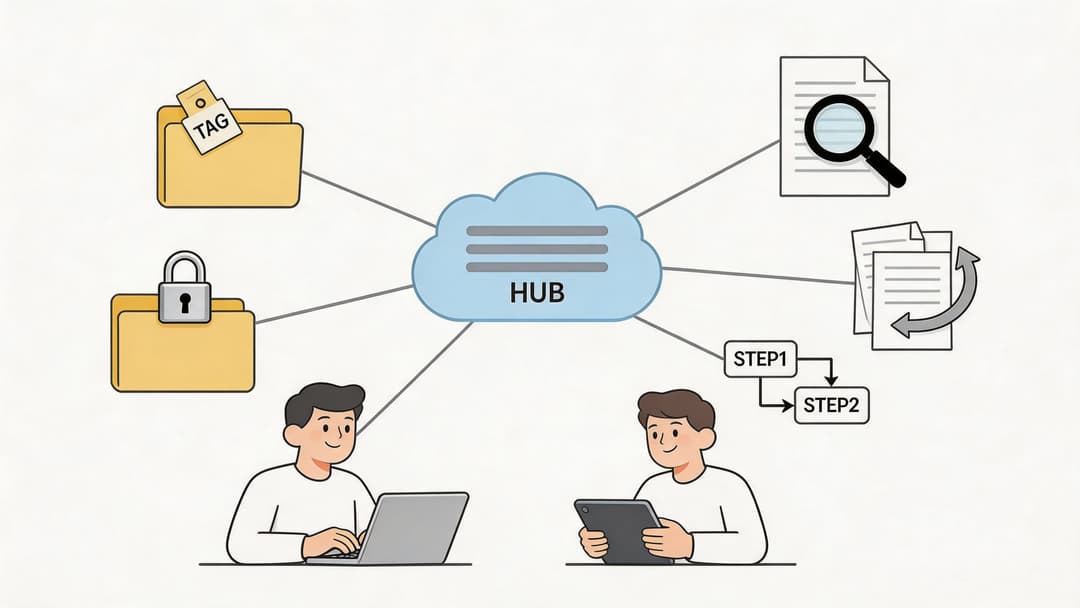
The Core Components of a Marketing Asset System
The easiest way to understand marketing asset management is to picture a digital library.
A library isn’t useful just because books exist in one building. It works because there’s a structure behind the shelves. Books are grouped logically. Each one has catalog information. Old editions are tracked. Access is managed. Borrowing follows a process.
A marketing asset system works the same way.
Centralized storage
This is the shelf itself. Your team needs one reliable home for marketing assets.
That doesn’t mean every file in the company belongs there. It means the assets marketers use should live in a place everyone trusts. Logos, social templates, product images, campaign videos, ad variants, brand guidelines, creator briefs, and approved copy blocks should not be scattered across inboxes, local desktops, and random chat threads.
If you’ve ever optimized my listings on Amazon or worked with someone who has, you’ve seen this need in action. Product imagery, comparison charts, A+ content files, and storefront creatives all need a single source of truth. Otherwise, outdated visuals sneak into live listings.
For a social team, centralized storage means a scheduler, designer, and approver all pull from the same approved set of assets. Nobody is publishing from a mystery folder.
Taxonomy and metadata
These two terms confuse people because they sound technical. They’re not.
Taxonomy is how you group assets. It’s the shelving system. Metadata is the information attached to each asset. It’s the catalog card.
A taxonomy might organize files by:
Channel such as Instagram, LinkedIn, TikTok, email
Campaign such as product launch, webinar, holiday promo
Asset type such as carousel, reel, thumbnail, static ad
Status such as draft, approved, expired, archived
Metadata adds searchable details to each file, like:
Audience for founders, customers, partners, or prospects
Product line tied to a specific offer
Usage rights for licensed photo, UGC, or internal design
Performance notes such as top CTR creative or high-save post
Here’s a simple example. Instead of storing a file as “graphic3-final.png,” you tag it as a summer campaign Instagram carousel for SMB owners, approved for paid and organic use, featuring product A, created in square format.
That single step makes search much easier later.
Good metadata turns “I know we made that graphic” into “I found it in seconds.”
Search and retrieval
Search is where teams feel the value.
Without a search layer, a library is just a room full of books. Without search in MAM, a folder system is just a pile with subfolders. The goal is to help someone find the right file quickly, even if they don’t remember the exact filename.
A strong retrieval setup lets a marketer search by campaign, content theme, format, audience, approval status, or even visual characteristics if the platform supports semantic search.
For social media work, this matters every day. You might need:
Last quarter’s best-performing testimonial video
The approved vertical version of a product demo
The current logo lockup for dark backgrounds
Every holiday template still cleared for reuse
If people can’t retrieve assets fast, they’ll recreate them. That leads to waste and inconsistency.
Version control
Version control answers one question cleanly. Which file should we use right now?
Every marketing team has lived through version confusion. The ad manager downloads one file. The designer updates text in another. The founder approves a third in email. Nobody knows what’s final.
Version control keeps a record of changes and makes the current approved version obvious. It also helps when teams need localized variants, resized formats, or revisions for different channels.
A practical naming structure might include campaign name, channel, format, and version. But naming alone isn’t enough. The system should also track status and approval history, so “latest” doesn’t just mean recently edited. It means ready for use.
Access and permissions
Not every user needs the same level of control.
A designer may need upload and edit rights. A freelancer may only need access to a limited campaign folder. A sales rep may need view-only access to approved one-pagers and brand visuals. An intern shouldn’t be able to overwrite your master logo files.
Permissions protect brand quality and reduce accidental mistakes. They also make collaboration easier because people can work confidently inside clear boundaries.
Here’s a simple way to understand it:
Role
What they usually need
Designer
Upload, edit, version, archive
Social manager
View approved assets, schedule, request revisions
Freelancer
Limited upload and comment access
Leadership
Review and approval access
Sales or partner teams
Download approved materials only
Workflows and approvals
A library also needs rules for circulation. In MAM, that’s your workflow.
Every asset moves through stages. The details vary by team, but the path is familiar: brief, draft, review, approved, published, archived or retired. If that flow only lives in people’s heads, mistakes happen.
For social content, workflows are especially important because speed creates risk. A trend hits, the team rushes to publish, and brand checks get skipped. With a workflow in place, fast doesn’t have to mean messy.
A simple workflow can answer:
Who creates the first draft
Who checks brand, legal, or messaging
Who marks the file approved
Where the approved file goes
How published assets get tagged for later reuse
When these five components work together, marketing asset management stops feeling abstract. It becomes a working system your team can trust.
Why Marketing Asset Management Matters for Growth
A lot of teams treat asset organization like housekeeping. Nice to have. Helpful when things get messy. Not directly tied to growth.
That’s a mistake.
When your team can find the right file, trust that it’s approved, reuse winning creative, and move a campaign from draft to publish without confusion, you’re not just cleaning up operations. You’re increasing the speed and quality of marketing output.
Efficiency that shows up in real work
The first gain is operational. Social teams feel it immediately.
When assets are organized, your team spends less time searching chat threads, checking if a file is current, or rebuilding things that already exist. That means more time for writing stronger captions, testing better hooks, and adapting content for each platform.
It also improves handoffs. Designers know where finished assets go. Social managers know which folder contains approved exports. Reviewers know what needs sign-off and what’s already cleared.
Brand consistency without bottlenecks
Growth creates complexity. More campaigns. More contributors. More formats. More opportunities for drift.
Without a system, your brand starts changing by accident. A creator uses an old intro slide. A freelancer crops a logo incorrectly. A regional team publishes a retired visual. None of these mistakes seem huge on their own, but together they weaken recognition and trust.
MAM helps by separating approved assets from working drafts and making governance practical. The team can move quickly because the right materials are already easy to access.
Brand consistency doesn’t come from telling people to be careful. It comes from making the correct assets easier to use than the wrong ones.
Better reuse means better return from every asset
Marketing teams often underuse their own best creative.
A strong testimonial clip might work in paid social, organic posts, landing pages, sales follow-up, and email. But if nobody can find it later, the asset dies after one campaign. The team spends money and time creating more instead of extracting more value from what already works.
That’s one reason MAM connects so well to growth. It increases the useful life of your creative work.
And the business case is not theoretical. According to MarCom’s write-up on measuring the impact of marketing asset management, top-performing organizations implementing MAM achieve 2-3 times higher local revenue, 98% of those top performers measure success through revenue growth, and 82% evaluate MAM by on-time and on-budget project delivery.
That tells you two important things:
High-performing teams don’t treat MAM as storage alone.
They judge it by business outcomes, not just tidier folders.
Why this matters for social-first teams
Social media work often looks lightweight from the outside. One post, one image, one caption. But behind each post sits a chain of assets, revisions, approvals, and performance choices.
For small businesses and creators, growth usually depends on producing more content without losing quality. MAM helps you do that by turning your asset library into reusable infrastructure.
Instead of starting from scratch every time, your team builds on what’s already approved, what already matches the brand, and what already proved useful in market.
That’s how organization becomes an advantage.
MAM vs DAM What Is the Real Difference
These terms get mixed together constantly, and the confusion is understandable.
Both deal with digital files. Both involve storage, search, and organization. Both can include permissions and workflows. But they are not the same thing.
The simplest way to separate them is this. DAM is usually the technology layer. MAM is the marketing operating layer.
The short version
A digital asset management system is a repository for digital files. It gives teams a central place to store, organize, retrieve, and govern assets.
A marketing asset management approach uses that repository, or a similar toolset, and adds the marketing-specific structure around it. That includes campaign workflows, approval rules, performance context, asset reuse, and governance tied directly to brand and content operations.
The market growth around DAM shows why this foundation matters. The global DAM market was valued at USD 4.22 billion in 2023 and is projected to reach USD 11.94 billion by 2030, according to Grand View Research’s digital asset management market analysis. Teams clearly need centralized repositories. But a repository alone doesn’t tell marketers what to reuse, what’s approved, or how an asset performed.
MAM vs DAM Key Distinctions
Aspect
Digital Asset Management (DAM)
Marketing Asset Management (MAM)
Primary purpose
Store and organize digital files
Manage marketing assets through their full working lifecycle
Scope
Often broader across the whole organization
Focused on marketing, brand, and campaign use
Typical users
Multiple departments such as HR, legal, product, sales, and marketing
Marketing teams, creative teams, agencies, social managers
“Is this the right file, approved, current, and worth reusing?”
Relationship to the other
Can act as the system of record
Often sits on top of or alongside DAM practices
A practical example
If your team stores logos, videos, sales decks, event photos, and HR brand files in one organized repository, that’s DAM territory.
If your marketing team adds rules for approval status, campaign tags, social-ready variants, expiration dates, and performance notes for those same assets, that’s marketing asset management.
So when do you need one versus the other?
You need DAM when files are scattered and nobody trusts the source of truth.
You need MAM when marketers need to create, approve, publish, and reuse assets in a repeatable way.
For many teams, the answer is both. A company-wide repository handles storage and governance, while marketing creates workflows and performance logic around the assets it uses every day.
If you want to see how that operational layer fits into day-to-day execution, this guide to a digital asset management workflow is a useful companion.
A DAM can tell you where the book is. MAM tells your team which edition to use, who approved it, where it belongs in the campaign, and whether it earned a spot on the shelf next time.
Your Roadmap to Implementing Marketing Asset Management
Marketing teams often delay marketing asset management because it sounds like a migration project with endless setup. It doesn’t have to be.
The fastest way to fail is to start by moving every file you own into a new platform. The better approach is to treat MAM like an operational redesign. Start with the assets your team uses constantly, define the rules around them, and build from there.
Phase one audit what you already have
Before choosing tools or naming conventions, find out how work currently moves.
List where assets live now. That usually includes Google Drive, Dropbox, Canva, Adobe files, email attachments, Slack, local desktops, agency portals, and scheduling tools. Then map who creates assets, who approves them, and how they get published.
Look closely at friction points such as:
Search delays when the team can’t find the latest version
Duplicate creation when someone rebuilds an asset that already exists
Approval confusion when draft and approved files sit together
Rights risk when licensed or time-limited content remains in active folders
Publishing errors when outdated visuals make it into live posts
This audit doesn’t need to be fancy. A spreadsheet is enough if it captures the truth.
Phase two choose a workable system
Once you know the pain points, pick a setup that fits your team’s size and workflow. Aprimo outlines a four-stage rollout for implementation that includes auditing current practices, selecting scalable solutions, designing taxonomy and metadata frameworks, and using phased migration to reduce disruption. The same source notes that AI-powered features can reduce content duplication by 30% or more in the right setup, as explained in Aprimo’s MAM best practices overview.
For a small team, “workable” usually means:
easy search
clear permissions
version tracking
comments or approvals
integrations with the tools you already use
A larger team may also need governance, rights management, and API access. What matters is fit, not feature sprawl.
If your content operation includes social scheduling and approvals, a connected workflow matters as much as storage. This article on marketing workflow management helps frame that operational side.
Field note: Don’t buy for your imagined future org chart alone. Buy for the workflow pain your current team feels every week.
Phase three design the system before migration
Many implementations experience instability. Teams move files before they define the logic.
Start with a naming convention your team can realistically follow. Keep it simple and descriptive. Then define your taxonomy and metadata. Don’t try to tag everything under the sun. Focus on the fields that support real decisions.
For a social-first team, useful metadata often includes:
Metadata field
Why it matters
Campaign
Groups related assets across channels
Channel or format
Separates reel, story, carousel, static, ad
Status
Distinguishes draft, approved, retired
Audience
Helps reuse assets for the right segment
Usage rights
Prevents accidental use of restricted content
Performance note
Flags creative worth reusing
Also define the asset lifecycle. A simple model is enough: brief, draft, review, approved, live, retired.
At this stage, set permission rules too. Decide who can upload, who can edit master assets, who can approve, and who gets view-only access.
Phase four migrate in phases and prove value early
Now move assets, but only the high-priority ones first.
That usually means your most used and most risky files:
Brand essentials such as logos, fonts, approved colors, and brand guidelines
Active campaign assets currently in rotation
Social templates for recurring content types
Top-performing evergreen assets your team reuses often
Licensed or rights-sensitive files that need clear governance
This phased approach lowers disruption and gives the team a fast win. If your social managers can instantly find approved templates next week, adoption gets much easier.
After the first migration wave, train people on the new habits. Show them where approved files live, how to search, how to tag a new asset, and how to retire one. Training should focus less on the software menu and more on the daily actions each role needs to perform.
A short walkthrough can help teams visualize the process in action:
The smallest useful starting point
If this still feels too large, start smaller.
Pick one content stream, such as weekly social posts. Create one approved folder, one draft folder, one archive folder, a short naming convention, and a few metadata tags. Then run that system for a month.
A solo creator can do this. A three-person agency can do this. A growing in-house team can do this without waiting for enterprise software approval.
MAM works best when it begins as a repeatable habit and grows into a platform, not the other way around.
Measuring Success and Integrating Your Tech Stack
A tidy asset library feels good. A useful asset library saves time, reduces rework, and helps your team choose better creative the next time around.
For social teams, that difference matters every week. You are not filing documents for compliance. You are trying to publish on time, reuse what already works, and avoid rebuilding the same carousel, video cut, or caption set from scratch.
The metrics that matter most
A marketing asset system starts proving its value when you can answer simple operational questions with confidence.
How often did the team reuse approved assets? Are designers still recreating pieces that already exist? Did campaign setup get faster? Can social managers find the right version without asking in Slack? Those are the signals that show whether the system is helping daily work.
A good way to frame this is to treat your library like a kitchen prep station. If every ingredient is labeled, fresh, and easy to grab, cooking gets faster and the meals are more consistent. If assets carry context about usage, status, and performance, content production gets faster and the output improves.
Useful KPIs often include:
Asset reuse rate, which shows whether strong creative keeps getting used
Production cost trend, which helps you spot duplicate work and wasted design time
Time to launch, which shows whether approved assets move into campaigns faster
Search friction, which you can measure through team feedback, requests for help, or repeated “where is that file?” questions
Retirement discipline, which shows whether expired, off-brand, or weak assets are leaving active circulation
Social teams should add one more layer. Attach performance context to the asset whenever possible. If a customer quote graphic keeps outperforming a product feature post, that note should live near the file itself, not disappear inside a reporting deck.
Turn the library into a feedback loop
The gain comes from closing the loop between creation, publishing, and results.
Without that loop, the asset library acts like storage. With it, the library works more like a reference shelf in a newsroom. Your team can look back and see which visual formats, hooks, and campaign themes deserve another run.
That changes the quality of internal requests. A content lead can ask for “the approved testimonial set that performed well on Instagram Stories” instead of “something like that post from last month.” A designer can review which aspect ratios and templates got reused most often. A strategist can compare what travels well across organic social, paid social, and email.
If you want a clearer way to decide what performance signals belong in that system, this guide to content performance metrics is a useful companion.
What integration looks like in practice
Integration does not need to start with a big enterprise project. For a solo creator or small marketing team, it can be as simple as making sure your asset library and your publishing tools share the same logic.
Here is the practical version. An asset should carry enough context that anyone on the team can answer a few key questions without hunting through five tools:
Connected tool type
What it adds to MAM
CRM
Audience and campaign context
Analytics platform
Engagement and conversion outcomes
Ad platforms
Creative-level paid performance
Design tools
Version history and faster updates
Social scheduler
Publishing history, approvals, and reuse patterns
That setup is especially helpful for SMBs and social teams that work fast with limited headcount. One person may be acting as strategist, creator, approver, and publisher in the same week. In that environment, MAM is less about software complexity and more about reducing context switching.
A practical example helps. Say your team runs recurring social campaigns around product education, customer proof, and event promotion. If the asset system is connected to the rest of your workflow, each file can show where it ran, which campaign it supported, whether it is still approved, and whether it deserves reuse or retirement. That turns “make a new one” into “adapt the approved version that already proved useful.”
That operational visibility also improves reporting. If your team is trying to get sharper about marketing ROI for small businesses, asset-level tracking gives you a cleaner line between the creative you approved, the content you published, and the results you discuss later.
When your library helps the team repeat winning formats, update aging assets, and retire weak ones, MAM stops being a filing project. It becomes part of how your content operation learns.
Frequently Asked Questions About MAM
Can I start with Google Drive or Dropbox
Yes.
A shared drive is often the right starting point for a small team, a solo creator, or an SMB that is still building process. What matters is the system you place on top of the tool. If your drive works like a closet where everything gets tossed onto one shelf, people waste time searching and reuse the wrong files. If it works like a labeled library, the same tool becomes far more useful.
Start simple. Create folders for draft, approved, and archived assets. Use one naming format across the team. Set basic permissions so only approved files make it into live posts.
What’s the difference between taxonomy and metadata
These terms sound technical, but the distinction is practical.
Taxonomy is your organizing structure. It covers categories like campaign, channel, content type, or approval status. Metadata is the information attached to each asset. It can include audience, product line, creator, usage rights, expiration date, or a note about past performance.
A shared kitchen is a good comparison. Taxonomy is where ingredients are stored, pantry, fridge, freezer. Metadata is the label on each item that tells you what it is, when to use it, and whether it is still good.
I’m a solo creator. Do I really need marketing asset management
Yes, in a lightweight form.
If you manage reels, carousels, hooks, thumbnails, brand files, sponsor creatives, and caption variations, you already have marketing assets. The question is whether you can find the right version quickly and reuse it without second-guessing yourself. That matters even more for social work, where content moves fast and old files can slip back into circulation by accident.
A solo setup can stay small:
Create three states: draft, approved, and archived
Use clear file names with platform, topic, and version or date
Mark reusable winners so strong posts are easy to revisit
Separate sponsor or client assets from your evergreen content
That small amount of structure saves time every week.
How do I know when an asset should be retired
Retire an asset when using it would create confusion, inconsistency, or risk.
Old pricing graphics, expired offers, outdated logos, and files with unclear rights should leave your active library. Social teams feel this quickly because an outdated image can get reposted in seconds through a scheduler, a content calendar, or a duplicate template. Archiving protects the team from avoidable mistakes.
Do I need expensive software to do this properly
No.
Clear rules beat expensive tools. A small team with clean naming, approval habits, and a few useful tags will usually work faster than a larger team with a complicated platform and no shared process.
Software helps after the operating habits are clear.
What should I organize first
Start with assets your team touches often and could easily misuse.
For social teams, that usually means brand files, current campaign visuals, recurring post templates, approved product screenshots, logo variations, and evergreen assets that get repurposed across channels. Organizing those first gives you the fastest payoff because they show up in day-to-day creation, reviews, and scheduling.
If your team publishes across several social channels, the next practical step is to connect that asset discipline to your publishing process. Postiz can support that workflow by giving creators, agencies, and in-house teams one place to plan posts, collaborate, publish, and review performance, so approved assets and scheduled content stay aligned.
Best time to post on instagram on friday - Maximize Friday engagement! Get data-backed best times to post on Instagram on Friday. Find your personal peak postin





![Top 10 Hopper Hq Alternatives [2024 update]](/_next/image?url=https%3A%2F%2Fcms.postiz.com%2Fwp-content%2Fuploads%2F2024%2F09%2FBlog-Post-27.png&w=1080&q=75)