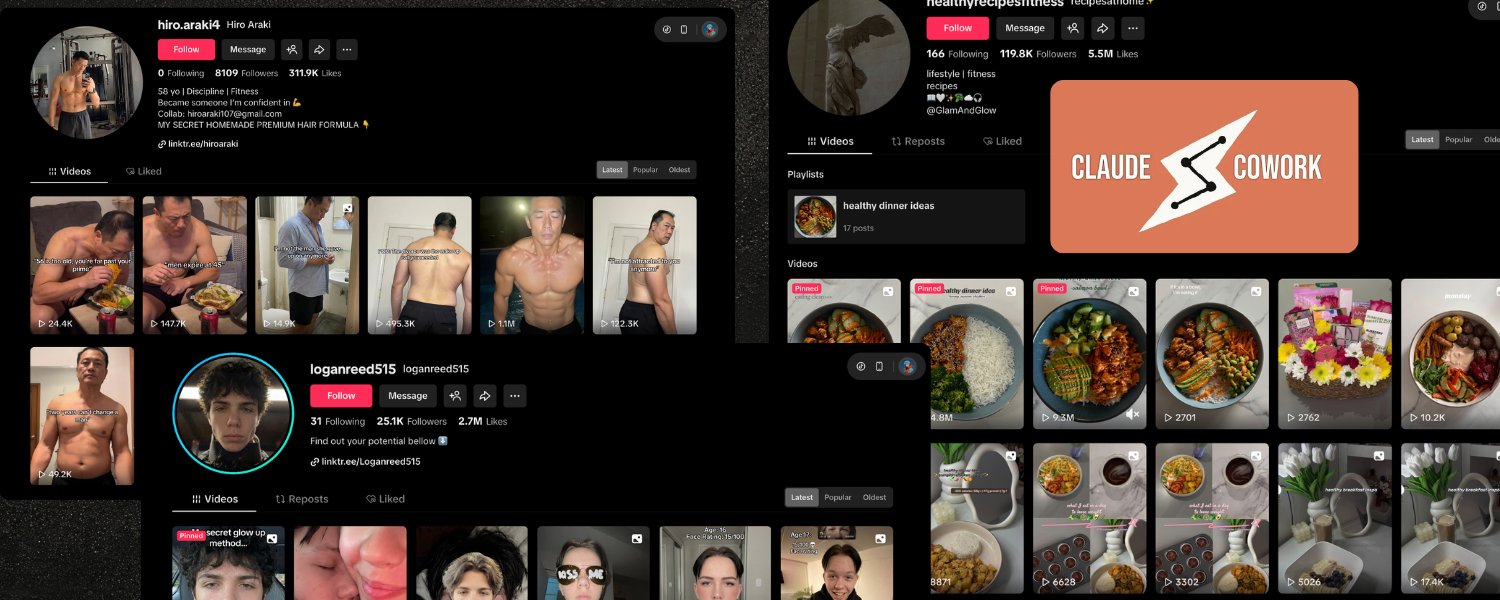
AI influencer accounts on TikTok are pulling millions of views. Faceless fitness accounts, skincare pages, recipe channels — they post daily, grow fast, and never burn out. The secret isn’t hustle. It’s a three-tool automation pipeline that handles everything from script writing to publishing, and it costs a fraction of what traditional production would.
Alex Nguyen, a developer and content creator, recently published a detailed breakdown of exactly how this works. The workflow chains together Claude (Anthropic’s AI assistant) for script generation, Arcads AI for video production, and Postiz for scheduling and cross-platform distribution. Here’s the full playbook — with technical implementation details you can start using today.
Why Short-Form Video Automation Actually Matters Now
TikTok has over 1.5 billion monthly active users. Instagram Reels and YouTube Shorts follow the same algorithmic playbook: reward consistency, surface fresh content, and punish gaps in posting frequency. The accounts that grow aren’t necessarily the most creative — they’re the most consistent.
That creates a brutal production bottleneck. A single piece of short-form content requires brainstorming, scripting, filming or sourcing footage, editing, captioning, and uploading. Multiply that by daily posting across three platforms, and you’ve got a full-time job just feeding the algorithm.
This is where AI-powered automation changes the math entirely. By combining specialized tools for each phase of production, you can build a pipeline that runs from “topic idea” to “published post” with minimal manual intervention. The economics are stark: hiring a UGC creator runs $80–200 per video. At 14 videos per week, that’s $4,480–11,200 monthly. The automated stack described here delivers comparable output at roughly 5–10% of that cost.
The Three-Tool Stack: How Each Piece Fits Together
Each tool in this pipeline handles a distinct phase. There’s minimal overlap, and the output of each feeds directly into the next.
Claude: The AI Content Strategist
Claude, built by Anthropic, serves as the scriptwriting and strategy engine. Using Claude’s desktop app or the Cowork mode for autonomous multi-step tasks, you can research trending topics in your niche, generate batch scripts optimized for short-form video, and organize everything into structured content calendars.
What makes Claude especially effective here is its ability to work with local files. You can point it at a project folder, give it brand guidelines and audience demographics, and it will generate scripts informed by that context rather than producing generic templates. The scheduled tasks feature means you can set up weekly automated script generation — every Monday at 8 AM, a fresh batch of 14 scripts lands in your project folder.
Arcads AI: The Virtual Production Studio
Arcads AI turns scripts into realistic direct-to-camera videos using AI-powered human actors. You paste a script, choose from over 300 AI performers, and the platform renders a polished UGC-style video in roughly two minutes. The AI handles lip sync, natural gestures, micro-expressions, and even breathing motions.
The batch creation feature is where this gets powerful at scale. Prepare a CSV of scripts (Claude can generate this), select your actor pool, and initiate a batch. Arcads processes all videos simultaneously, meaning an entire week’s content can be produced in a single session. The platform supports over 35 languages, which opens up international scaling without additional production costs.
Postiz: The Distribution Command Center
Postiz is the scheduling, cross-posting, and analytics layer. It’s the agentic social media scheduling platform supporting over 30 channels — TikTok, Instagram, YouTube, X, LinkedIn, Reddit, Facebook, Pinterest, Threads, and more. What sets Postiz apart from other scheduling tools is its deep automation capability through a CLI agent, REST API, and MCP (Model Context Protocol) server that AI tools can connect to directly.
Step 1: Script Generation with Claude
The first phase is content ideation and script writing. Start by asking Claude to research trending content in your niche. If you have the Chrome connector enabled, Claude can actively browse TikTok’s Creative Center and competitor profiles.
A strong prompt for batch generation looks like this: “Based on the trend research, generate 14 TikTok video scripts for the next two weeks. Each script should include a strong hook in the first 3 seconds, body content of 45–60 seconds, and a clear call-to-action. Save each script as a separate text file in /scripts/ folder, named by date and topic.”
Optimization tips that make a real difference: generate 3 hook variations per script for A/B testing, specify the emotional tone for each piece (calm and authoritative vs. excited and urgent), and incorporate platform-native language patterns. TikTok scripts need to feel conversational — written for the ear, not the page.
For ongoing generation, Claude’s scheduled tasks feature lets you automate this weekly. Set a recurring task, provide your standard prompt with instructions to reference previous performance data, and fresh scripts appear automatically. Just note that scheduled tasks require the Claude Desktop app to be open.
Step 2: Video Production with Arcads AI
With scripts ready, Arcads handles the production phase. A few formatting rules help optimize the output: keep scripts under 200 words for 60–90 second pacing, write conversationally, use ellipsis for natural pauses, and mark emphasis with caps.
Actor selection matters more than most people realize. Using the same 2–3 actors across your content builds audience familiarity, similar to having a recurring host. Match the actor’s demographic to your target audience and select background settings that fit your niche — a home office for productivity content, a gym for fitness, a kitchen for cooking.
The workflow per video is straightforward: paste your script, select actor and background, choose emotion settings, click Generate, and download the MP4 after about two minutes. For post-production touches like trending audio, animated captions, or branded intros, CapCut (free and TikTok-native) handles the finishing work.
Step 3: Scheduling and Publishing with Postiz
With produced videos in hand, the distribution phase is where Postiz shines — and where the technical depth really opens up. While the Postiz dashboard provides an intuitive calendar drag-and-drop interface, the CLI and API approach unlocks full programmatic control.
Using the Postiz CLI for Automated Scheduling
The Postiz CLI agent is purpose-built for AI-driven workflows. Install it globally and authenticate:
npm install -g postiz
postiz auth:login
postiz integrations:list
From there, uploading and scheduling is a single pipeline:
# Upload your video and capture the URL
VIDEO_RESULT=$(postiz upload ./video-day1.mp4)
VIDEO_URL=$(echo "$VIDEO_RESULT" | jq -r '.path')

# Schedule the post to TikTok
postiz posts:create \
  -c "Your caption with #hashtags" \
  -m "$VIDEO_URL" \
  -s "2026-04-20T10:00:00Z" \
  -i "your-tiktok-integration-id"
For multi-platform distribution, pass multiple integration IDs separated by commas. A single TikTok video gets scheduled to Instagram Reels, YouTube Shorts, LinkedIn, and X simultaneously:
postiz posts:create \
  -c "Platform-specific caption here" \
  -m "$VIDEO_URL" \
  -s "2026-04-20T10:00:00Z" \
  -i "tiktok-id,instagram-id,youtube-id,linkedin-id"
Each platform has different character limits and settings. Use postiz integrations:settings <id> to discover the exact requirements for each connected account before posting.
Using the Postiz REST API Directly
For deeper integration — say, connecting this pipeline into n8n or Make.com workflows — the REST API provides full programmatic control:
curl -X POST "https://api.postiz.com/public/v1/posts" \
  -H "Authorization: your-api-key" \
  -H "Content-Type: application/json" \
  -d '{
    "type": "schedule",
    "date": "2026-04-20T10:00:00.000Z",
    "posts": [{
      "integration": { "id": "your-tiktok-id" },
      "value": [{
        "content": "Caption with #hashtags",
        "image": [{ "id": "vid-id", "path": "https://uploads.postiz.com/video.mp4" }]
      }],
      "settings": {
        "__type": "tiktok",
        "privacy_level": "PUBLIC_TO_EVERYONE",
        "duet": true,
        "stitch": true,
        "comment": true,
        "content_posting_method": "DIRECT_POST"
      }
    }]
  }'
The API supports platform-specific settings for every channel. TikTok posts can configure privacy level, duet/stitch permissions, and whether to use direct posting or creator approval. YouTube posts can set titles, visibility, tags, and playlist assignments. Reddit posts can target specific subreddits with required flairs.
MCP Integration: Let Claude Schedule Posts Directly
The most powerful integration point is Postiz’s MCP (Model Context Protocol) server. This lets AI assistants like Claude interact with Postiz natively — no manual CLI steps needed. Configure it in your Claude Desktop settings:
{
  "mcpServers": {
    "postiz": {
      "url": "https://api.postiz.com/mcp/your-api-key"
    }
  }
}
Once connected, Claude can directly list your integrations, generate images for posts, create and schedule content, and even generate videos — all through natural language. The MCP server exposes 8 tools including integrationList, schedulePostTool, generateImageTool, and generateVideoTool.
This means a single Claude prompt like “Generate 7 scripts for this week, create images, and schedule them across TikTok and Instagram at optimal times” can orchestrate the entire publishing workflow end-to-end.
Step 4: The Analytics and Optimization Loop
Automation without measurement produces noise, not growth. Postiz provides built-in analytics across all connected platforms. The key metrics to track for short-form video: average watch time and completion rate, engagement rate (likes + comments + shares divided by views), follower growth per post, and click-through rate.
The real leverage comes from feeding these insights back into script generation. Export weekly analytics from Postiz, drop the CSV into your Claude project folder, and ask Claude to analyze what worked and why. “Identify the top 3 performing videos and what made them successful. Use these insights to adjust next week’s script batch.” This creates a compounding feedback loop where each week’s content is informed by real performance data.
Systematic A/B testing becomes straightforward with this stack. Test one variable at a time: different hooks for the same content, different AI actors delivering identical scripts, different posting times, different caption strategies. Run each test for at least a full week before drawing conclusions. Use Claude to analyze results and generate actionable adjustments.
Building the Full Automated Pipeline
For maximum automation, connect all three tools into a hands-off workflow using n8n, Make.com, or Zapier — all of which Postiz integrates with natively.
A typical automated pipeline looks like this:
- Scheduled trigger fires every Monday morning
- Claude generates a batch of scripts via a pre-configured scheduled task
- An n8n watcher node detects new script files in the project folder
- Scripts are sent to Arcads via their API for video generation
- Completed videos are downloaded and uploaded to Postiz via the CLI
- Posts are scheduled across all platforms according to the content calendar
Even without API integrations, Claude can serve as a file-based orchestrator. Set up a folder structure — /scripts/ for generated scripts, /videos/ for Arcads output, /ready-to-post/ for final content, /analytics/ for performance exports — and Claude can monitor these folders, move files between stages, and keep the content calendar updated.
Cost Breakdown: AI Automation vs. Traditional Production
The economics make the strongest case for this approach. Here’s a realistic cost breakdown for producing 14 videos per week (56 per month):
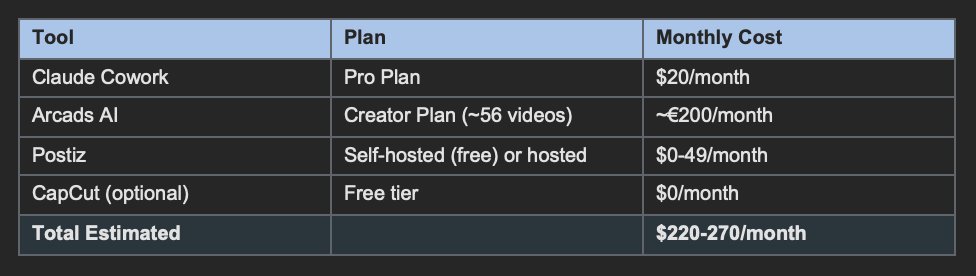
Compare that to traditional UGC production at $80–200 per video: 56 videos per month would cost $4,480–11,200. Even a modest in-house setup with equipment, editing time, and opportunity costs exceeds $2,000 monthly. The AI stack delivers at roughly 5–10% of the traditional cost.
Common Pitfalls and How to Avoid Them
Repetitive content syndrome. AI-generated scripts can feel formulaic if you don’t actively vary formats. Cycle through educational how-tos, opinion pieces, trend reactions, myth-busting, and storytelling. Variety keeps audiences engaged and helps the algorithm categorize your content favorably.
Platform blindness. What works on TikTok doesn’t automatically translate to Instagram Reels or YouTube Shorts. Customize captions, hashtags, and even video length for each platform when cross-posting through Postiz. Claude can generate platform-specific caption variations in batch.
Losing the human element. Automation should enhance your presence, not replace your personality. Intersperse AI-generated content with genuine personal videos. Respond to comments yourself. Use the time saved to engage more deeply with your community — the algorithm notices authentic interaction.
Skipping quality review. Always preview AI-generated videos before publishing. Arcads produces impressive results, but occasional lip-sync or expression glitches can occur. Build a quality gate into your workflow where each video gets approved before entering the scheduling queue.
Physical product limitations. AI actors cannot hold, demonstrate, or interact with physical products naturally. If your content requires product demos, supplement AI videos with real filmed content and use Arcads primarily for talking-head and testimonial scripts.
Scaling Beyond a Single Account
Once the base pipeline runs smoothly, scaling is where things get interesting.
Multiple niches. The same tool stack powers content for entirely different TikTok accounts. Create separate project folders in Claude, maintain distinct actor selections in Arcads, and connect all accounts through Postiz for centralized management.
Agency model. As businesses scale their operations — whether through AI-powered analytics dashboards for recruiting or content automation for marketing — the need for multi-tenant platforms grows. Postiz’s architecture supports separate environments for each client. Managing dozens of accounts from a single dashboard becomes feasible — each client’s strategy, scripts, and analytics stay isolated.
International expansion. Arcads supports 35+ languages with accurate localization. Combined with Claude’s translation capabilities, a successful content formula can expand into international markets with minimal additional effort. Write scripts in English, translate, generate localized videos, and schedule through Postiz — all within the same workflow.
Content repurposing. Use Claude to transform top-performing TikTok scripts into blog posts, email newsletters, Twitter threads, and LinkedIn articles. Postiz schedules all these repurposed pieces alongside the original video content, multiplying the value of each script.
Frequently Asked Questions
How much does it cost to automate TikTok content with AI?
A typical setup runs $220–270 per month: Claude Pro at $20/month for script generation, Arcads AI Creator plan at approximately 200 euros per month for 56 videos, and Postiz at $0–49/month for scheduling. This produces 14 videos per week across multiple platforms — compared to $4,480–11,200/month for traditional UGC creators.
Can I schedule posts to TikTok, Instagram, and YouTube at the same time?
Yes. Postiz supports cross-posting to 20+ platforms from a single command or dashboard action. Using the CLI, pass multiple integration IDs to schedule one video across TikTok, Instagram Reels, YouTube Shorts, and other channels simultaneously.
Do I need to code to set up this automation?
Not necessarily. The Postiz dashboard provides a visual calendar for scheduling, and Claude’s desktop app handles script generation through natural language prompts. For the full automated pipeline (scripts to videos to publishing), some CLI or API usage is involved, but the commands are straightforward and well-documented.
Is AI-generated video content against TikTok’s terms of service?
TikTok requires disclosure of AI-generated content. Arcads’ output is designed to feel authentic and UGC-style, but you should follow each platform’s content policies regarding AI disclosure. Postiz’s TikTok integration includes settings for brand content and AI-made content toggles.
How does the Postiz MCP integration work with Claude?
Postiz exposes an MCP server that Claude can connect to natively. Once configured, Claude can list your social accounts, create and schedule posts, generate images, and produce videos — all through natural conversation. This enables end-to-end automation where a single prompt generates and publishes content across all your channels.
Start Building Your Automated Content Pipeline
The gap between creators who post sporadically and those who dominate their niche isn’t talent — it’s systems. This three-tool pipeline (Claude for scripts, Arcads for production, Postiz for distribution) compresses weeks of manual work into hours of automated output.
The most successful operators don’t treat this as set-it-and-forget-it. They use automation to eliminate repetitive production work, then invest the saved time into strategic thinking, community engagement, and creative experimentation.
Here’s a practical ramp-up plan:
- Week 1: Set up all three tools and produce your first batch of 7 videos manually to learn the workflow
- Week 2: Use Claude for batch script generation and establish your folder structure
- Week 3: Implement scheduled tasks and begin tracking analytics systematically
- Week 4: Review your first month of data, optimize, and explore API-level automation
- Month 2+: Scale to daily posting, add cross-platform distribution, and run A/B tests
Ready to automate your social media content? Try Postiz free — the agentic scheduling platform that connects your entire content pipeline. On every plan, Postiz gives you the CLI, API, and MCP integrations to build exactly the automation workflow described here. Start scheduling smarter today.