So, you're ready to start making money from your Discord community? That's awesome. The very first decision you'll make is also the most important one: choosing the right tool for the job.
This choice boils down to two main paths. You can either use Discord's built-in Server Subscriptions or integrate a more powerful third-party tool. This isn't just a technical detail; it's the foundation of your entire business model.
Choosing Your Monetization Path
Think of it like this: are you looking for an all-in-one, easy-to-use system, or do you need a specialized, high-performance engine you can customize? Neither is right or wrong, but one will definitely fit your community's needs—and your long-term vision—much better than the other.
The Native Route: Discord Server Subscriptions
Going with Discord's own Server Subscriptions is all about simplicity and a smooth user experience. Everything happens right inside the Discord app, which your members already know and trust. There are no external websites to visit or new accounts to create, which can make a huge difference in getting people to sign up.
The setup is incredibly straightforward. Discord handles all the payment processing and automatically assigns the paid roles. This is the perfect path if you want to get up and running quickly with a low-maintenance, "set it and forget it" approach.
Of course, that convenience comes with some trade-offs. You're locked into Discord's fee structure and have less control over the checkout process and your customer data.
Key Takeaway: The native route is fantastic for prioritizing ease of use for both you and your members. It's a solid starting point for anyone who wants a direct, uncomplicated way to offer paid roles.
As you plan this out, it helps to think bigger. Integrating your server monetization into broader strategies for growing an online business will ensure you’re building something that can last.
The Third-Party Integration Path
If you're looking for more power and flexibility, a third-party service like Whop, Memberful, or Patreon is the way to go. These platforms are purpose-built for managing memberships, offering advanced features that go well beyond what Discord’s native tool can do.
With these tools, you can unlock a whole new level of control:
Customizable Landing Pages: Build branded, professional sales pages that are designed to convert visitors into subscribers.
Diverse Payment Options: Give your members more ways to pay, which can directly boost your sign-up rates.
Advanced Analytics: Get real data on your revenue, subscriber growth, and churn so you can make smarter decisions.
Integration with Other Tools: Connect your membership platform to your email marketing software, CRM, and other essential business tools.
Yes, this path takes a bit more work to set up. You'll need to configure the service and connect it to your Discord server, usually with a bot. Members also have to complete their purchase on an external site. But for serious businesses, the long-term control, scalability, and powerful features are often well worth the effort.
Manage all your social media in one place with Postiz
To make the choice clearer, let's break down the key differences side-by-side.
Feature
Discord Server Subscriptions (Native)
Third-Party Integrations (e.g., Memberful, Whop)
Ease of Setup
Very simple and fast; managed entirely within Discord.
More complex; requires setting up an external account and bot.
User Experience
Seamless; users subscribe without leaving the Discord app.
Requires an extra step; users go to an external site to pay.
Fees
90/10 split; you keep 90% of the revenue.
Varies; typically a lower platform fee plus payment processing fees.
Customization
Limited; uses Discord's standard checkout and interface.
High; customizable landing pages, branding, and checkout flows.
Analytics & Data
Basic; provides simple revenue and subscriber counts.
Advanced; deep insights into sales, churn, and member behavior.
Feature Set
Focused on role-gating and basic subscriptions.
Extensive; includes marketing tools, affiliates, and integrations.
Payment Options
Standard credit/debit card and PayPal options via Discord.
Flexible; often includes Apple Pay, Google Pay, and crypto.
Ultimately, the best choice depends on your specific goals. If you're just starting out or want a simple, no-fuss solution, Discord's native subscriptions are a great fit. But if you're building a more sophisticated business and need advanced tools to scale, a third-party integration will give you the power and flexibility you need to grow.
Crafting Tiers and Perks People Actually Want
Designing your membership tiers is where creativity meets business sense. Anyone can throw "exclusive content" behind a paywall, but the communities that actually thrive are the ones that deliver real, tangible value. The goal isn't just to ask for money—it's to make people excited to subscribe.
Forget generic templates. A successful tier structure comes from knowing what your specific audience genuinely wants. A community for stock traders will value wildly different perks than a fan club for a popular streamer or a guild for an MMORPG.
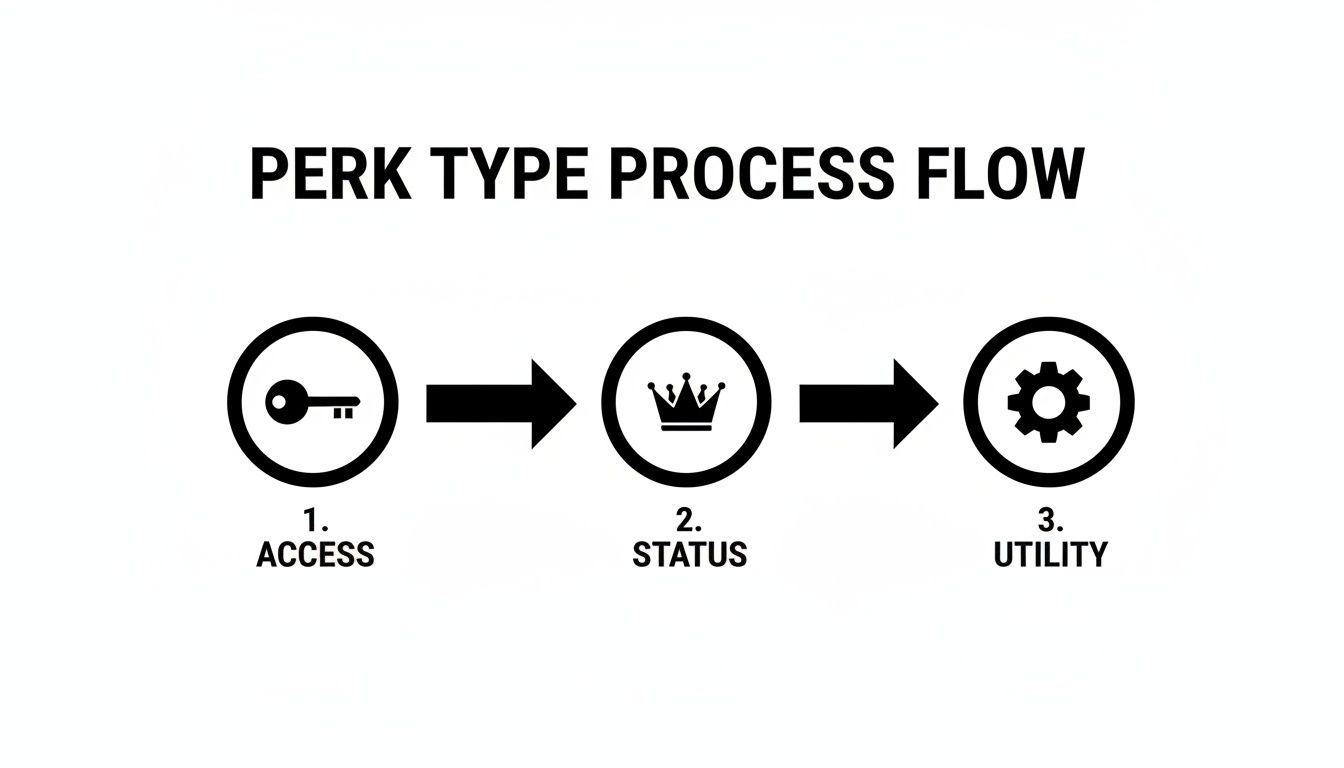
The Three Flavors of Killer Perks
To build a balanced and appealing offering, I find it helpful to think about perks in three main buckets. A really solid tier will usually mix and match from each, creating something that feels well-rounded and worth the price.
Access Perks: This is the most common type. You’re giving subscribers a key to a locked room—a private channel, early content, a secret part of the server. It creates a clear sense of exclusivity.
Status Perks: These are all about recognition and social standing. Think custom role colors, a shiny icon next to their name, or a spot on a "Top Supporters" list. It’s less about function and more about feeling important.
Utility Perks: These perks give members a tangible tool or advantage. Maybe it’s access to a special bot command that saves them time, the ability to post images in a channel where others can’t, or priority in a queue.
Mixing these is the secret sauce. A basic tier might just offer access to one private channel. But a premium tier could bundle that access with a unique role color (status) and the ability to use a custom bot command (utility). Now that feels substantial.
Building a Value Ladder People Want to Climb
Your tiers should tell a story, with each one feeling like a logical and tempting upgrade from the one before it. This is often called a value ladder. The jump in price between tiers has to be matched by a clear and significant jump in value.
Let's imagine a community for a competitive shooter game:
Tier 1 ($5/month): Get access to our private #strategy-discussion channel and a unique "Supporter" role icon. (Access + Status)
Tier 2 ($15/month): Everything in Tier 1, plus access to weekly VOD reviews with our coaches and entry into members-only tournaments. (Adds high-value Access)
Tier 3 ($30/month): Everything from the first two tiers, plus a monthly one-on-one coaching session and a flashy, custom-colored role name that really pops in chat. (Adds high-value Utility + premium Status)
See how that works? It feels like a natural progression. The $5 tier is an easy "yes" for most people, while the higher tiers offer benefits that directly help a competitive player get better at the game.
A great tier structure doesn't just sell features; it sells outcomes. Members aren't just buying access to a channel. They're buying a better chance to win, a deeper connection with the community, or a faster way to reach their goals.
Real-World Perk Ideas for Different Communities
The best perks are always tailored to your niche. Here are some practical examples to get the gears turning.
For a Creator Fan Club:
Early access to new videos before they go public.
A "Behind-the-Scenes" channel with candid updates, photos, or works-in-progress.
The ability to vote on future content ideas or video topics.
A special role that gets highlighted when the creator is live on stream.
For a Trading or Investing Group:
Access to channels with real-time trade alerts from experts.
Exclusive bot commands that pull specific financial data or charts on demand.
Weekly market outlook webinars or Q&A sessions with seasoned traders.
A "Hall of Fame" role for members who share highly successful trade ideas.
Just look at Discord's own history. When Server Boosting was introduced back in 2018, it let users pay to collectively upgrade their entire server with perks like better audio and more emoji slots. This created a viral, community-funded growth loop that, by 2023, helped push total revenue to $575 million. You can dig deeper into how community-funded features fuel Discord's growth statistics and revenue.
The lesson is the same for your subscriptions: offer perks that not only benefit the individual but also visibly improve the community for everyone. When you do that, people will be proud to pay. By carefully designing your paid roles, tiers, and perks, you’re building a sustainable system that rewards your most dedicated members and creates a reliable income stream.
A Practical Guide to Setting Up Server Subscriptions
Alright, let's roll up our sleeves and get this done. We've talked strategy, now it's time to actually build your subscription program using Discord's native tools. The process is pretty straightforward, but the details are what separate a sloppy launch from a professional one.
First things first, you can't just flip a switch. Discord has a few boxes you need to tick before you can even see the monetization options.
Checking Your Server Eligibility
Before you can start offering paid roles, your server and your personal account have to meet Discord's criteria. This isn't optional, so let's get it out of the way.
You have to be 18 or older to handle the money side of things.
Your Discord account needs a clean record—no recent violations or strikes.
Two-Factor Authentication (2FA) is mandatory. You need it enabled on your account, and you must require it for all moderators on your server.
Your server must be set to "Community" mode. This unlocks the analytics and other tools you'll need to manage a growing subscriber base.
Once you’ve met these requirements, you'll see a Server Subscriptions option pop up in your Server Settings, right under the "Monetization" section.
Activating and Configuring Your Tiers
Now for the fun part. With eligibility sorted, you can start building out your subscription tiers directly in Discord. This is where your planning comes to life as you define the roles, prices, and perks people will pay for.
The interface holds your hand through creating each tier, letting you set a price and write a description. Keep it clear and punchy. For a $5 tier, you're not writing an essay. Something like, "Get access to our exclusive #supporters-lounge and a unique role color to show your support!" works perfectly. Clarity sells.
This is exactly how Discord's own Nitro subscription became such a massive success. It started in 2016 with simple perks like custom emojis and better streaming. By 2023, that one feature was pulling in $207 million in revenue. You can dig into more stats on Discord's financial success to see how powerful this model is.
A good way to structure your perks is to layer the value as tiers go up.
As you can see, you can start with basic access, layer on status symbols for mid-tiers, and save your most unique, utility-based perks for the top-tier supporters.
Linking Tiers to Roles and Permissions
Pay close attention here—this is the most critical technical piece of the puzzle. The whole point of Server Subscriptions is the automation. A member pays, they get the role. They cancel, the role disappears. This only works if your permissions are set up correctly.
For every tier you create, Discord will ask you to connect it to a role.
Create Your Roles: Head to Server Settings > Roles and make a new role for each subscription tier (e.g., "Gold Member," "VIP Access").
Lock Down Channels: Go into the settings for your exclusive channels (Edit Channel > Permissions). Add your new subscriber role and give it permission to view the channel. Then, and this is crucial, make sure the @everyone role is explicitly denied permission to view that same channel.
Make the Connection: Back in the Server Subscriptions setup, link your paid tier to the role you just configured.
Pro Tip: Don't just assume it works. Grab a friend or use a second, non-admin account to test the entire flow. Subscribe to a tier and make sure you get the right role and can see only the channels you're supposed to.
If you want to get fancier with custom welcome messages or commands just for subscribers, you'll need to look into building a custom bot. If that sounds interesting, we have a complete walkthrough on how to make Discord bots.
Customizing Your Subscription Landing Page
Finally, don't neglect your "Promo Page." This is the landing page Discord gives you where potential subscribers can see what you're offering before they even join. A clean, convincing page can make a huge difference in conversions.
Spend a few minutes making it look good:
Write a compelling summary of what your community is all about.
Add a sharp banner image or a short video.
Clearly list the perks for each subscription tier.
Think of this page as your storefront. A professional first impression here makes it much more likely that a curious visitor will become a paying member.
Smart Pricing and Managing Your Earnings
Figuring out what to charge for your paid roles can feel like a total guessing game. If you price too high, you risk scaring everyone off. Go too low, and you're not just leaving money on the table—you're undervaluing all the work you put in. The trick is to be strategic, not random.
One of the most effective strategies I've seen is price anchoring. It’s a classic psychological tactic where the first price someone sees sets the standard for everything else. You can use this by creating a super-premium, high-value tier first, even if you don't expect a ton of people to sign up for it.
For example, imagine you create a "$50 VIP" tier that includes one-on-one coaching. Suddenly, your "$15 Tier" with group Q&As and exclusive content looks like an incredible deal. The pricey option frames the value of your other tiers, subtly guiding people toward the one you actually want them to choose.
Your Revenue Split and Payouts
Knowing how the money gets from your members to your bank account is just as crucial as setting the right price. When you're using Discord's own Server Subscriptions, the financial side is pretty straightforward. Discord uses a 90/10 revenue split.
That means you, the creator, get to keep 90% of everything you earn. Discord's platform fee is the other 10%. Honestly, this is one of the better splits out there; many other platforms take a much bigger slice of the pie.
Everything is handled through Stripe, the gold standard for online payment processing. During the monetization setup, Discord will have you connect an existing Stripe account or create a new one. This keeps all your financial info secure and makes sure payouts are reliable.
Quick Tip: You need to hit a $100 earnings threshold before you can cash out for the first time. After that initial withdrawal, the minimum drops to a much friendlier $25 for all future payouts.
The Business Side of Your Community
The moment you start earning, you've officially shifted gears from being just a community manager to a business owner. It's a big step, and it comes with some less-than-glamorous responsibilities—namely, taxes.
Keep Track of Your Income: Your Stripe dashboard is going to be your new best friend. It gives you detailed reports on all your earnings, so you can easily track your monthly income.
Know Your Tax Obligations: Yes, the money you make from your Discord server is taxable income. The exact rules depend on where you live and how your business is set up, but you are responsible for reporting it.
Set Money Aside: Get into the habit of setting aside a chunk of your earnings (a good rule of thumb is 20-30%) just for taxes. Trust me, this will save you from a massive headache and a surprise bill when tax season rolls around.
Treating your Discord monetization like a real business from day one is the key. It protects you from financial trouble down the road and builds a foundation for sustainable growth.
Common Pricing Mistakes to Avoid
When you're mapping out your prices and perks, try to sidestep a few common traps that can slow you down. A huge one is just copying another server's pricing model. What works for a massive gaming community probably won't fly for your small, niche hobby group. Their value proposition and audience are completely different from yours.
Another classic mistake is offering way too many tiers at launch. This can lead to "analysis paralysis," where potential supporters get so overwhelmed by the choices that they just decide not to subscribe at all. Start with two or three really clear tiers that show a distinct increase in value. You can always add more later as your community grows.
Finally, don't be afraid to adjust your pricing over time. If you've been adding a ton of new value—like exclusive tools, regular events, or more in-depth content—it’s completely fair to raise your prices for new subscribers. Your pricing should always reflect the actual value you're delivering.
Marketing Your Tiers and Keeping Members Engaged
So you've built your paid tiers. Honestly, that was the easy part. The real challenge—and where the long-term success comes from—is getting people to subscribe and, more importantly, stick around.
Success with Discord monetization really boils down to two things: smart promotion to get people in the door and consistent engagement to convince them to stay. Your launch is just a single moment in time, but growing a healthy paid community is a marathon.
Generating Buzz for Your Launch
Don't just quietly flip the switch and hope for the best. A strong launch requires a real plan. You need to build excitement and frame your new subscriptions as a can't-miss event, especially for your most dedicated members.
Your first announcement is your single best shot at converting your most loyal followers into your first paying subscribers. Treat this like a product launch, because that's exactly what it is.
Start by writing a killer announcement for your main announcements channel. Be transparent about why you're launching subscriptions and explain what their support will help you build for the community. Then, break down each tier and its perks so it's super easy to understand at a glance.
Here's a simple game plan to get you started:
Drop Some Teasers: A few days before you go live, post some sneak peeks. Maybe a blurred-out screenshot of a new subscriber channel or a hint about an exclusive event. Build that curiosity.
Go Big on Launch Day: Write a clear, enthusiastic announcement. Use @everyone or @here (but please, use it sparingly!) to make sure as many people see it as possible. Pin that message for at least a week.
Show, Don't Just Tell: Let people see the value firsthand. If a perk is a special bot, post a quick GIF of it in action. If it's an exclusive guide, share a compelling snippet.
The point of your launch isn't just to make a few sales. It's to immediately establish the value of your paid roles. You want to show non-subscribers what they're missing out on in a way that feels exciting, not exclusionary.
The Art of Member Retention
Getting someone to subscribe feels great. But keeping them is what builds a stable, predictable income stream you can count on. Retention starts the second they hit that "subscribe" button. A stellar onboarding experience immediately reassures them they made the right call.
Effectively keeping members engaged means thinking about and optimizing the customer journey from start to finish. Every touchpoint, from their first impression to their daily interactions, should be designed to build loyalty.
I always recommend setting up a private welcome channel just for new subscribers. Use a bot to automatically pop in with a warm welcome message that tags them, thanks them for their support, and points them toward their new perks. That small personal touch makes a huge difference.
Keeping a paid community active is an ongoing job. The worst thing you can do is let those subscriber-only channels turn into ghost towns.
To stay on track, it helps to have a simple checklist of engagement tasks.
Member Retention Action Plan
Here's a basic framework to ensure your subscribers always feel valued and see a return on their investment.
Frequency
Action Item
Objective
Weekly
Host a members-only poll or ask an engaging question in a subscriber channel.
Encourage regular interaction and make members feel heard.
Weekly
Share a piece of "behind-the-scenes" content or a personal update.
Strengthen the personal connection and provide unique value.
Monthly
Run a members-only event, such as a Q&A session, game night, or a live workshop.
Deliver high-value, exclusive experiences that justify the subscription cost.
Monthly
Review subscriber feedback and make one small improvement based on suggestions.
Show members that their input matters and you are actively improving their experience.
At the end of the day, retention is all about consistently delivering on your promises. Your paid roles, tiers, and perks have to prove their worth month after month. Keep innovating, listen to your members, and never take their support for granted. If you can do that, you won't just keep churn low—you'll build a core group of true advocates for your community.
Common Questions About Monetizing Your Discord
When you start thinking about making money from your Discord server, a bunch of "what if" questions are bound to pop up. Even the best-laid plans for paid roles and membership tiers can hit a snag when faced with real-world problems. Let's walk through some of the most common hurdles I see creators run into.
One of the biggest initial roadblocks is location. You might be ready to launch, only to find out you're not in a region that Discord's built-in tools support.
Don't worry, this is a super common issue. While native Server Subscriptions are indeed region-locked, there's a simple and effective solution.
Navigating Geographic and Payment Hurdles
If you find yourself outside a supported country, third-party platforms are your best bet. Tools like Whop or Memberful were built to solve this exact problem. They manage payments from all over the world and connect to your server with a bot, which handles assigning roles to your subscribers automatically. It’s a rock-solid workaround that puts you in the driver's seat, no matter where you live.
Another big question is how to deal with the messy stuff—refunds and cancellations. What do you do when someone wants their money back or decides to cancel their subscription?
If you're using Discord's native Server Subscriptions, they handle all of it. A member can cancel right from their user settings, and their access to premium perks just ends when their billing cycle is up. If you're using a third-party tool, you'll be managing these requests from that platform's dashboard. This is why having a crystal-clear refund policy posted somewhere obvious is non-negotiable.
A well-defined refund and cancellation policy isn't just a legal CYA; it's a trust-builder. When members know the rules of the game upfront, it prevents headaches and shows them you're running a professional community.
Avoiding Common Tier Creation Mistakes
Finally, let's talk about setting up your membership tiers. The single biggest mistake I see people make? Overpromising. It's so easy to get carried away and offer perks that sound amazing but are impossible to maintain, like daily one-on-one coaching sessions. That's a fast track to burnout.
Here’s how to avoid that trap:
Start Small: Launch with just one or two tiers that offer real, sustainable value. You can always expand your offerings once you've found your rhythm.
Automate Everything You Can: Lean into perks that don't require your direct involvement for every single member, like access to exclusive channels or special bot commands.
Price for Your Value: Don't just look at what another server charges and copy it. Your pricing should reflect the unique value, expertise, and community you've built.
As you bring in paying members, keeping the server safe and welcoming becomes even more critical. Make sure you have things locked down. Setting up a reliable Discord explicit content filter is a crucial step to protect your community and keep the vibe positive. By getting ahead of these common questions, you can build your paid community on a solid foundation, ready for whatever comes your way.
Ready to streamline your social media promotions for your new Discord community? With Postiz, you can schedule announcements, generate engaging content with AI, and analyze your performance all in one place. Take control of your marketing workflow at https://postiz.com.
Discover the 12 best AI content generation tools to automate writing, design, and marketing. Compare features, pricing, and pros/cons to boost productivity.