

Scheduling content isn’t just about publishing on time — it’s about building a repeatable workflow that keeps your team consistent, reduces last‑minute stress, and makes distribution predictable.


How to Schedule a Blog Post in Postiz (Step-by-Step + Screenshots)
Manage all your social media in one place with Postiz
 Instagram
 Youtube
 Gmb
Gmb Dribbble
 Linkedin
 Reddit
 TikTok
 Facebook
 Pinterest
 Threads
 X
X Slack
Slack Discord
 Mastodon
 Bluesky
 Lemmy
Lemmy Warpcast
 Telegram
 Nostr
Nostr Vk
Vk Devto
Devto Medium
 Hashnode
 Wordpress
+7 more
What you’ll learn
- How to start from the Calendar (the planning layer)
- How to open the composer and select channels
- How to fill content and prep a scheduled post
- How to stop safely at Draft (no accidental scheduling)
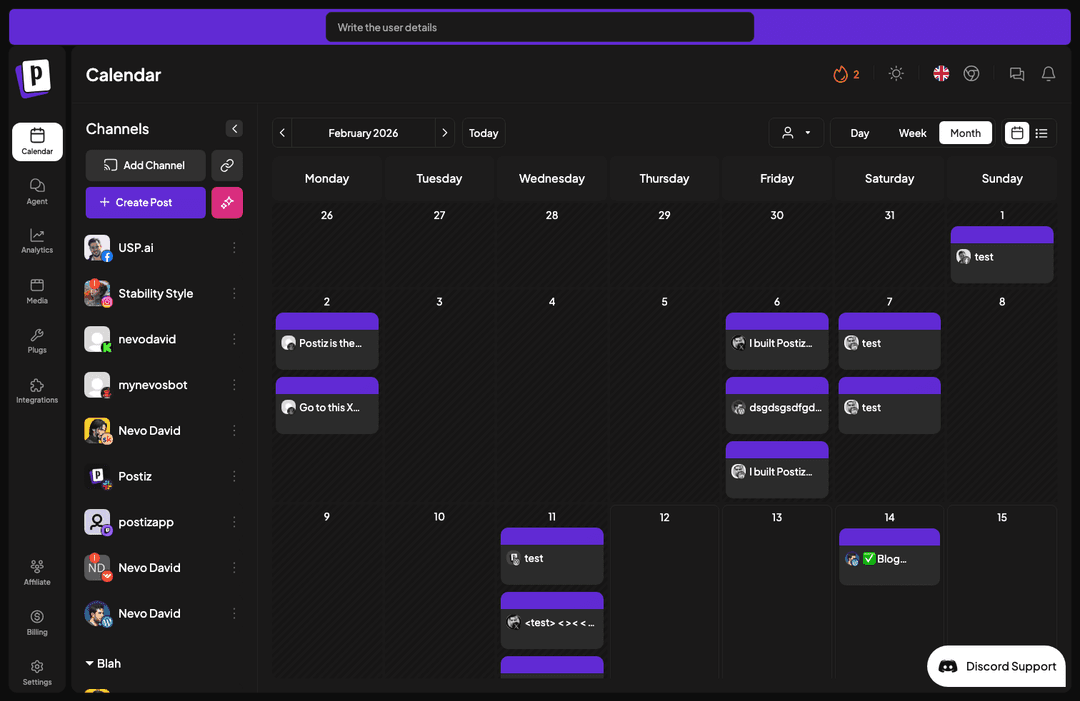
Step 1 — Start from the Calendar
The Calendar is your “source of truth” for what’s going out and when. It’s the best place to begin so you’re thinking in terms of a plan, not a pile of drafts.

Step 2 — Click “Create Post”
From the Calendar view, click Create Post to open the post composer.

Step 3 — Select the channels (WordPress + social)
At the top, you’ll see channel circles. Pick the channels you want this post to publish to — for a blog post, select WordPress. You can optionally add a social channel (like X) to publish a promo post alongside your blog post.

Step 4 — Fill the content
Write your post content in the editor. This is where you refine the title, structure, and visuals so the post is ready before you schedule it.

Related reading
Here are a few recent posts from the Postiz blog you can link to internally:


Founder of Postiz, on a mission to increase revenue for ambitious entrepreneurs

Do you want to grow your social media faster?

Do You Want to Grow Your Social Media Faster?
Thousands of creators and businesses use Postiz to 10x their social media reach. Stop spending hours — automate and grow.
🚀Schedule to all platforms at once
🤖Let AI write your posts for you
📈Watch your engagement skyrocket
💸Completely free to start
Related Posts

Learn how to build a gym social media strategy that grows your community, attracts local members, and turns followers into paying gym clients.

Learn what a collaborator on Instagram is and how to create a Collab post. Step-by-step guide to inviting collaborators, boosting reach, and maximizing engagement.
showcase page linkedin: Discover how to create, optimize, and manage a LinkedIn Showcase Page for niche audiences and boost engagement.