Most founders spend their first year fighting two enemies at the same time: the empty product and the empty content calendar. Elijah Khan, the founder of Accentify, decided to settle the second fight with a system instead of a willpower diet.
Today his app sits at 3,500 monthly active users, 30,000 total installs, and $1,300 MRR — and almost none of it came from paid ads. It came from a content distribution pipeline he wired together himself: a custom AI agent harness on top of Claude/ChatGPT, a Notion database as the source of truth, and Postiz as the publishing layer that ships everything to X, Instagram, TikTok, YouTube, and Facebook on schedule.
This article walks through the exact setup he uses, why each piece is in there, and the deterministic cron job that quietly does the work while he sleeps. If you have ever wanted to copy a working stack for automated social media posting without paying for an enterprise tool, this is the playbook to steal.
Why this matters: the myth Elijah is trying to kill
Elijah ran a specialist marketing agency for five years before he started building products. He graduated from Founder Institute as the #1 ranked founder in his cohort and wrote a book on growing a business. So when he says the loudest myth in startups is “build less, market more,” he has the receipts to back it up.
His counter-claim: every hockey-stick moment Accentify has had came from a UI or feature update — not from a marketing tactic. Distribution still matters, but it only compounds after you have a product that actually solves a problem.
“If your product isn’t solving a problem, no amount of marketing is going to save you. Problem → Solution.”
Once that part is in place, distribution becomes an engineering problem. And engineering problems can be automated.
The “VIBE” foundation Elijah uses before any automation
Before plugging in any AI social media manager, Elijah validates demand the unsexy way. He calls it VIBE:
- V — Validate the idea. Prove the problem is real before writing a line of code.
- I — Interview users daily. Find their pain, their objections, their language.
- B — Build the waitlist. Capture demand before committing months of work.
- E — Engage until launch. Keep early users warm and involved.
For Accentify, this looked like surveys, alpha and beta tests, focus groups, and dozens of user interviews on accents, pronunciation, and confidence. The waitlist did the heavy lifting until the app crossed its first thousand users.
After that, the bottleneck shifted. Word-of-mouth was working but it was capped by how often he could create and publish content himself. So he replaced the human in that loop with an agent.
Meet Soren: the AI Chief of Staff that runs the pipeline

Elijah’s AI agent harness is called OpenClaw. Inside it, the lead orchestrator agent is named Soren — the one that decides what gets written, when it ships, and where it goes. Soren delegates to specialist sub-agents (Ari, Rook, Nia, Milo) that handle growth, ops, data, and marketing tasks individually.
In Soren’s own words:
“I orchestrate the different skills and workflows behind the scenes, keep the system organised, and coordinate specialist agents across growth, ops, data, and marketing. In practice, that means I help Elijah think, plan, write, prioritise, schedule, and keep momentum across the whole machine without things falling into chaos.”
The structure matters. A single mega-prompt agent collapses under the weight of every task at once. Splitting it into a planner agent and specialist worker agents means each one has a focused tool surface, which keeps reasoning quality high and makes the system debuggable when something breaks.
If you build with Claude or ChatGPT, you already have everything you need to copy this pattern — the harness is just the glue between the agent, your tools, and a scheduler.
The pipeline at a glance: AI Agent → Notion → Postiz
Here is the full content workflow Elijah and Soren run end-to-end:
- Ideate. Elijah picks a content angle (often borrowed from a competitor format that is already winning).
- Research and draft. Soren works with the underlying LLM to research a category and produce 50 quizzes, captions, or hooks per category.
- Approve. Elijah reviews everything manually. AI drafts, human approves — never the other way around.
- Store in Notion. Approved content lands in a Notion database that acts as the single source of truth for the calendar.
- Schedule via Postiz. A cron job reads Notion, schedules each “Ready to Schedule” row through the Postiz API, writes the post ID back to Notion, and flips the status.
- Reconcile. On the next run, Soren checks which posts actually published, updates the database, and posts a Discord report.
Two principles make this stack work:
- Notion is the source of truth, not the AI. The agent never invents posts that aren’t in the database. It only acts on rows explicitly marked ready.
- Postiz is treated as infrastructure, not a calendar. The agent calls the API directly, so the publishing layer is just another tool in the harness.
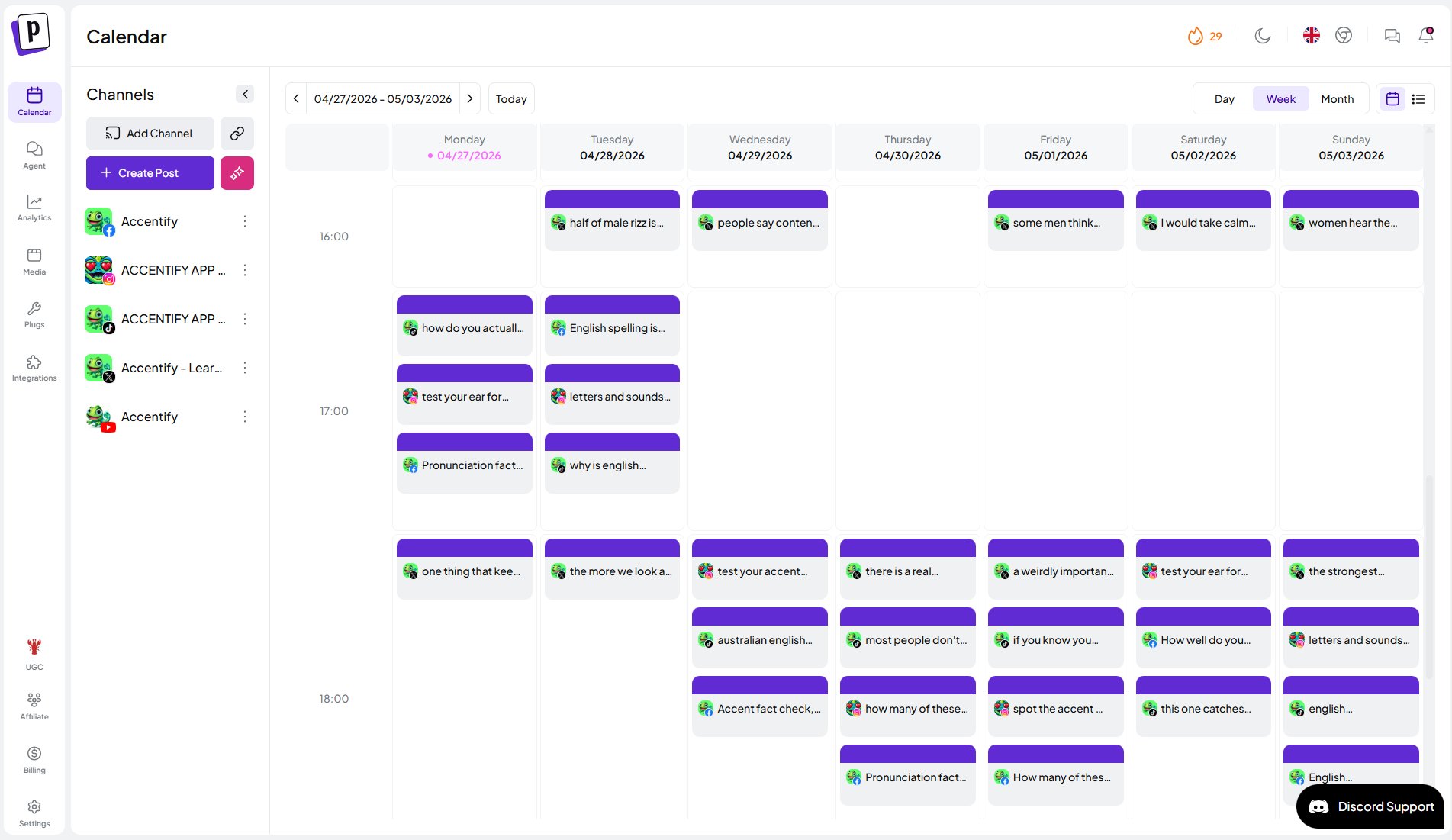
Right now Accentify ships 8 to 15 posts a day across YouTube, Facebook, Instagram, TikTok, and X. Elijah has plans to add LinkedIn, Threads, and creator accounts on top of the same pipeline.
How Elijah finds formats worth automating
The other reason this works is that Soren is not generating content from a blank page. Elijah does competitor research first. When he saw an account called Learn Daily generating thousands of views with a simple A/B/C/D quiz format on English idioms, he didn’t dismiss it as off-brand. He adapted it.
Accentify doesn’t teach language — it teaches accents. So the format ports over, but the content shifts:
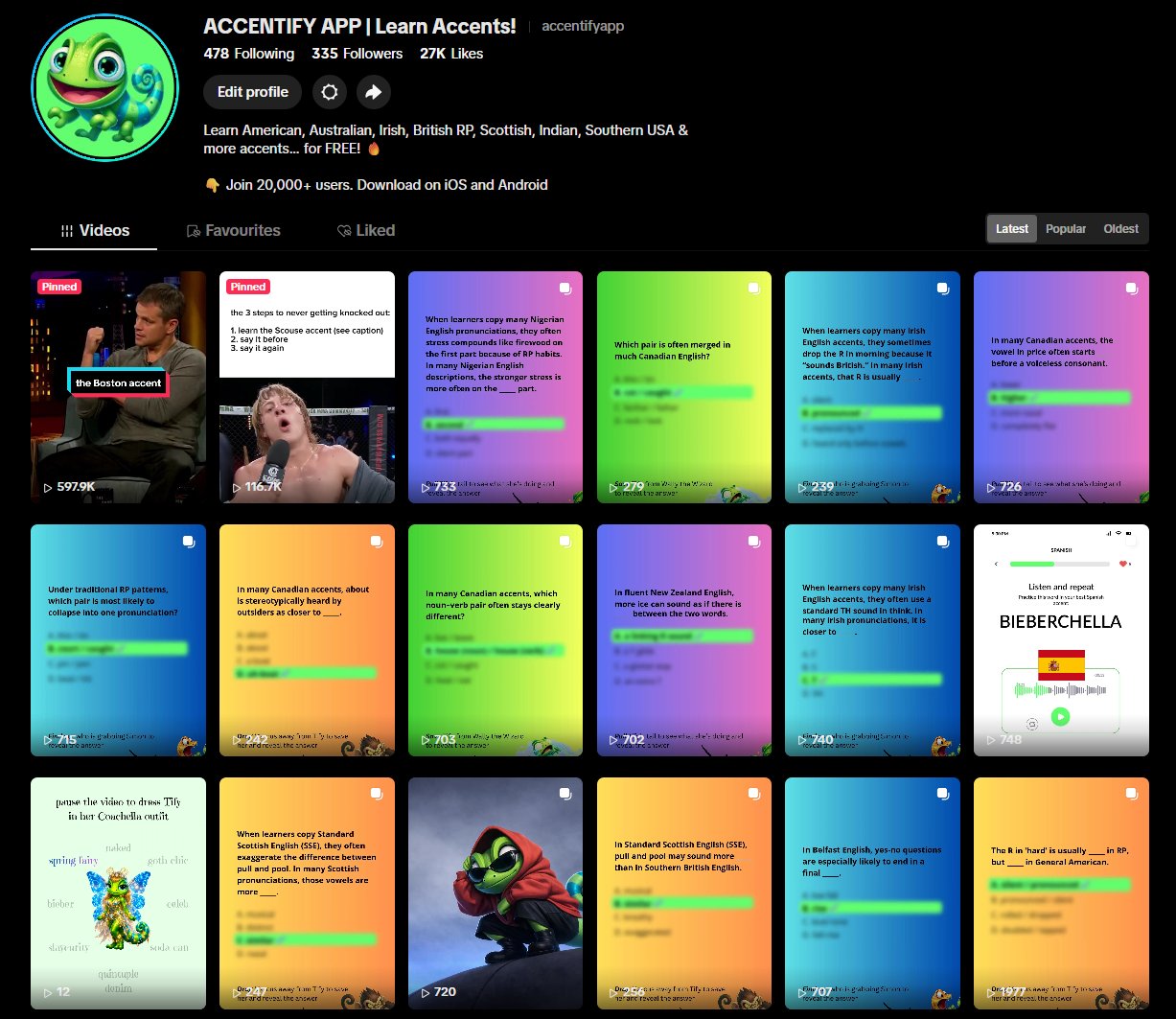
That single post pulled close to 4,000 views on X. He has now adapted the same format into 9:16 vertical carousels for Instagram (which IG’s own app does not support natively), TikTok carousels, and Facebook posts.
The lesson: find a format that already works in your niche, then put it on rails. Manual content creation is fine for prototyping a format. Once you know the format converts, you put the agent on it.
The technical part: scheduling Notion → Postiz with the public API
This is the section most articles skip. Here’s what the integration actually looks like.
1. Connect your accounts in Postiz
Postiz supports 28+ destinations — X, LinkedIn, LinkedIn Pages, Instagram (FB-linked and standalone), Facebook, TikTok, YouTube, Threads, Bluesky, Mastodon, Reddit, Pinterest, Discord, Slack, Telegram, Medium, Dev.to, Hashnode, WordPress, and more. You connect them once in the Postiz UI; the agent never has to touch OAuth.
2. Grab an API key
In Postiz, head to Settings → Developers → Public API and generate a key. The agent uses this for all subsequent calls.
export POSTIZ_API_KEY=your_api_key_here
You can either hit the REST API directly (for cron-job style automation, like Soren does) or connect through the Postiz MCP server (for Claude/Cursor/ChatGPT agents that prefer tool calls).
3. List your integrations
Every post needs an integration ID — the unique handle for the social account it’s going to. Discover them with the Postiz CLI:
postiz integrations:list
You get back a JSON array like:
[
  { "id": "twitter-123", "provider": "twitter" },
  { "id": "instagram-456", "provider": "instagram" },
  { "id": "tiktok-789", "provider": "tiktok" }
]
Store the relevant IDs in Notion next to each platform column.
4. Upload media first, then schedule
Postiz expects media to be uploaded to its CDN before you reference it in a post. That keeps payloads small and lets the same asset be reused across multiple posts.
postiz upload ./quiz-cockney.jpg
Response:
{
  "id": "836d17a6-6a1d-439b-8e8c-69f16261a694",
  "path": "https://uploads.postiz.com/kOyOUExRFs.png"
}
You then pass the id and path into the post payload’s image array.
5. Schedule the post
A scheduled post via the public API looks like this:
curl -X POST https://api.postiz.com/posts \
  -H "Authorization: $POSTIZ_API_KEY" \
  -H "Content-Type: application/json" \
  -d '{
    "type": "schedule",
    "date": "2026-05-01T09:00:00Z",
    "posts": [{
      "integration": { "id": "twitter-123" },
      "value": [{
        "content": "In Cockney, the T in \"water\" often sounds more like ___ ?\n\nA. a glottal stop\nB. a rolled R\nC. an L\nD. a Y sound",
        "image": [{
          "id": "836d17a6-6a1d-439b-8e8c-69f16261a694",
          "path": "https://uploads.postiz.com/kOyOUExRFs.png"
        }]
      }],
      "settings": { "__type": "x" }
    }]
  }'
Two details worth noting:
- The
Authorization header takes the raw API key, not a Bearer prefix.
- Each platform’s
settings object requires a __type field. X uses x, Instagram uses instagram, TikTok uses tiktok and requires extra fields (privacy level, duet/stitch settings, etc.). The Postiz docs list the schema for every platform.
6. Connect to an agent through MCP (optional, but elegant)
If you would rather have your AI agent call Postiz as a first-class tool — instead of writing curl wrappers — Postiz exposes an MCP server with eight tools: integrationList, integrationSchema, triggerTool, schedulePostTool, generateImageTool, generateVideoOptions, videoFunctionTool, and generateVideoTool.
Configure it once in your client:
{
  "mcpServers": {
    "postiz": {
      "url": "https://api.postiz.com/mcp/your-api-key"
    }
  }
}
After that, your agent can schedule posts in plain English: “Schedule the cockney quiz to X tomorrow at 10am with the attached image.” The MCP layer translates that into a schedulePostTool call with the right shape.
This is the layer Soren effectively replaces with a deterministic cron — but for solo founders just getting started, MCP is the lowest-friction way to wire an AI social media manager into your stack.
The Notion → Postiz cron job: what the agent actually does
Here is the deterministic loop Soren runs on a schedule, in plain language. You can hand this brief to any decent agent harness and have it generate the script for you.
Goal: read the Notion content database, find rows ready to schedule, schedule them in Postiz, write the Postiz ID back into Notion, and reconcile published posts on later runs.
Behaviour requirements:
- Notion is the source of truth. Only schedule rows explicitly marked
Ready to Schedule. Never schedule planning rows. Never guess from the title — read the full row.
- Validate required fields before scheduling. For each ready row, verify: title, status, platform, publish date, publish time, content link or media source, caption/body, notes, Postiz ID field. If anything required is missing, mark the row as blocked in the run summary instead of scheduling it.
- Prevent duplicates. Before creating a post, check (a) whether a Postiz ID already exists in Notion, (b) whether the row was already scheduled in local tracking, (c) whether a matching live post already exists in Postiz. If any of those is true, block instead of double-posting.
- Schedule via the Postiz public API. Send the API key as the raw
Authorization header (not Bearer). If media is required, upload it first and reuse the returned media object. Create the scheduled post with the row’s caption, platform, media, and ISO datetime.
- Write results back to Notion. After scheduling, store the returned Postiz post ID in a
Postiz ID field and update status to Scheduled on Postiz.
- Reconcile on later runs. Query scheduled rows, compare against live Postiz posts, and update any that have published to
Published so the database stays clean.
- Output a concise run summary every cycle. Counts for scheduled, published, blocked, and mismatched posts, plus short line items for each. Push the summary to Discord (or Slack, email, whatever your team reads).
That’s the entire contract. Everything else — error handling, retries, the exact Notion property names — is just configuration. Keep all of it in a small config file the agent can edit when your schema changes.
What the system unlocks
The reason this is worth the engineering investment is what happens once it’s running:
- Compounding. Every quiz, hook, and carousel Elijah and Soren approve goes into the bank. The pipeline keeps shipping it until something stops working, then the agent flags the dip and Elijah swaps in a new format.
- Cross-platform reach without copy-paste. One Notion row → five platforms with the right format for each (9:16 carousels for IG, vertical-first for TikTok, threaded for X).
- Real attribution. Because the Postiz ID lives next to each Notion row, every metric a post produces can be tied back to the idea, the format, and the date — making the next iteration actually data-driven.
- No content emergencies. When the calendar is full a week ahead, “what should I post today?” stops being a question that eats two hours of focus.
The unglamorous truth is that none of this is one clever trick. It’s a small machine made of three boring components — an AI agent, a database, and a social media scheduling tool that exposes a clean API. The advantage is that boring machines run while you build the next feature.
Try it yourself: the easiest version of this stack
You don’t need a custom harness named after a Norse warrior to start. Here’s the smallest version that still works:
- Pick one format that already wins in your niche. Carousels, quizzes, before/after, screenshots of customer wins — whatever your competitors are doing that gets engagement.
- Build a Notion database with columns for caption, platform, media URL, publish datetime, status, and a Postiz ID field that starts empty.
- Connect your accounts to Postiz and grab an API key.
- Wire up a sync. Either write a tiny script and run it on a cron, or hand your AI agent the brief above and let it generate the script.
- Approve, ship, measure. Keep the human in the approval seat — let the agent handle everything downstream.
If you want the publishing layer to just work — across X, Instagram, TikTok, YouTube, LinkedIn, Threads, and 20+ other channels — that is exactly what Postiz is built for. You can start a free Postiz account here and have your first automated social media posting flow live the same afternoon.
Stop posting by hand. Build the machine.