If you run a Skool community, consistency is the whole game. Members don’t join for one great post—they join for the rhythm: regular prompts, wins, reminders, and updates that make your community feel alive.
That’s exactly why scheduling matters. Instead of relying on “I’ll post later,” you can plan your content, hit the best time windows for your members, and keep momentum even when you’re busy.
Skool is built for community—your job is to keep the conversation moving.
What is Postiz?
Postiz is an open-source, AI-powered social media management platform that brings scheduling, content creation, analytics, and automation into one place. It supports many channels (including community platforms), and it’s designed to make consistent publishing easier—without living in a dozen tabs.
In short: Postiz helps you plan content once and publish on schedule across your channels.
Postiz gives you a central place to plan and schedule content.
Why scheduling Skool posts is important
1) Consistency builds trust (and retention)
Communities feel “dead” when posting is random. A predictable cadence (daily prompt, weekly win, weekly recap) creates a habit loop for members—and habits drive retention.
2) You can post at the right time (not the convenient time)
Most creators post when they have a free minute. Scheduling flips that: you post when members are most likely to see and respond—which increases replies, reactions, and momentum.
3) You avoid the feast-or-famine cycle
One busy week shouldn’t mean your community goes silent. Scheduling lets you batch-create content when you’re in the zone, then publish steadily.
4) You’ll ship more experiments
When scheduling is easy, you test more: different prompts, different formats, different CTAs. The faster you test, the faster you learn what drives engagement.
Before you start
A Skool community (admin access).
A Postiz account with your channels connected.
If you don’t see Skool as an option in your Postiz composer, make sure the Skool channel is connected in Integrations first.
How to schedule a Skool post from Postiz (step-by-step)
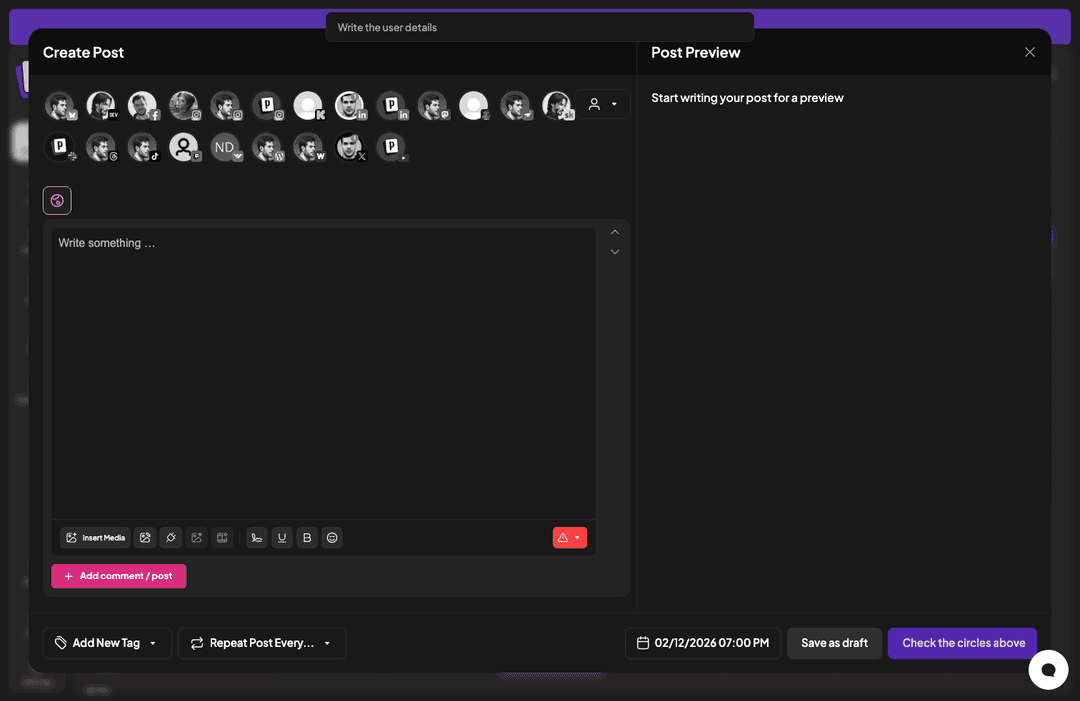
At the top of the composer, you’ll see channel icons (“circles”). Click the Skool channel to target your community.
Select the Skool channel before scheduling, so your post goes to the right place.
Tip: If the schedule button says something like “Check the circles above,” it usually means you haven’t selected a channel yet.
Step 3: Write your post (use a simple engagement prompt)
Skool posts that get replies tend to be clear and specific. One easy format is:
One sentence of context
One direct question
A simple CTA (“Reply below 👇”)
Write the post content in the composer before choosing your schedule time.
Step 4: Choose a date & time
Click the date/time control and pick when you want it to go live. If you’re not sure, start with times when your members are typically online (often early morning, lunch, or early evening in their primary timezone).
Pick the publish date/time for your Skool post.
Step 5: Schedule (or save as draft)
Once the Skool channel is selected and the date/time is set, you can schedule the post. If you’re still iterating, Save as draft—then schedule when you’re ready.
Best practices for scheduling Skool posts
Batch your content weekly
Set a 30–60 minute block once a week to schedule:
1 welcome/housekeeping post
3–5 discussion prompts
1 progress check-in (“What did you ship this week?”)
Rotate post types
Don’t post only announcements. Mix in:
Prompt posts (questions)
Win posts (celebrate members)
Resource posts (templates, links, quick tips)
Keep a “reply-first” mindset
Skool is a community platform. Your goal isn’t views—it’s replies. Write posts that make replying easy.
Troubleshooting: common scheduling issues
I don’t see Skool in the channel circles: go to Integrations in Postiz and ensure Skool is connected.
The schedule button is disabled: usually means no channel is selected (or required fields are missing).
My post didn’t publish at the right time: double-check timezone settings in your workspace and the schedule control.
Scheduling Skool posts isn’t just a productivity trick—it’s community strategy. When your content ships consistently, your community feels active, members participate more, and retention climbs.
Master social media analytics reporting with our guide. Learn to track key metrics, choose the right tools, and create reports that prove your marketing impact.
Four independent AI builders share how they use AI agents with Postiz to automate social media distribution across 30+ platforms — generating a combined $98K/month in revenue and hundreds of millions of organic views without marketing teams.