Ever wondered if you can post a YouTube video on Instagram? You absolutely can, and it’s a brilliant way to reach a whole new audience. The trick is to download your original video, reformat it for a vertical view (like 9:16 for Reels), and then trim it down to a bite-sized, engaging clip that you can share as a Reel, Story, or even a feed post.
Why Bother Posting Your YouTube Videos on Instagram?
Before we get into the nuts and bolts of how to do this, let’s talk about why it’s such a smart move for creators. This isn’t just about reposting for the sake of it. It’s a strategic play to connect with a different crowd and build a much stronger brand across platforms. The reality is, your YouTube subscribers and Instagram followers are often two totally separate groups with different viewing habits.
Find a Fresh Audience and Expand Your Reach
Instagram is a visual playground, and its algorithm—especially for Reels and the Explore page—is built for discovery. This gives you a massive opportunity to get your work in front of people who might never stumble upon your channel. Think about it: countless users are scrolling Instagram for quick, entertaining videos, not necessarily searching for long-form content on YouTube.
Sharing a killer clip from your YouTube video acts as the perfect teaser. It’s a low-effort way for someone new to get a feel for your style, personality, and the value you offer.
Get More Mileage Out of Your Hard Work
Let’s be honest, making a great YouTube video is a ton of work. It’s a shame to let all that effort live on just one platform. When you start repurposing your videos for Instagram, you’re essentially squeezing every last drop of value out of your content.
Here’s what that looks like in practice:
You give your old videos a second life, getting more views and engagement from the content you’ve already made.
You can easily keep your Instagram feed active and consistent without having to film entirely new material.
You start building a true content ecosystem, where your Instagram and YouTube channels feed each other.
The big idea is to create a brand that works for you around the clock. Your Instagram becomes the high-energy movie trailer that gets people excited to go to YouTube and watch the full feature film.
This strategy saves you a ton of time and helps create a consistent brand message everywhere you post. Of course, to make sure these posts land with maximum impact, you’ll want to post when your audience is online. We’ve actually put together a guide on the very topic, which you can find here: best days to post on social media.
Manage all your social media in one place with Postiz
Getting Your Video Ready for Instagram’s Vertical World
One of the most common mistakes I see is people simply uploading their horizontal YouTube videos straight to Instagram. It’s an easy trap to fall into, but it doesn’t work. YouTube is designed for that classic 16:9 widescreen view, while Instagram is all about the vertical screen in your hand. To make your content feel like it belongs, you’ve got to adapt it.
First things first, you need the actual video file. The absolute best way is to grab the original file you uploaded to YouTube. That way, you’re starting with the highest possible quality. If you’ve misplaced it (it happens to the best of us), you’ll have to use a service to download the video from your channel.
With the file in hand, the real work begins. This isn’t just about cutting a few seconds off the start and end; it’s about completely reframing your content for a totally different audience and viewing experience.
Resizing for a Vertical Screen
The single most important change you’ll make is the aspect ratio. Instagram Reels and Stories thrive on a full-screen, vertical 9:16 aspect ratio. If you just post your horizontal video as-is, you’ll get those clunky black bars on the top and bottom. It instantly screams “repost” and can kill your engagement before anyone even watches.
You’ll need a video editing tool for this part. Simple mobile apps like CapCut or InShot are perfect, and even iMovie gets the job done.
Here’s what you do:
Open your editor and change the project’s aspect ratio to 9:16.
This will place your horizontal clip in the middle of a tall, vertical frame.
Now, zoom in and move the frame around to keep the most important action front and center.
Let’s be honest: attention spans on Instagram are short. Your ten-minute YouTube deep-dive won’t fly. An Instagram Reel has a 90-second time limit, but your goal isn’t to squeeze in as much as possible. It’s to create a powerful, self-contained teaser.
When I’m editing, I hunt for the single best 60-second moment. I’m looking for the punchline, the key insight, or the most visually interesting part. That clip needs to deliver value on its own while making people curious enough to check out the full video on YouTube.
A great teaser does two things at once: it gives your Instagram audience an immediate win and creates a compelling reason for them to click over to your YouTube channel for the rest of the story.
Focusing your efforts on Reels is a solid strategy. The numbers don’t lie—Reels get far more eyeballs and interactions than regular posts. They average a 1.23% engagement rate and see 49% more interactions than static image posts. When you format your video correctly, you’re giving it the best possible chance to succeed.
Alright, you’ve got your perfectly edited video clip ready to go. Now for the fun part: getting it onto Instagram and in front of the right eyeballs. Where you post it isn’t just a technical choice; it’s a strategic one.
You essentially have three main options, and each serves a totally different purpose. Think about what you want this clip to do. Are you trying to pull in new followers, or are you talking to your loyal fans? Your answer will point you straight to the right format.
Choosing the Right Placement for Your Goal
Not all Instagram video formats are created equal. Each one has its own superpower, and knowing which one to use is key to making your YouTube content shine on Instagram.
Instagram Reels: This is your growth engine. Reels are designed for discovery, meaning Instagram pushes them out to people who don’t follow you yet. If you want to reach a brand-new audience and attract new subscribers, Reels are your best bet.
Instagram Stories: These are for your existing community. Stories are casual, personal, and disappear after 24 hours, making them perfect for behind-the-scenes glimpses, quick updates, or driving immediate clicks with interactive stickers.
Instagram Feed Videos: With the rise of Reels, these are less common for short clips, but they still have a place. A video on your main feed becomes a permanent part of your profile grid. Use this for evergreen content or important announcements you want visitors to find easily.
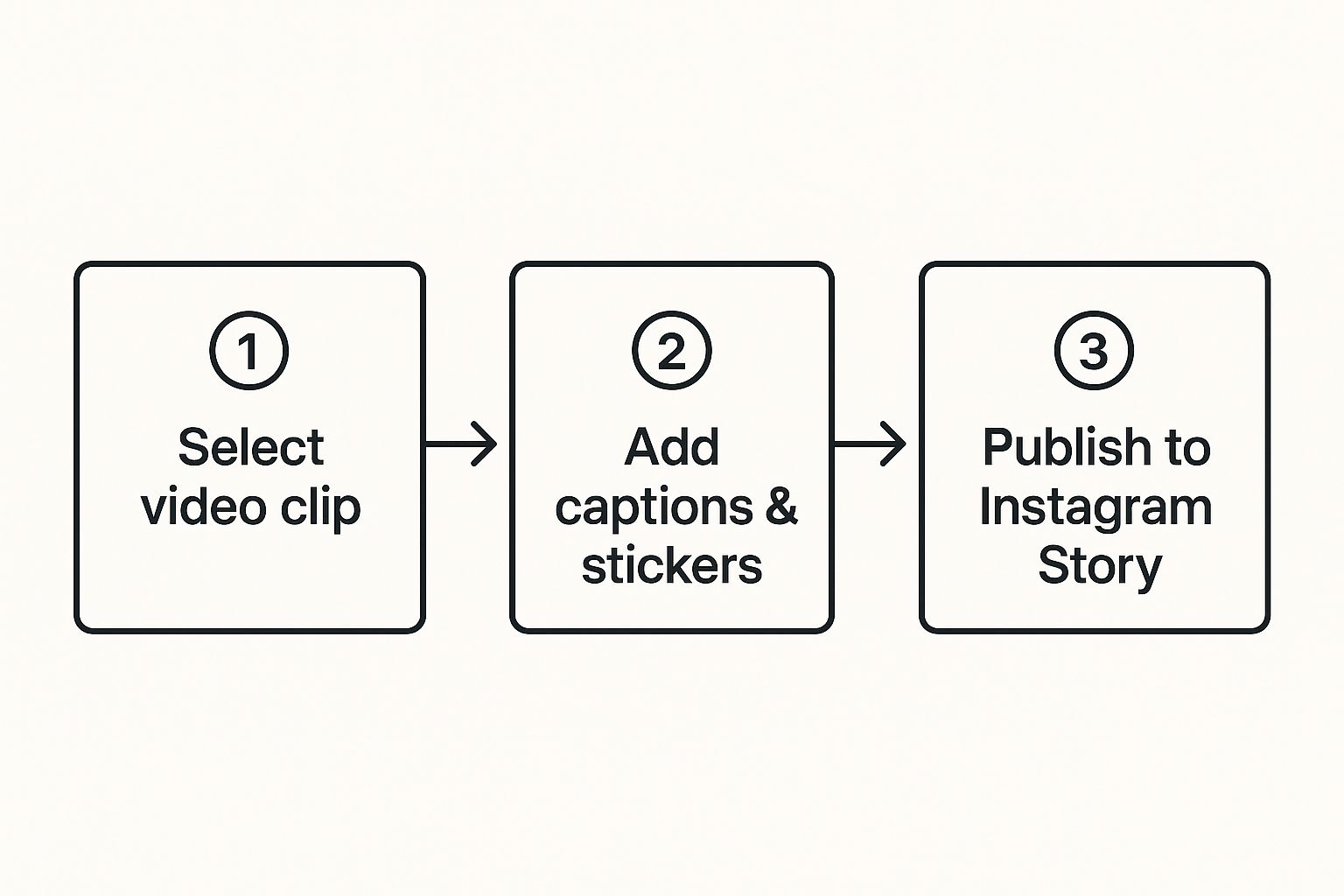
Here’s a quick visual that shows how simple it is to get a clip from your camera roll into an engaging Instagram Story.
As you can see, the real magic happens when you add those native Instagram elements to make the content feel like it belongs on the platform.
Instagram Video Format Comparison
To make the decision even easier, here’s a quick cheat sheet. Use this table to figure out the best home for your YouTube clip based on your specific goals.
Feature
Instagram Reels
Instagram Stories
Instagram Feed Video
Best For
Reaching new audiences, viral potential, showcasing personality
Engaging current followers, behind-the-scenes content, driving traffic with link stickers
Permanent, high-value content, tutorials, important announcements
Length
Up to 90 seconds
Up to 60 seconds per Story slide
Up to 60 minutes
Lifespan
Permanent (on Reels tab & Feed)
24 hours (unless saved to Highlights)
Permanent (on Feed)
Key Features
Trending audio, effects, remixes, shown to non-followers
Interactive stickers (polls, quizzes, Q&A, link), direct messaging
Can be saved and shared easily, appears on your main profile grid
Ideal YouTube Clip
A funny outtake, a quick “aha!” moment, or a visually stunning highlight
A teaser with a “Link in Story” sticker, a personal message about the new video
A mini-tutorial, a condensed version of your main points, or a polished trailer
Ultimately, the best format depends entirely on the clip and what you want it to achieve. Don’t be afraid to experiment!
Crafting the Perfect Post
Just uploading the video isn’t enough. The caption, hashtags, and call-to-action are what actually turn a passive view into a meaningful interaction.
Your caption needs to be a hook, not just a dry description. Kick it off with a compelling question or a bold statement that makes someone stop scrolling and pay attention.
Next up, hashtags. You’ll want a healthy mix of broad and niche tags. For example, if your YouTube video is about container gardening, you might use general tags like #gardening alongside more specific ones like #balconygardenideas.
Finally, and most importantly, you need a strong call-to-action (CTA). Don’t leave people guessing what to do next.
The most effective CTAs are direct and simple. Tell people exactly what you want from them. “Watch the full tutorial on YouTube (link in bio!)” or “What’s your biggest gardening challenge? Let me know below!” works wonders because it’s crystal clear.
Engagement doesn’t stop at posting. Actively replying to comments and interacting with similar creators increases visibility and signals quality to the algorithm. An AI Instagram Comment Generator can help you write relevant, thoughtful comments faster, making it easier to stay active in your niche without sounding repetitive or generic.
Don’t forget to use Instagram’s own features to your advantage. If you’re posting a Reel, add trending audio (you can turn the volume way down) to give the algorithm a little nudge. For Stories, the “Link” sticker is your best friend for sending people directly to your YouTube channel. These small tweaks can make a massive difference in how your post performs.
Use Automation to Streamline Your Workflow
Let’s be real: manually downloading, reformatting, and scheduling every YouTube clip for Instagram is a surefire way to burn out. We all know consistency is crucial for growing on social media, but your time is too valuable to be spent on repetitive tasks. This is where automation tools come in, acting as your secret weapon for keeping your content flowing without the daily grind.
Using an Instagram Post Scheduler makes this process far more efficient. Instead of manually uploading and publishing each clip, you can schedule your YouTube-based Reels, Stories, or feed videos in advance, ensuring they go live at the best times without constant manual effort. This keeps your Instagram active and consistent while freeing up time to focus on creating better content.
Picture this: you hit “publish” on a new YouTube video, and almost instantly, a perfectly formatted teaser Reel is created and scheduled to post on your Instagram. This isn’t some far-off dream. Tools exist right now that are built specifically for this, turning a tedious, multi-step chore into a completely hands-off process.
By setting this up, you can consistently post a YouTube video on Instagram, keeping both your audiences engaged and happy. It frees you up to do what you actually enjoy—creating amazing content.
How Automation Connects Your Platforms
The real magic of these tools is their ability to get platforms talking to each other when they otherwise wouldn’t. Think of them as a smart bridge, automatically translating your YouTube video into the perfect format for an Instagram Reel. Setting up these automations has become incredibly simple; with some services, you can get it done in just a couple of minutes.
For creators like us, the benefits are huge:
More Free Time: Forget spending hours in a video editor every week just to reformat clips.
A Consistent Feed: Your Instagram profile stays active and engaging, even on your busiest days.
Better Reach: You get more mileage out of every single piece of content you create by putting it to work on multiple platforms.
Automation isn’t about being lazy; it’s about being strategic. By automating the repetitive tasks, you reserve your creative energy for developing new ideas and connecting with your community.
If your content workflow is getting really complex, you might even consider looking into professional automation services. They can build out custom solutions to help you scale your content strategy without a hitch.
Let’s be real. When you post a YouTube video on Instagram, just dumping the same file on both platforms won’t get you very far. True success comes from understanding that each social network has its own vibe, its own audience, and its own unspoken rules. A video that crushes it on YouTube can totally flop on Instagram if you don’t tweak it first.
Think about the captions. Your YouTube description is often a keyword-rich mini-blog post, designed to get picked up by search. On Instagram, it’s all about sparking a conversation right now. Your caption needs to be more direct, more engaging, and tailored to that specific audience.
Customizing Your Content for Each Platform
The pros treat each platform like its own unique channel, because that’s exactly what it is. This goes way beyond just rewriting the caption—it’s about fine-tuning the content itself to feel right at home.
A simple but crucial first step? Get rid of any platform-specific watermarks. Seeing a TikTok logo on an Instagram Reel just feels off, and some platforms have been known to penalize content for it. You want your video to look like it was made specifically for the place you’re posting it.
A smart cross-promotion strategy isn’t about cutting corners by posting the same thing everywhere. It’s about investing the time to make your content feel native and valuable on each platform, which is how you build a genuine connection with your followers.
This same logic applies to your hashtags. On YouTube, tags are mostly a behind-the-scenes tool. But on Instagram, they’re front and center, playing a huge role in how people discover your content. You’ll want to use broader, community-driven hashtags on Instagram to join in on popular conversations.
A solid cross-posting workflow means customizing your captions and hashtags and maybe even giving some of your older content a fresh look. To stay consistent without burning out, many creators will batch-produce their videos. A common schedule might be three posts a week on their primary platform and another one or two on their secondary ones.
Got Questions About YouTube to Instagram? Let’s Clear Things Up.
Putting your YouTube content on Instagram can feel like navigating a maze of rules. I get it. Over the years, I’ve seen the same questions pop up time and time again. Let’s tackle the big ones.
First up: music copyright. This is a huge tripwire for creators. Just because you licensed a track for YouTube doesn’t mean you have the rights for Instagram. It’s a common mistake that can get your video muted or even taken down. The safest move? Use Instagram’s own library of licensed music for your Reels and Stories. It’s built right in and saves you a major headache.
Then there’s the question of video length. Instagram lets you post longer videos, but that doesn’t mean you should. For Reels, the magic number is usually under 60 seconds. You want to create something snappy and engaging that people will watch to the end and share. Think of it as a compelling trailer for your longer YouTube video.
Can I Just Upload the Same File to Both?
You could, but you really, really shouldn’t. A standard YouTube video is a horizontal 16:9 rectangle. On Instagram, everything is built for a vertical 9:16 screen. Uploading your YouTube clip directly will leave you with ugly black bars and a video that screams “repost.”
Always take a few extra minutes to reformat your video. Cropping and reframing it to fit the full vertical screen makes it look like it belongs on Instagram, which is crucial for grabbing attention.
The goal isn’t just to dump your content on a new platform. You need to adapt it. When your video feels like it was made for Instagram, you’ll connect with that audience so much better.
Of course, posting the clip is just one piece of the puzzle. You’ll also want to think about broader strategies for content promotion on social media to make sure your content gets the visibility it deserves.
Discover how a Bluesky scheduler can transform your content strategy. Learn to automate posts, engage your audience, and save time with our practical guide.
Learn how consultants can build a focused social media strategy that attracts the right clients. From positioning and platforms to content, workflow, and ROI tracking.